Scam: Document | A Quotation Request With No Attachment, Sent From Gmail to Itself

At a glance
- Verdict
- ScamGet the recipient to reply about the missing 'attached document' so a malicious file, phishing link or fake order can follow.
- Subject line
Document- Claimed sender
- blessed Rekhoto
blessedrekhoto@gmail.comReply-to:blessedrekhoto@gmail.com - Impersonates
- No real organisation or person
- Received
- · Published
- Related analyses
- Fake: Invitation to register as ADNOC vendor
- Fake: Query Regarding Purchase Procedures for Product Information
- Fake: We are pleased to invite you or your company to quote the following item listed below
- Scam: Inquiry About Product Supply to Italy / CATALOG REQUEST | Handpake Manufacturing Company Ltd.
- Scam: Materials Intercessor | The Same German Buyer, Reworded and Sent Again the Next Morning
- Scam: Materials Logistics Management | An Anonymous German Buyer on a Polish Freemail Address
- Scam: Request for Project Price Offer | Carsten Steffen, a Buyer Whose Address Is Mostly a Billing Link
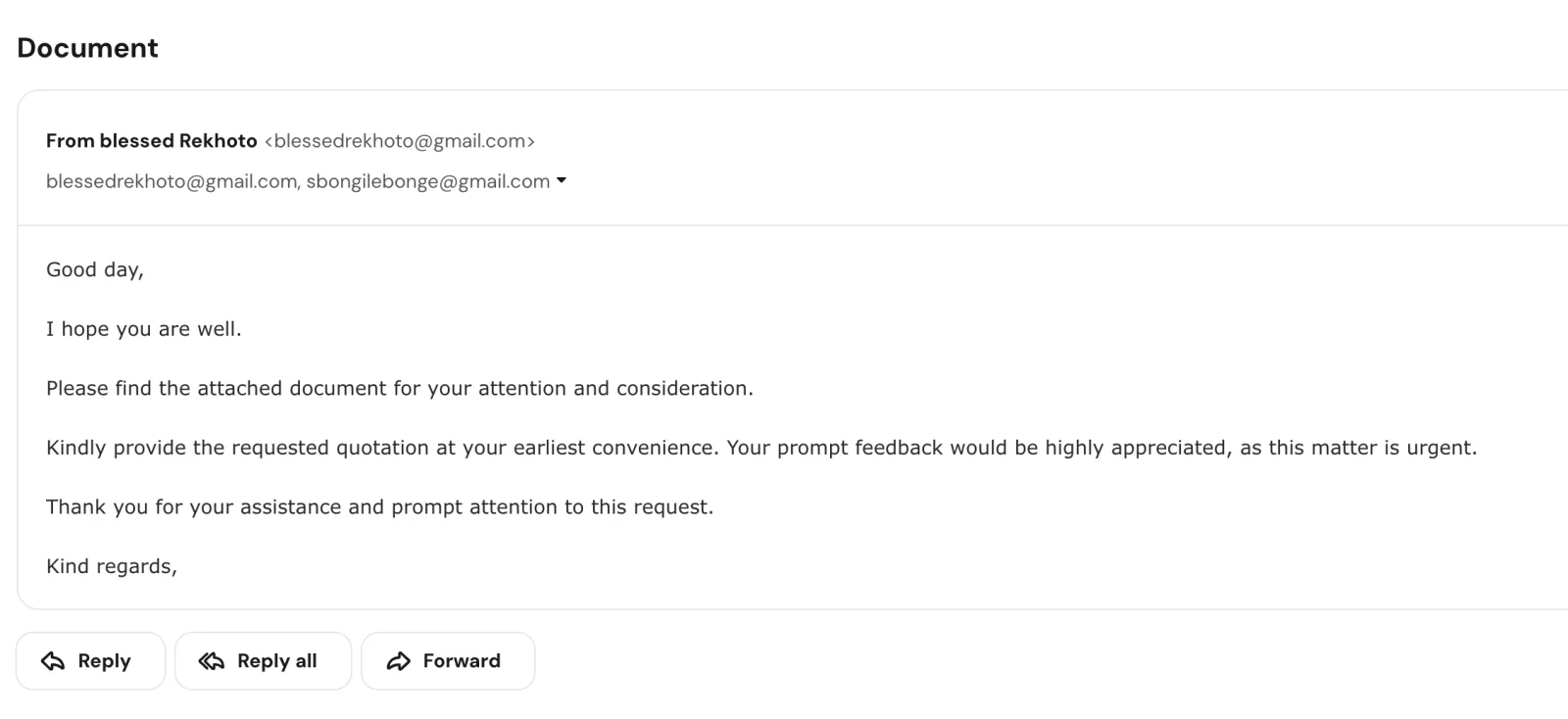
The To line holds the sender's own address, a second Gmail account is copied and the real recipient was blind-copied; the body refers to an attached document, but the message carried no attachment. A second copy with the same subject and body came from 'Mavuyi Memela' at memelamavuyi1@gmail.com, copying the same second Gmail account.
Evidence: the message as received plus passive registry lookups; links and attachments are not opened. How we analyse a scam email.
Please find the attached document for your attention and consideration. Kindly provide the requested quotation at your earliest convenience. Five polite sentences, a one-word subject and no attachment: a quotation request that names no product, no company and no person, sent from a Gmail account to itself with the recipient blind-copied.
Complete Email
from: blessed Rekhoto blessedrekhoto@gmail.com
to: blessed Rekhoto blessedrekhoto@gmail.com
cc: sbongilebonge@gmail.com
reply-to: blessedrekhoto@gmail.com
date: 09/14/2026 4:30 PM
subject: Document
Email Body
Good day,
I hope you are well.
Please find the attached document for your attention and consideration.
Kindly provide the requested quotation at your earliest convenience. Your prompt feedback would be highly appreciated, as this matter is urgent.
Thank you for your assistance and prompt attention to this request.
Kind regards,
Second Copy
A second copy of this email was also received. The subject and body are identical, word for word, and so is the Cc: the same sbongilebonge@gmail.com account is copied. Only the sender changed:
from: Mavuyi Memela memelamavuyi1@gmail.com
cc: sbongilebonge@gmail.com
subject: Document
What the unchanged Cc suggests is taken up in Red Flag 3.
Red Flags
This is a reply-bait quotation request — the opening move of the procurement-scam family, stripped down further than any specimen in this archive. The Handpake inquiry at least named a company and a country; the Materials probes at least named a material. This one names nothing: no product, no company, no person, and no document, despite being entirely about one. There is not a spelling mistake in it, and there is no link or attachment to analyse. Every tell is structural, which makes it a useful specimen: it is what a scam email looks like once every cosmetic error has been removed.
1. The Document the Whole Message Is About Does Not Exist
- Subject: Document
- "Please find the attached document for your attention and consideration."
- "Kindly provide the requested quotation"
Nothing was attached. The subject line is the document; the first substantive sentence is the document; the quotation is "the requested quotation" — requested where? In the document. Every element of the message points at an object that is not in it. As received, it contains nothing to open, nothing to click, and nothing to quote.
Two things can produce a message like this. A mail gateway can strip an attachment it does not like — but a gateway that does so normally leaves a notice in its place, and there is none here. Or the message was sent without one, deliberately. The missing attachment is a recognised technique, and it has an advantage over a real one: an attachment can be scanned, sandboxed and blocked, while an absent attachment passes every filter because there is nothing to inspect. It then does something a real attachment cannot. It hands the recipient a reason to write back. "I don't see anything attached — could you resend it?" is the most natural, helpful reply in business correspondence, and once it is sent, whatever comes back as the "resend" arrives inside a conversation the recipient started, from a sender the recipient has already answered. The reply is the objective. The document was never part of the plan.
2. Sent From Gmail to Gmail — Your Address Is Not in the Header
- from: blessed Rekhoto
blessedrekhoto@gmail.com - to: blessed Rekhoto
blessedrekhoto@gmail.com
The sender addressed the message to themselves. The recipient's address is nowhere in the header, which means the recipient — and everyone else who got this — was blind-copied. A buyer asking one supplier for one quotation puts that supplier in the To field, because the message is to them. A sender who puts their own address in To and the list in Bcc is sending one message to many people, so that each of them sees an identical, anonymous header and none of them can see the others. It is the same mechanism as the dummy gisela@techie.com in the Materials Logistics Management probe, with the sender's own mailbox doing the placeholder's job. The number of people who received this exact message is unknown; that it was more than one is written in the header.
3. A Second Personal Gmail Account, Copied and Never Explained
- cc:
sbongilebonge@gmail.com— on both copies
A real quotation request copies a colleague — the buyer's manager, a procurement mailbox — at the same company, on the same domain. This one copies a second free Gmail account under a different personal name, with no explanation of who that person is or why they are on the thread. Nothing in the message connects the two accounts to each other, to a company, or to a role.
What the Cc does, mechanically, is put a second mailbox on every reply. The Reply all button beside Reply in the screenshot sends the recipient's answer to both accounts at once; the reply-to, set to the sender's own address, catches the ordinary Reply. Between the two, no answer can be sent that reaches only one of them. Free accounts that send bulk mail get suspended; a second address already sitting on every conversation is one way to keep the conversations when that happens. Whether that, or simply two people working the same list, is the reason here cannot be known from the message. That a procurement department does not correspond from two personal Gmail accounts can.
The second copy points towards the first explanation. It came from a different Gmail account under a different name, Mavuyi Memela, and copied the same sbongilebonge@gmail.com. The sender changed and the Cc did not. The sending account is the part of this campaign that rotates, and the copied account is the part that stays. That is how an address held back from bulk sending, so that it is still alive when the senders are not, would be expected to look.
4. "Kind regards," — and Then Nothing
The message closes with Kind regards, — comma included — and stops. No name follows it. No company, no designation, no telephone number, no address, no website, no reference number, no order number. The display name, blessed Rekhoto, is the only identity anywhere in the message, and a display name is free text typed into a form at account creation, verified by nobody.
A signature block is the cheapest thing to add to a template. It is absent here either because the template's signature was never filled in — the sign-off with a blank after it is exactly what an unpopulated merge field looks like — or because it was left blank on purpose, since a signature names a company and a company can be looked up. In both cases the result is the same: there is nothing in this message that can be checked against anything outside it.
The second copy shows what else a blank signature buys. A signed body belongs to one sender. An unsigned one fits whichever account sends it, and this one went out again, unchanged, under a different name.
5. Nothing to Quote: No Product, No Quantity, No Specification, No Date
A genuine request for quotation names the item, the quantity, the specification or drawing number, the delivery address, the incoterm and the date by which the quotation is needed — because without those a supplier cannot quote. This one names none of them. It cannot even say what industry it believes it is writing to. A message that mentions no product can be sent unchanged to a machine shop, a florist, a software company and a law firm, and that property — not any oversight — is why it mentions none. Wording that fits every recipient is the signature of a template written for a list, not a letter written to a supplier. The one-word subject line, Document, serves the same purpose: it is neutral enough to fit any inbox and generic enough to give a filter nothing to learn.
6. Three Appeals for Speed and No Reason for Any of Them
- "at your earliest convenience"
- "Your prompt feedback would be highly appreciated, as this matter is urgent."
- "Thank you for your assistance and prompt attention to this request."
Five sentences; three of them press for speed; none says why. There is no date by which the quotation is needed, no project it feeds, no tender that is closing, no consequence for delay. "This matter is urgent" is asserted about a matter the message has not described. Urgency of this kind has one function: to shorten the gap between reading the message and answering it, so that the answer goes out before the reader notices there was nothing to answer.
7. A Buyer on a Free Gmail Account
blessedrekhoto@gmail.com,sbongilebonge@gmail.commemelamavuyi1@gmail.com— the second copy
gmail.com is free, anonymous, and available to anyone in a minute. A business that issues requests for quotation writes from its own domain — that is how a supplier knows which company it is quoting to and where the purchase order will come from. There is no company domain anywhere in this message: not in the From, not in the Cc, not in the signature, because there is no signature. The lowercase blessed in the display name is how the name was typed when the account was created; people setting up a professional identity capitalise their own name. That is consistent with an account created quickly for sending — and, it should be said, also with a real person's account that has been taken over, which is the other common source of Gmail-borne bulk mail. Either way, the message offers no company to verify and no person who can be reached by any route other than replying to it.
The second copy adds a third account of the same kind: memelamavuyi1@gmail.com, a personal name with a numeral on the end. Across two copies there are three Gmail accounts under three different names, and still no company.
How This Scam Works
The email is bait, and unusually pure bait: it contains no link, no attachment and no checkable claim, so the only thing it can produce is a reply. What follows a reply is not observed here — we do not reply — but this template belongs to a family whose progression is well documented, and it typically runs like this:
- The Sweep: A five-sentence template goes out from a free Gmail account to a scraped list of business addresses —
sales@,info@,quotes@— with the sender in To and the list in Bcc. Nothing in it is specific to any recipient, which is why it can go to all of them. - The Filter: Most recipients ignore it. The ones who reply — "I can't see an attachment", "what do you need quoted?" — have confirmed a live mailbox, read by a human, in a role that handles quotations and is inclined to be helpful. Those replies are the product of this stage. The rest of the list is discarded.
- The "Resend": The document arrives, typically in one of three shapes. In the phishing variant, it is a link to view the document on a page styled as a file-sharing service or a mail portal that asks for the recipient's email password; the mailbox is then used to run invoice fraud against the recipient's own customers. In the malware variant, it is an attachment — an HTML file, a PDF carrying a link, or an archive holding an executable. In the procurement variant, it is a plausible-looking RFQ: an itemised list of goods on a letterhead, which leads to the next stage.
- The Order: In the procurement variant, the quotation is accepted with little negotiation and a purchase order follows, in most cases on the borrowed letterhead of a real company, school, hospital or government department. Delivery is requested on credit, to an address that is not the organisation's. The goods are collected; the invoice is never paid.
- The Fee: In another branch, the order is made conditional on the supplier paying something first — a vendor-registration fee, a tender-document fee, a courier charge for the signed contract. The fee is real. The order is not.
- The Harvest: Whatever else happens, the reply and any quotation carry the supplier's letterhead, signature, price list, tax registration and bank details — the raw material for impersonating the supplier to its own customers.
- The Rotation: The Gmail account is abandoned when it is suspended, the copied account or a fresh pair takes over, and the template is sent again unchanged, because it never contained anything a filter could learn from. Part of this stage is visible here: the second copy went out word for word from a new account,
memelamavuyi1@gmail.com, with the samesbongilebonge@gmail.comstill copied.
Conclusion and Recommendations
There is no document, no product, no company and no person in this message. There is a Gmail account writing to itself, a second Gmail account copied on every reply, and five polite, error-free sentences built so that the kindest possible response — pointing out that the attachment is missing — is exactly the one the sender is waiting for.
It is worth keeping precisely because it is so clean. The tax notices in this archive can be caught on a wrong section number or a missing DIN; the German-buyer probes on there for their. This one gives a reader nothing of the kind. What it cannot hide is its shape: an attachment that is not there, a To field that does not contain you, a Cc that no procurement department would write, a signature that stops at the comma, and a request for a price with nothing to price.
Immediate Actions:
- Do Not Reply — Not Even to Say the Attachment Is Missing: That reply is the entire objective. It confirms a live, human-read mailbox in a quotations role and opens a thread the sender can now put anything into. If a genuine buyer had forgotten an attachment, they would notice and resend it without prompting; this one cannot, because there is nothing to resend.
- Do Not Use Reply All: The copied address receives every reply-all. One click puts a second unknown mailbox on the conversation.
- If a "Resend" Ever Arrives, Do Not Open It: Whatever follows this message — a link to view a document, an HTML or PDF attachment, an archive — is the payload the first message was clearing the way for. Do not click, download or open it, and do not enter an email password on any page it leads to.
- Do Not Send a Quotation, Catalogue, Price List or Company Profile: Those documents are the raw material for fake orders and fake invoices issued in your name.
- Block Every Address and Report the Message as Spam: That means both sending accounts and the copied
sbongilebonge@gmail.com, which is on both copies. Use the mail client's report function rather than plain deletion, so that the sending account reaches the provider's abuse system. Gmail's Report spam and Report phishing options do this for a Gmail sender. - Tell Whoever Watches the Sales or Quotations Inbox: A polite "urgent" request with a missing attachment reads as a customer who needs help, to a person whose job is to help customers. That perception is the whole mechanism, and one sentence of warning removes it.
Verification Steps:
- Look for Your Own Address in the To Field: If it is not there, you were blind-copied along with everyone else on a list, and the message was not written to you.
- Ask What Is Being Quoted: Item, quantity, specification, delivery address, date required. A request that supplies none of them is not a request for a price.
- Ask Who Is Asking: Company name, registered address, company number, website, a landline on that website. A genuine buyer supplies all of these unprompted, in the signature. This message supplies a first name in lowercase.
- Read the Domain to the Right of the
@:gmail.com, twice. A company with a procurement function has a domain, and it uses it. - Search the Sentences: Paste the body into a search engine. Bulk-sent templates tend to surface verbatim on scam-reporting forums, often under many different sender names. This one has already arrived under two.
- If in Doubt, Verify Through a Route You Already Had: A number you looked up yourself, a colleague who knows the buyer, a purchase order you can check against the ordering organisation's own switchboard. Never a number, address or link supplied by the message you are trying to check.
Additional Protection Tips
- Treat a Missing Attachment as a Tell, Not a Mistake: Genuine senders forget attachments — and then send a second message with it, within minutes, unprompted. A "please find attached" with nothing attached, from a stranger, that you are being asked to act on urgently, is not an oversight; it is the hook.
- Treat Freemail as Disqualifying for B2B Procurement: A company that can issue purchase orders can register a domain. Write it into the quotations policy: no quotation is prepared for a request from a consumer mailbox until the buyer's company has been identified and reached through its own switchboard.
- A Quotation Is Only Ever Prepared Against a Specification: Make it a rule, not a judgement call. If the request does not say what, how many and by when, the reply is nothing, not a question.
- Verify Every Purchase Order With the Organisation That Supposedly Issued It: On a number from its own website, not from the order. Purchase-order fraud depends on the supplier trusting the letterhead; a two-minute call to the real procurement office ends it.
- Never Deliver on Credit to a New Contact, and Never to an Address That Is Not the Buyer's: Confirmed payment or a verified letter of credit on first orders, without exception, and delivery only to the registered premises of the organisation on the order.
- Turn On Multi-Factor Authentication for Every Mailbox That Handles Quotations: The "document" that typically follows a reply to this kind of message is a login page for your own email. A password alone should not be enough to open it.
- Keep the Ones You Catch: File this beside the last quotation scam that reached you. A template that has removed every spelling error is best recognised by its shape, and the shape is easiest to see in a set.
Remember: A genuine request for quotation tells you what to quote, who is asking, and how to reach them. This one told you none of those things, and asked you to hurry. A request for a price that cannot say what it wants priced is not asking for a quotation. It is asking whether anyone is there.
