Phishing: Your mailbox is full. | Fake Storage Warning From Your Own Address

At a glance
- Verdict
- PhishingGet the recipient to click 'Get more storage' or 'Delete files' and type their mailbox password into a mail login page on a travel-business domain.
- Subject line
Your mailbox is full.- Claimed sender
info@secure-techie.comspoofed to look like the recipient- Impersonates
- No real organisation or personPersona: An unnamed, unsigned mail provider warning from the recipient's own address that the mailbox is full
- Received
- · Published
- Known variants
- Phishing: Messages Delivery Notification [Failure] | Fake Held-Mail Report From Your Own Address
- Phishing: Multiple unusual login attempts | Fake Mail Administrator Alert From Your Own Address
- Phishing: WARNING: [15] Messages Delivery Notification [Failure] | Fake Postmaster Notice From Your Own Address
- Related analyses
- Phishing: 🔔 Action Required: Storage 100% Full | Fake Cloud Services Payment Notice, Five Weeks Later
- Phishing: Mail Verification Required Tuesday, March 19, 2024
- Phishing: Messages Pending Delivery on Your E-mail Portal | Fake jd-bots.com Domain Portal Notice
- Phishing: Pending lncoming Tuesday, January 7, 2025:6:03:03 PM - Message ID:XVMQN3LPSBW5SEJ05IHC5IE3OU28D22UZ6XE
- Phishing: URGENT Renewal attempt failed | Fake Cloud Services Disabled Storage Alert
- Phishing: ⛔️ Warning! Your Cloud Storage Is Full | Fake Cloud Services Payment Failure Notice
The From line carries no display name, and the message was sent to the same address it came from. The External Email line below the message is the recipient's mail gateway's tag.
Evidence: the message as received, passive registry lookups, and the results of a detonation the recipient ran in a secured sandbox; the analysis itself opens nothing. How we analyse a scam email.
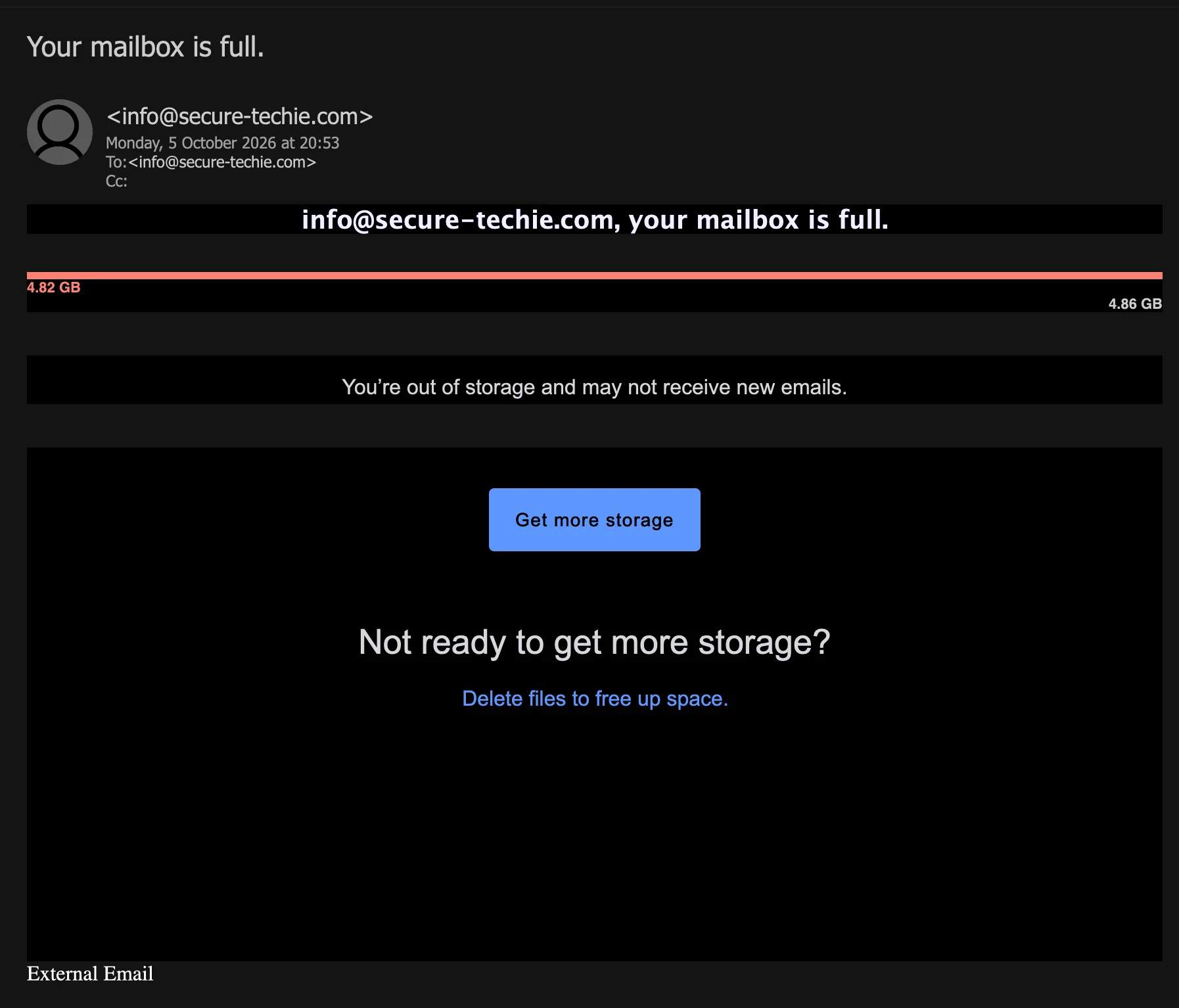
You're out of storage and may not receive new emails. The warning comes from the recipient's own address, the same sender's third lure in 83 minutes. It names no mail service, calls the mailbox full while its own figures leave about 40 MB free, and carries the same mail login link.
Complete Email
from: info@secure-techie.com
date: 10/05/2026 8:53 PM
subject: Your mailbox is full.
Email Body
info@secure-techie.com, your mailbox is full.
4.82 GB
4.86 GB
You’re out of storage and may not receive new emails.
Get more storage
Not ready to get more storage?
Delete files to free up space.
Link
The link in the message, as reported by the recipient, is the same one the login alert and the delivery-failure notice carried that evening:
https://kebecotravel.com/be4f96/0910/mail/server/authn/log(in).html#info@secure-techie.com
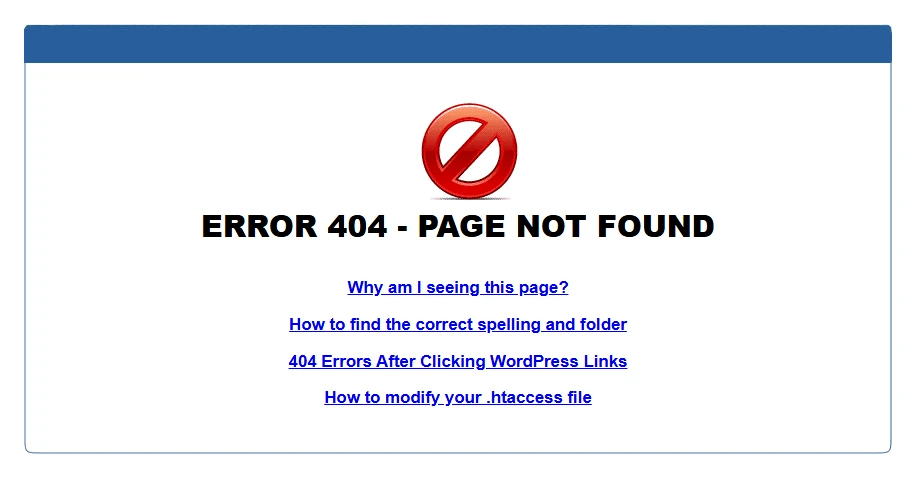
Detonated by the recipient in a secured sandbox, the link returned this page:
Red Flags
This is mailbox credential phishing dressed as a storage warning: a report that the recipient's mailbox has run out of space, with a button to buy more and a link to delete files. Its opening move is the fear of mail that never arrives; what it is after is the password to the mailbox. It is the third lure from the same operator to the same mailbox that evening, after the fake login alert at 19:30 and the fake delivery-failure notice at 20:09: from the same address, with the same link. Its story belongs with three Cloud Services storage warnings, which used full storage as the pretext for payment details: the storage-full notice, its return five weeks later and the alert that paused uploads. It also belongs with the notice that restricted 7 incoming messages, which played on mail that never arrives, as this one does. Everything below comes from the message, the link and sandbox result reported by the recipient, and the public registration record of the link's domain.
1. From Your Own Address, With No Name at All
- From, as reported:
info@secure-techie.com, with no display name - To, in the screenshot: the same address
- Below the message: External Email
The warning comes from the mailbox it says is full, and the screenshot shows it addressed to that mailbox too. A mail provider sends its storage notices from its own domain, under its own name; it does not write to an account from the account. Putting the recipient's own address in the From line is a deliberate choice: a message from your own address looks internal, like the mail system talking to itself.
This time the sender did not even put a name in front of the address. On its two earlier lures that evening it did, as the recipient reported them: Mail Administrator on the login alert, postmaster.secure-techie.com on the delivery notice. Here the From line is the address and nothing else.
The recipient's mail system was not persuaded. The External Email line below the message is the recipient's mail gateway's tag for mail that arrived from outside the organisation, the same tag it put on the two earlier lures. A message from an account to itself does not arrive from outside.
2. A Storage Warning From No Provider
- "
info@secure-techie.com, your mailbox is full." - Button: Get more storage
Whose mailbox, at which provider, on what plan? The message never says. Its text names no mail service, no plan and no account, and it has no signature, no footer and no link to a help page. It addresses the recipient by their email address, which the sender already had, and offers more storage without saying from whom, how much or at what price.
A real storage notice comes from the service whose storage it is, under that service's name, because the plan, the limit and the upgrade are all that service's. A template that has to work for mailboxes at every provider at once cannot name any of them, so it names none. A provider that has measured a mailbox to two decimal places knows its own name.
3. Full, With 40 MB to Spare
- The bar: 4.82 GB under its start, in the bar's own red; 4.86 GB under its end
- The headline: your mailbox is full
- "You’re out of storage and may not receive new emails."
Do the arithmetic the notice invites. If 4.86 GB, at the far end of the bar, is the limit, and 4.82 GB, in the bar's own red, is the amount in use, the mailbox has 0.04 GB left: about 40 MB, room for hundreds of ordinary emails. The headline calls it full all the same, and the bar is drawn solid from end to end, with no empty part at all. A gauge drawn from a real measurement agrees with its own numbers. This one is drawn full, whatever its numbers say.
The limit is an odd figure too. Mailbox plans are usually sold in round sizes, such as 5, 15 or 50 GB, and the notice never says what plan 4.86 GB belongs to.
And the warning arrived. The mailbox it says may not receive new emails received it, 44 minutes after receiving the delivery notice from the same sender.
4. Buy Storage or Delete Files: Both Are Clicks
- Button: Get more storage
- "Not ready to get more storage?"
- Link: Delete files to free up space.
The message offers two ways out, and both are links. Get more storage is for the reader willing to pay to make the problem go away; Delete files to free up space is for the reader who is not ready to. Either way, the answer is a click into the email. The same sender's earlier lures did the same: This wasn't me and This was me on the login alert, Review and Delete on the delivery notice.
Freeing up a mailbox needs no link at all. Old mail is deleted in the mailbox itself, opened the way you always open it, and more storage is bought in the account, not through a button in a warning. The wording slips too: a mailbox holds messages, and files is the word of a cloud drive, in a warning whose headline is about a mailbox.
5. Three Problems in 83 Minutes, From One Address
- 19:30: Multiple unusual login attempts: someone trying to get in
- 20:09: WARNING: [15] Messages Delivery Notification [Failure]: fifteen messages unable to leave
- 20:53: Your mailbox is full.: no room for new mail to arrive
All three arrived on Monday 5 October 2026, at the India times shown in the recipient's mail client. In 83 minutes, one address reported three different problems with one mailbox: someone trying to get in, mail that could not leave, and no room for mail to arrive. None of the three mentions the others. A mailbox with all three problems at once would have one provider, reporting them in one place, under one name.
What stays the same is what the sender needs: the recipient's address in the From and To lines, and the link. Three stories lead to one page. That is not a mail system reporting faults. It is one operator trying stories on the same mailbox, one after another, to see which one gets the click.
6. A Storage Upgrade That Leads to a Mail Sign-In
- Domain:
kebecotravel.com - Path:
/be4f96/0910/mail/server/authn/log(in).html - After the
#:info@secure-techie.com, the recipient's own address
A button marked Get more storage should lead to a storage plan and a price. This one leads to a page named like a mail server's sign-in, log(in).html under mail/server/authn, and it is the same link as the login alert's and the delivery notice's, down to the last character. Three stories, one page: whatever the problem, the remedy offered is to sign in.
The page sits in folders on kebecotravel.com, a travel business's domain, registered in 2009 through Bluehost, with nothing to do with mail or storage. As the post on the login alert sets out, a seventeen-year-old business website carrying a mail sign-in deep in its folders fits a site whose hosting has been broken into and borrowed, which makes the business a victim too.
The part after the # is the recipient's own address. The browser does not send it to the server, but a script on the page can read it, and phishing pages commonly use it to fill in the sign-in form, so that only the password is left to type.
7. In the Sandbox: Page Not Found, Which Is Not the Same as Safe
The recipient detonated the link in a secured sandbox, and the server answered with the stock web-hosting error page shown under the link above: ERROR 404 - PAGE NOT FOUND, with help links on spelling and folders, WordPress links and .htaccess files. It is the same link as on the two earlier lures, and the same page. By the time it was detonated, the page was gone, or was being kept from that visitor. A 404 is a fact about the page on the day it was checked, not a verdict on the email. On 5 October, three lures in one evening were built to lead to a page dressed as a mail sign-in, and the sender's next one can point to a page that is still up.
How This Scam Works
The email is bait for one click on Get more storage or Delete files. What the page behind the link asked for was not observed (by the time the link was detonated, the page was gone), so the steps below describe how mailbox credential phishing of this kind typically works, not what this sender was seen to do. The third story, step 5, is the one stage observed here.
- The List: Lures like this go to addresses harvested in bulk, and role mailboxes such as
info@on company domains are among the most exposed, because they are published by design. The template fills the address into the From line, the To line, the headline and the link. - The Forged Sender: The From line carries the recipient's own address, this time with no name at all, so that the message reads as the mailbox's own system writing to its user.
- The Gauge: A red bar drawn full and two figures to two decimal places: enough to look measured, and nothing the reader can check from the email.
- The Fear: Mail that cannot arrive could be anything: an order, a payment, a reply a customer is waiting for. A full mailbox puts all of it at risk at once, and the only remedies on offer are in the email.
- The Third Story: This warning came 44 minutes after the same sender's delivery-failure notice and 83 minutes after its login alert, to the same mailbox, with a different story and the same link. Operators typically keep sending new stories to an address that has not taken the bait, and this one sent three in a single evening.
- The Page: Pages behind lures of this kind typically show a webmail sign-in form with the victim's address already filled in from the part of the link after the
#, and ask only for the password. Many report the first password as wrong to collect it twice, then send the victim on to their real webmail, so that nothing seems amiss. Storage lures sometimes add a payment form for the upgrade, to take card details as well. - The Prize: A business mailbox password opens far more than mail: password resets for other services, contacts who trust the address, and the invoices and payment conversations that business email compromise feeds on. A captured mailbox is typically turned against its own contacts, sending them the next round of the same lure.
Conclusion and Recommendations
Nothing in this warning measures a real mailbox. It is the same operator's third lure of the evening to the same mailbox: from the recipient's own address with no name at all, it names no mail service, calls the mailbox full while its own figures leave about 40 MB free, offers storage from nobody, and links to the same mail login page as the login alert and the delivery notice before it.
Mailboxes do fill up, and this warning counts on that. Your mail account shows how full it is, with no link needed. A storage warning that can only be answered with a click is not about storage.
Immediate Actions:
- Do Not Click Get More Storage or Delete Files: Both are links, and neither leads to your storage. If you need more space, buy it or free it up inside your own account.
- Do Not Reply: Nobody behind this message reads replies in good faith, and any answer confirms that the mailbox is watched.
- Check Your Storage Yourself: Sign in to your mail the way you always do, from a bookmark or its app, and open its storage or quota page. Your real usage and limit are there; if they do not match the email, the email is false.
- Report It: Use your mail client's Report phishing option, so the next copy is filtered for everyone, and forward the message to CERT-In at
incident@cert-in.org.in. The registration record listsabuse@bluehost.comas the abuse contact of the link domain's registrar; reports there help get pages like this removed. If money was lost, use the National Cyber Crime Reporting Portal atcybercrime.gov.inor call the helpline 1930. - If You Entered Your Password: From a trusted device, go to the mail service directly, change the password, sign out every other session and turn on multi-factor authentication. Then check the mailbox for forwarding rules, filters and connected apps you did not set up, tell whoever runs your mail, and change the same password anywhere else it is used. If the page also took card details for the upgrade, call your bank on the number printed on the card and block it.
Verification Steps:
- Read the From Line: A storage warning from your own address, to your own address, was not sent by your mail provider.
- Look for the Provider's Name: A real storage notice names the service, the plan and the limit you pay for. A warning from nobody has no storage to sell.
- Do the Arithmetic: Subtract the figures. 4.82 GB used of 4.86 GB is not full, and a bar that disagrees with its own numbers was drawn, not measured.
- Point Before You Click: On a computer, rest the pointer on a button and read the address from the left to the first single slash.
kebecotravel.comis not your mail provider, and a storage upgrade does not start at a sign-in page. - Watch for the External Tag: If your mail system tags mail from outside, a message from your own address that carries the tag did not come from your account.
- Search the Wording: Paste You're out of storage and may not receive new emails into a search engine. Templates like this are often reported word for word.
Additional Protection Tips
- Turn On Multi-Factor Authentication for Every Mailbox: Shared mailboxes such as
info@included. A stolen password is then not enough on its own. - Know Your Real Limit: Look up your mailbox's actual size limit and current use once, in your account or with whoever runs your mail. A warning that quotes other numbers then stands out at once.
- Use a Password Manager: It offers a saved sign-in only on the domain it was saved for, so it stays silent on a mail login page that lives on someone else's website.
- Sign In Only From a Bookmark or the App: Then no email ever needs to send you to your mail's sign-in page, and one that tries stands out.
- Publish DMARC on Your Own Domain: A DMARC policy, raised to
p=rejectonce your genuine mail is confirmed to pass, tells receiving servers to refuse mail that puts your domain in the From line without your authority. - Expect the Next Story: When lures start arriving from your own address, tell whoever reads the mailbox that more are likely to follow from the same sender, with different stories and the same kind of link. This warning was the third in 83 minutes.
Remember: How full your mailbox is, your own account can tell you without a link. A storage warning that sends you to a sign-in page is not making room for your mail. It is making room for someone else in your mailbox.
