Phishing: ⛔️ Warning! Your Cloud Storage Is Full | Fake Cloud Services Payment Failure Notice

At a glance
- Verdict
- PhishingGet the recipient to click the 'Update payment method' button and enter cloud login and card details on an affiliate-tracked landing page.
- Subject line
⛔️ Warning! Your Cloud Storage Is Full- Claimed sender
alert-7751@rlnvq.pgqspoofed to look like the recipient- Impersonates
- No real organisation or personPersona: Cloud Services, an unnamed generic cloud storage provider signing as 'Trusted Sender'
- Received
- · Published
- Known variants
- Related analyses
- Phishing: Account Activity Notification, Debit Your Account | Fake Intuit QuickBooks Debit Alert
- Phishing: Mail Verification Required Tuesday, March 19, 2024
- Phishing: Messages Pending Delivery on Your E-mail Portal | Fake jd-bots.com Domain Portal Notice
- Phishing: Re: Payment Confirmation & Records | Fake SWIFT Advice PDF Attachment
- Phishing: Pending lncoming Tuesday, January 7, 2025:6:03:03 PM - Message ID:XVMQN3LPSBW5SEJ05IHC5IE3OU28D22UZ6XE
- Phishing: Update payment details | Fake OpenAI ChatGPT Payment Declined Notice
- Phishing: URGENT Renewal attempt failed | Fake Cloud Services Disabled Storage Alert
- Phishing: Your mailbox is full. | Fake Storage Warning From Your Own Address
Spoofed sender: the From display name and the 'sent by' address are the recipient's own mailbox, while the technical From sits on the non-existent .pgq TLD and was relayed via an Indonesian .my.id bulk-mail host. The To line is a dummy AOL address; the real recipient was blind-copied.
Evidence: the message as received plus passive registry lookups; links and attachments are not opened. How we analyse a scam email.
We couldn't renew your Cloud storage subscription because your payment method needs to be updated. A storage-full warning whose body is actually about a failed payment, sent from a domain on a top-level domain that does not exist, linking to a page parked inside a Google Cloud Storage bucket.
Complete Email
from: [recipient's own mailbox name] alert-7751@rlnvq.pgq
via: swvs.sb003.directtrafficroute.my.id
sent by: Trusted Sender [the recipient's own email address]
to: me@aol.com
mailed-by: sb003.directtrafficroute.my.id
signed-by: swvS.sb003.directtrafficroute.my.id
date: 08/25/2026 4:59 AM
subject: ⛔️ Warning! Your Cloud Storage Is Full
Email Body
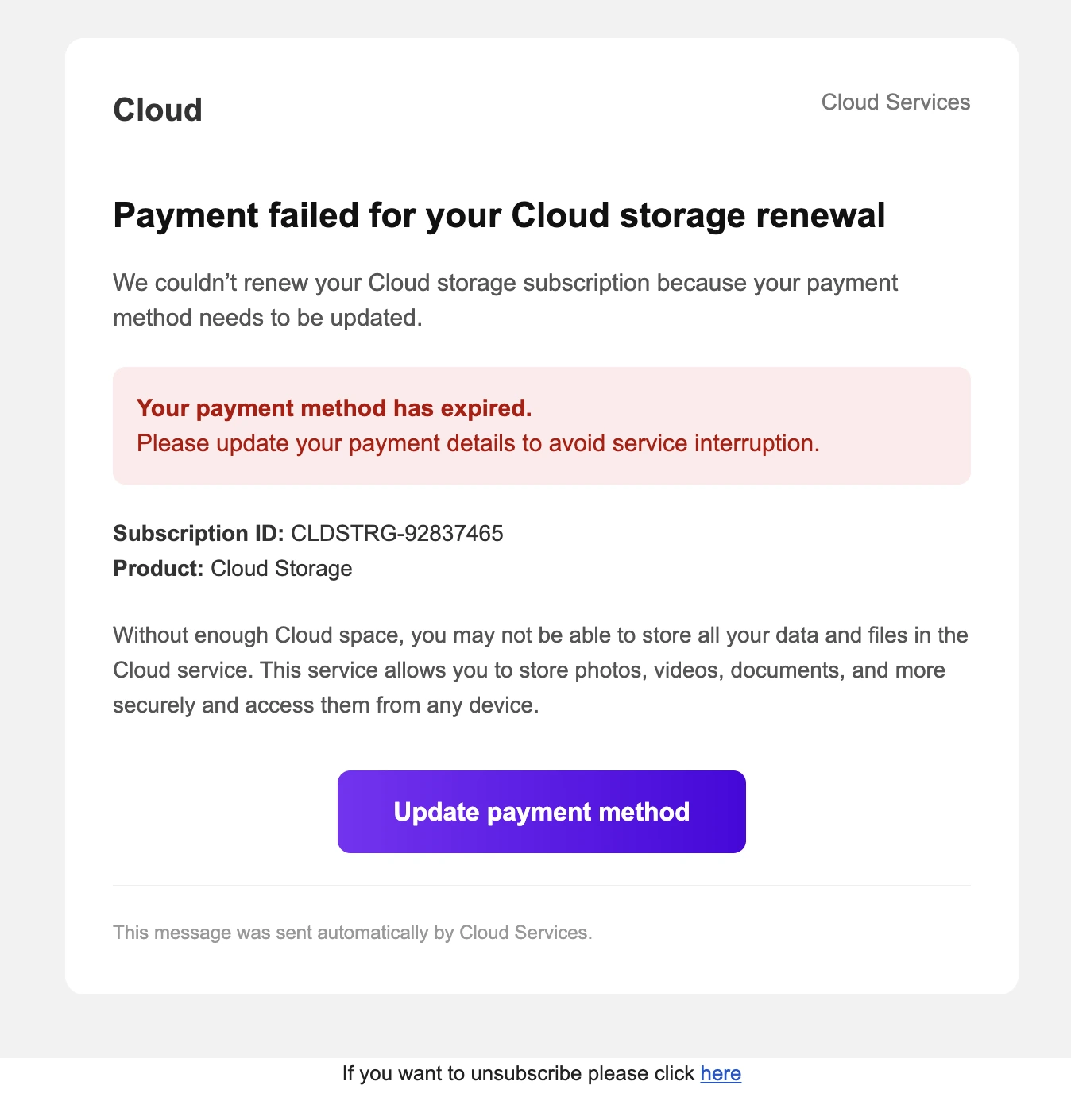
Cloud Cloud Services
Payment failed for your Cloud storage renewal
We couldn't renew your Cloud storage subscription because your payment method needs to be updated.
Your payment method has expired.
Please update your payment details to avoid service interruption.
Subscription ID: CLDSTRG-92837465
Product: Cloud Storage
Without enough Cloud space, you may not be able to store all your data and files in the Cloud service. This service allows you to store photos, videos, documents, and more securely and access them from any device.
Update payment method
This message was sent automatically by Cloud Services.
If you want to unsubscribe please click here
Hyperlink behind the "Update payment method" button: https://storage.googleapis.com/flores/flores.html#?act=cl&pid=11992_md&uid=2&vid=338155&ofid=335&lid=492&cid=1358804
Red Flags
This is a billing-failure phish wearing a storage-quota subject line, and its opening move is to make you afraid of losing files you have already stored. The rendered message is clean: sensible typography, a red alert panel, a purple call-to-action button, a subscription reference number, and a footer. There are no spelling mistakes anywhere in the body. On appearance alone, it passes.
Then you read the envelope it arrived in. The From address ends in a top-level domain that does not exist. The display name on the signing line is the phrase "Trusted Sender," and the address behind it is your own. The To line is somebody else entirely. The message was actually relayed by a numbered mail server on Indonesia's personal-domain namespace. And the one clickable thing in it is a static HTML file sitting in a public Google Cloud Storage bucket, carrying an affiliate network's tracking parameters behind a # so that no server ever logs them.
Not one of those facts is visible in the part of the email that was designed to be looked at.
1. The Sender's Address Ends in a Top-Level Domain That Does Not Exist
- from:
alert-7751@rlnvq.pgq
Start at the end and work backwards. .pgq is not a top-level domain. It is not a country code, it is not one of the original generic TLDs, and it is not among the new gTLDs delegated since 2013. It is not in the root zone at all, which means no nameserver anywhere on the internet can resolve rlnvq.pgq, no MX record exists for it, and no mail can ever be delivered back to it.
That is not a typo or an obscure registry you have not heard of. It is a deliberately unroutable address, and it tells you something precise about the campaign: the attacker never intends to receive a reply. Every bounce, every out-of-office, every angry response, every "please remove me" goes nowhere and costs them nothing. A sender who wanted conversation would need a working mailbox. This one only needs a plausible-looking string in a header field.
The rest of the address is built the same way. rlnvq is five consonants with no vowel and no meaning, the output of a generator rather than a choice. alert-7751 pairs an emotionally loaded word with a four-digit counter, which is what a mailbox looks like when it is one of thousands being rotated through a list.
A real cloud provider sends billing mail from a domain you can look up, that has published SPF, DKIM, and DMARC records, and that has been sending mail for years. This one cannot even be spelled into existence.
2. The Signing Line Says "Trusted Sender," and the Address Behind It Is Yours
- sent by: Trusted Sender
[the recipient's own email address]
Two separate things are wrong on one line, and both are worth naming.
First, nothing legitimate ever calls itself "Trusted Sender." Trust is a conclusion the recipient reaches, not a label the sender applies to themselves. It is a free-text display name, chosen by whoever sent the message, and it exists for exactly one reason: to be the reassuring phrase your eye lands on before it reaches the address. Apple does not sign its mail "Trusted Sender." Google does not. Microsoft does not. Only something that needs you to skip the check does.
Second, and far more important: the address behind that display name is the recipient's own. The From header was forged to the target's own email address. This is a deliberate psychological move, and it works on two levels at once:
- It makes the message look like it originated inside your own account rather than arriving from outside, which quietly implies the account is already authenticated and the notice already legitimate.
- It suppresses the instinct to check the sender. You do not scrutinise your own address the way you scrutinise a stranger's.
It also happens to be the reason this campaign is visible at all. Gmail could not verify that the claimed sender authorised the message, so it split the header apart and showed you the machinery: the via line, the sent by line, and the mailed-by line all appear precisely because the authentication did not line up. When your mail client volunteers extra sender information you did not ask for, it is telling you it could not confirm the sender's identity. That display is a warning, not a formatting quirk.
3. The Real Sending Machine Is a Numbered Relay on an Indonesian Namespace
- via / mailed-by:
sb003.directtrafficroute.my.id - signed-by:
swvS.sb003.directtrafficroute.my.id
This is the only sending domain in the entire message that actually exists, and it has nothing to do with cloud storage.
.my.id is a second-level domain inside .id, Indonesia's country-code TLD, and the my.id namespace is specifically the cheap, lightly verified space intended for personal sites. It is a common home for disposable infrastructure precisely because registrations are inexpensive and fast.
The hostname itself is a confession. directtrafficroute is not a product name, a brand, or a company anyone markets to customers; it is a description of the job the machine does, which is to route traffic. sb003 is a sequence number, which means there is an sb001 and an sb002 and very probably an sb047. swvs is another generated label stacked in front of it. What you are reading is the naming convention of a bulk-mail server fleet, where individual hosts are numbered, burned when they are blocklisted, and replaced.
The signed-by line deserves one specific caution, because it is the field most often misread. A DKIM signature proves that the domain doing the signing authorised the message and that the body was not altered in transit. It proves nothing whatsoever about the brand named inside the body. Here the signature belongs to swvS.sb003.directtrafficroute.my.id — the Indonesian relay signing its own outgoing mail, exactly as any mail server would. A valid signature from the attacker's own infrastructure is not a security guarantee; it is the attacker filling in a form correctly. No signature from any cloud provider appears anywhere in this message, because no cloud provider was involved.
4. The To Line Is me@aol.com, and That Is Not You
- to:
me@aol.com
You received this message. The To: header addresses somebody called me at AOL. Both statements are true at once, and the only way both can be true is if your address was in the BCC field.
That is the definitive signature of a list blast. A single message is composed once, a placeholder is dropped into To: so the header is not empty, and the real recipient list is hidden in blind carbon copy so that no recipient can see the others. The placeholder chosen here is almost comic in its laziness: the literal word me at a consumer webmail provider, a mailbox that either does not exist or belongs to an uninvolved stranger who has been receiving bounces for years.
The consequence is worth stating plainly. A billing notice that is not addressed to you is not about you. Your cloud provider bills a specific account, so its dunning mail necessarily goes to that account's address in the To: field, one recipient at a time. It is structurally incapable of arriving via BCC alongside thousands of strangers.
The 4:59 AM delivery time fits the same picture. That is not a business hour in any of the plausible sending or receiving time zones; it is when a queue drains unattended, and it is chosen so the message is sitting at the top of the inbox when the target first unlocks their phone, still half-awake and least likely to inspect a header.
The same trick, with the same dummy recipient standing in for a hidden list, drove the Materials Intercessor procurement blast. Different pretext, identical plumbing.
5. The Subject Says the Storage Is Full. The Body Says the Payment Failed.
- Subject: ⛔️ Warning! Your Cloud Storage Is Full
- Body headline: Payment failed for your Cloud storage renewal
These are two different problems, and they are not compatible.
A full drive is a capacity event. You have used the space you are entitled to, nothing is wrong with your account, and the fix is to delete files or buy more. A failed renewal is a billing event. Your card did not go through, your entitlement is at risk, and the fix is to update a payment method. A quota can be full on a perfectly paid-up account, and a payment can fail on an account that is nearly empty. Neither causes the other.
No real provider conflates them, because the two notices come out of two different systems: one is generated by storage telemetry when you cross a usage threshold, the other by the billing engine when a charge is declined. They have different templates, different senders, and different calls to action.
Why staple them together? Because the subject line and the body are optimised for two different things. The subject exists to win the open, and "your storage is full" is the more universal, more instantly recognisable anxiety — nearly everyone has seen that notification, and nobody has to remember whether it applies to them. The body exists to produce the payout, and only a payment pretext justifies asking for a card. The seam between the two is where the message stops being an email and starts being a funnel.
The ⛔️ in the subject is part of the same calculation. Emoji in a subject line raise visibility in a crowded inbox, and a red prohibition sign reads as severity before a single word is processed. No cloud provider on earth opens a billing notice with a no entry sign.
6. The Brand Is Literally Just the Word "Cloud"
Read the message again and try to name the company. You cannot, because it never does.
The wordmark says Cloud. The header says Cloud Services. The product is Cloud Storage. The footer says the message was sent automatically by Cloud Services. There is no Apple, no Google, no Microsoft, no Dropbox — no company, no legal entity, no trademark, no logo belonging to anyone.
This is not an oversight. It is the single most deliberate decision in the whole email, and it buys the attacker two things:
- It works on every recipient. Name a specific provider and the message instantly fails for everyone who does not use that provider, which on a scraped list is most of them. Say only "Cloud" and each reader supplies the brand from their own memory. The recipient does the impersonation on the attacker's behalf, and they do it more convincingly than any template could.
- It is harder to take down. No trademark has been infringed, no logo has been copied, and there is no brand-protection team with a legal basis to file a complaint. The message is a forgery of a company that does not exist.
The tracing is still visible, though, in the one paragraph of real prose:
"This service allows you to store photos, videos, documents, and more securely and access them from any device."
Photos, videos, documents, any device. That is the standard marketing sentence consumer cloud storage has used for a decade, lifted whole and stripped of its brand name. The scaffolding of the copy is genuine; only the identity has been sanded off.
7. The Only Link Is a Static File Parked in a Google Cloud Storage Bucket
https://storage.googleapis.com/flores/flores.html#?act=cl&pid=11992_md&uid=2&vid=338155&ofid=335&lid=492&cid=1358804
Read it left to right and stop at the first single slash. The domain is storage.googleapis.com, and here is the uncomfortable part: that domain is genuinely Google's. It is the public endpoint for Google Cloud Storage, the same service that serves legitimate assets for a large fraction of the web. There is no lookalike spelling, no swapped character, no suspicious new registration.
That is exactly the point. Anyone can create a Google Cloud Storage bucket, make it publicly readable, and upload an HTML file to it. The moment they do, their page inherits Google's domain, Google's valid TLS certificate, Google's uptime, and Google's decades of accumulated domain reputation. The padlock is real. A reputation-based mail filter sees googleapis.com and waves it through. And the single most reliable consumer-facing check there is — look at the domain — returns a false pass, because the domain is not the lie. This is the same class of abuse as the fake QuickBooks debit alert, where a link that displayed as an Intuit address resolved somewhere else entirely; here the attacker has skipped the disguise and simply rented space on infrastructure you already trust.
/flores/ is the bucket name and flores.html the object inside it. The name is arbitrary and disposable — one of a rotation, abandoned the moment it is reported. (It is at least a coincidence worth noting that Flores is also an Indonesian island, and the relay that sent this sits on Indonesia's .my.id namespace.)
Now the parameters, which are where the message stops pretending to be a cloud provider:
| Parameter | Reads as |
|---|---|
act=cl | action = click |
pid=11992_md | publisher / partner ID |
uid=2 | user or upstream ID |
vid=338155 | visitor ID |
ofid=335 | offer ID |
lid=492 | lead ID |
cid=1358804 | campaign ID |
Publisher, offer, lead, campaign. That is the vocabulary of an affiliate marketing network — the schema a CPA platform uses to attribute a click to the partner who delivered it and to the offer it was sold into. Your cloud storage subscription does not have an offer ID. Your renewal is not attached to a campaign. A genuine billing link carries your account reference or an invoice number; this one carries the commercial identifiers needed to pay whoever put the message in front of you.
Note also what ofid implies: the destination is a variable. Change the offer ID and the same emailed link points somewhere else entirely, which is how one blast can be monetised repeatedly as offers rotate.
8. The # in Front of the ? Is There to Blind the Scanners
This detail is easy to skim past and it is the most technically deliberate thing in the message. Look at the punctuation:
flores.html#?act=cl&pid=...— the parameters sit after a#- A normal query string would be
flores.html?act=cl&pid=...— parameters after a?
Everything following a # in a URL is the fragment, and by design browsers never transmit the fragment to the server. It is a client-side value, meant for jumping to an anchor on a page, and it is readable only by JavaScript running in the visitor's own browser.
Follow what that means in practice:
- Google's servers see a request for a plain static HTML file, with no parameters at all. The bucket's access logs record an unremarkable file fetch. There is nothing in them to distinguish a victim from a crawler.
- A URL scanner that fetches the link server-side sees the same thing — a small, harmless, mostly empty HTML page hosted on a reputable Google domain. It scores as clean, because in isolation it is clean.
- The victim's browser is where the attack actually assembles. JavaScript inside
flores.htmlreads the fragment, decodes the offer and campaign IDs, and redirects the live human onward to the payment or credential page. The malicious step happens after the page loads, on the target's own machine, using data the security infrastructure was never given.
This is evasion by architecture rather than by disguise. The static file is bait for the scanners; the fragment is the payload for the human. It is also why "the link scanner said it was fine" is not an answer for this class of URL, and why the redirect target can be swapped at any time without ever changing the address that was emailed.
9. A Payment Failure Notice With No Payment in It
The message asks you to fix a billing problem while withholding every fact that would let you confirm one exists.
| A real failed-payment notice states | This email states |
|---|---|
| Which card failed (brand and last four digits) | nothing |
| The amount and currency of the failed charge | nothing |
| The date the charge was attempted | nothing |
| The account or email the subscription belongs to | nothing |
| The plan, tier, or storage quota | "Cloud Storage" |
| The renewal or cut-off date | nothing |
| A retry date before service is affected | nothing |
The only checkable-looking detail in the entire message is Subscription ID: CLDSTRG-92837465, and it survives about three seconds of attention. CLDSTRG is just the words "cloud storage" with the vowels removed, followed by eight digits with no structure, no checksum, and no format that corresponds to any real provider's identifiers. It exists to be unverifiable in an official-looking way — a reference number you cannot check, placed where a reference number you could check would go.
One line contradicts itself outright. "Your payment method has expired" is a specific, dated claim: an expired card has an expiry month printed on its face, and the provider that stored it knows exactly what that month was. Any genuine notice would say so, because naming the date is what makes the notice actionable. This one cannot, because there is no card, no account, and no subscription behind the sentence.
The vagueness is not laziness — it is a structural requirement. The message went to a scraped list. The sender does not know which cloud service you use, whether you pay for storage at all, or what card is on file. Every specific fact would break the message for the majority of recipients, so every specific fact has been removed. What is left has to be true of everyone, which is another way of saying it is about no one.
10. No Name, No Company, No Address, No Real Unsubscribe
The message never greets you. There is no "Dear" anything — not your name, not your username, not even your email address echoed back. A provider that is chasing a failed payment on your account demonstrably knows who you are; the greeting is the cheapest possible proof of that, and it is absent because the sender has an address and nothing else.
The footer is thinner still. "This message was sent automatically by Cloud Services." That is the whole thing. Missing from it:
- A legal entity name
- A registered postal address
- A privacy policy or terms link
- Any support route, phone number, or help centre
- Any statement of why you are receiving the message
Bulk commercial email is legally required to carry a physical postal address and a working opt-out under the US CAN-SPAM Act, and to meet comparable identification and consent requirements under GDPR and the UK's PECR. Every real marketing or billing email you receive carries that block because compliance teams insist on it. Its absence here means the sender is either outside the law's reach or indifferent to it, and either answer is the same answer.
Which leaves "If you want to unsubscribe please click here." On a message like this, an unsubscribe link is not an exit. Best case it is decoration. Realistically it is the same redirector as the button, or a variant of it, and clicking it does the one thing the attacker most wants: it confirms that a human being read the message and acted on it. An address that unsubscribes is an address that is awake, and awake addresses are worth more, both to this campaign and to everyone the list is sold to next.
How This Scam Works
The email is a doorway. Nothing is asked for inside it, which is exactly why it reads as harmless; every extraction happens after the click, on infrastructure the message never mentions.
- The Blast: A single message is queued on a numbered relay in the
directtrafficroute.my.idfleet and sent to a scraped list at 4:59 AM. The From header is forged to each recipient's own address so the notice looks self-originated, a throwaway string on a non-existent TLD fills the technical sender field,me@aol.comoccupies theTo:line, and the real recipients ride in BCC. - The Open: The subject sells a universal anxiety — your storage is full — because it needs no prior relationship to land. Everyone recognises that notification.
- The Switch: Inside, the problem quietly becomes a failed payment, because a capacity warning cannot justify asking for a card and a billing failure can. Nothing in the body acknowledges that the subject said something different.
- The Click: The button leads to
storage.googleapis.com. The domain is real, the certificate is real, the padlock is real, and the recipient's single most reliable check returns a pass. - The Handoff:
flores.htmlloads, reads the tracking values hidden in the URL fragment, and redirects in JavaScript. Google's logs recorded a static file fetch. Any scanner that pre-checked the link saw a blank page. Neither ever saw a parameter. - The Landing Page: The redirect resolves whatever
ofid=335currently points at — commonly a cloned cloud sign-in, a card-details "renewal" form, or a survey funnel that ends in a payment step. Because the destination is a variable in the URL, it can be changed at any time without altering the link that was mailed. - Credential Capture: If the page is a sign-in clone, the username and password are submitted to the attacker. Better kits forward them to the real provider immediately, so a genuine session opens and the victim notices nothing wrong.
- MFA Interception: If two-factor is enabled, the fake page requests the code and relays it while it is still valid. A code typed into a phishing page is a code handed to the attacker, which is why SMS and app-generated codes do not stop this.
- Card Capture: The "renewal" then collects card number, expiry, and
CVV. Sometimes the charge is the payout directly; more often the details enrol the victim in a recurring subscription disclosed only in small print, which is where affiliate funnels of this shape usually make their money. - Attribution and Resale: The
lidandcidvalues credit the click and any conversion back to whoever supplied the traffic. The address is scored as live, human-attended, and responsive to billing pretexts, then resold at a premium into the next campaign. - The Real Damage: A cloud storage account is rarely just files. It holds photos, identity documents, tax records, device backups, and saved passwords, and it is frequently the recovery destination for every other account the victim owns. Whoever holds that login can reset most of the rest.
Conclusion and Recommendations
There is no full drive, no failed payment, no subscription CLDSTRG-92837465, and no company called Cloud Services. There is a bulk-mail relay in Indonesia, a From address on a top-level domain that does not exist, a display name that describes itself as trusted, a placeholder in the To: line, and a static HTML file in a public Google bucket carrying an affiliate network's campaign IDs behind a # so that no scanner ever reads them.
What makes this one worth studying is that the two checks most people rely on both fail. Look for typos, and you find none; the body is clean. Check the domain, and it says google.com. This email is a demonstration that spotting phishing by looking harder at the pretty part has stopped working, and that the answer is not sharper eyes but a different question: does the sender's plumbing agree with the story the message is telling? Here it disagrees on every single line, and the whole contradiction is visible before you click anything.
Immediate Actions:
- Do Not Click the Button:
storage.googleapis.com/flores/flores.htmlis the attack in its entirety. The domain being genuinely Google's changes nothing about what the file inside the bucket does once your browser runs it, and the tracking IDs in the fragment confirm your address the instant the page executes. - Do Not Click "Unsubscribe" Either: It is on a message you already distrust, and on this class of mail it is the same funnel wearing a different word. Use your mail client's own report-and-block, never a link supplied by the sender.
- Do Not Reply:
rlnvq.pgqcannot receive mail, so a reply achieves nothing except confirming to any relay in the path that the mailbox is attended. - Check Your Actual Storage the Way You Normally Would: Open the provider's app, or type its address by hand. Your real usage and your real billing status are both one tap away, and thirty seconds there settles the only two questions this email raised.
- Delete and Report as Phishing: Reporting scores the sending infrastructure. Google also accepts abuse reports for content hosted in its buckets, and a reported bucket is one the next recipient will not reach.
- If Anyone Clicked and Signed In, Move Immediately: Change the cloud account password from a device you trust, sign out of all sessions, re-verify MFA, and audit connected apps, recovery email addresses, recovery phone numbers, and mail forwarding rules. If that password is used anywhere else, change it there first — reuse is where the real loss usually happens.
- If Card Details Were Entered, Call the Bank Now: Block the card and dispute any charge, including small ones. A low-value charge is often the enrolment step for a recurring subscription, not the end of the incident.
Verification Steps:
- Read the Text After the Final Dot:
.pgqis not a top-level domain. Neither are most of the strings that appear in campaigns like this. If you cannot name the TLD, that alone ends the conversation. - Treat "via," "sent by," and "mailed-by" as an Alarm: Your mail client only shows those lines when it could not confirm the sender is who the From header claims. That display is the software telling you something failed authentication.
- Check Whether the Message Is Addressed to You: If your address is not in the
To:field, you were BCC'd, and a personal billing notice is never sent by BCC. Expanding the recipient list takes one tap and is one of the fastest checks available. - Make the Subject and the Body Agree: A storage-quota warning and a payment-failure notice are different events from different systems. When the envelope and the contents describe different problems, neither is real.
- Demand That a Billing Email Name the Money: Card brand, last four digits, amount, currency, date attempted, plan, and the account it belongs to. A payment notice missing all of them is not a payment notice. This single question defeats the entire genre.
- Insist That the Sender Name the Company: "Cloud Services" is not a vendor. If the message cannot say which company it is from, it is not from a company.
- Remember That a Real Domain Is Not a Safe Destination:
googleapis.com, and every other public file-hosting and document-sharing domain, will host whatever a paying stranger uploads. The domain check tells you who owns the server. It tells you nothing about who wrote the page. - Never Fix a Billing Problem Through a Link: Go to the provider's app or type the address yourself. If the charge genuinely failed, it will be waiting in your account. If it is not there, the email was fiction.
Additional Protection Tips
- Use a Password Manager as a Phishing Detector: A manager offers credentials only on the exact domain it saved them against. When it silently declines to fill a page that looks precisely like your cloud sign-in, it has just made the domain judgment that humans reliably get wrong and software never does.
- Move to Passkeys or Hardware Keys: Codes typed into a fake page are relayed in real time. Passkeys and
FIDO2keys are cryptographically bound to the real domain and simply do not function on a clone, which is what makes them the only defence that stops this attack rather than slowing it down. - Know Which Cloud Services You Actually Pay For, and When: Keep the list, the renewal dates, and the card on file current. You cannot be panicked about a subscription you already track, and the entire pretext depends on you being unsure.
- Turn On Real Storage Alerts at the Source: If your provider can warn you inside its own app when you approach your quota, enable it. A notification you configured yourself is a channel an attacker cannot forge, and it makes an emailed version of the same warning immediately suspect.
- Separate Your Recovery Address From Your Everyday Address: If the mailbox that receives password resets is not the one on scraped marketing lists, most of these campaigns never reach the account that matters.
- Treat Clean Design as Neutral Evidence: No typos, correct spacing, and a well-built HTML template prove only that the sender used a decent template. The fake WordPress.com renewal notice was pixel-perfect and just as hollow underneath.
- Expect the Trusted-Host Pattern to Keep Growing: Public buckets, document-sharing links, form builders, and link shorteners are all being used the same way, for the same reason: they lend a legitimate domain to an illegitimate page. Train the reflex around what the page asks for, not around where it is hosted.
- Build a Reporting Habit, Not Just a Detection Habit: A one-click report button and a standing promise that admitting a click is met with help rather than blame is worth more than any awareness poster. This class of attack is defeated in the minutes between the click and the disclosure.
Remember: A real billing notice knows what it is charging you for. It names the company, the plan, the card, the amount, and the date, and it sends you to an account you already log into. This one could not name the company, the card, the amount, or even the problem — it opened by saying your storage was full and then asked you to pay for something else entirely. An email that has to say "Cloud" because it cannot say which cloud has already told you it is not writing to a customer.
