Phishing: URGENT Renewal attempt failed | Fake Cloud Services Disabled Storage Alert

At a glance
- Verdict
- PhishingGet the recipient to click through and pay to 'reactivate' storage, handing over card details, or to confirm their address on the unsubscribe form.
- Subject line
URGENT Renewal attempt failed- Claimed sender
- Billing Support
support@hudsonsonthedocks.com - Impersonates
- No real organisation or personPersona: Billing Support, or Payment System in the second copy, for an unnamed cloud storage provider presented only as Cloud Services
- Received
- · Published
- Related analyses
- Phishing: 🔔 Action Required: Storage 100% Full | Fake Cloud Services Payment Notice, Five Weeks Later
- Phishing: Update payment details | Fake OpenAI ChatGPT Payment Declined Notice
- Phishing: ⛔️ Warning! Your Cloud Storage Is Full | Fake Cloud Services Payment Failure Notice
- Phishing: Your mailbox is full. | Fake Storage Warning From Your Own Address
Display name as reported by the recipient; the screenshot shows only the address, with the recipient mailbox blurred. A second copy with the identical body and links came from 'Payment System' at support@fetchyournews.com under the subject 'Your account has been disabled'.
Evidence: the message as received, passive registry lookups, and the results of a detonation the recipient ran in a secured sandbox; the analysis itself opens nothing. How we analyse a scam email.
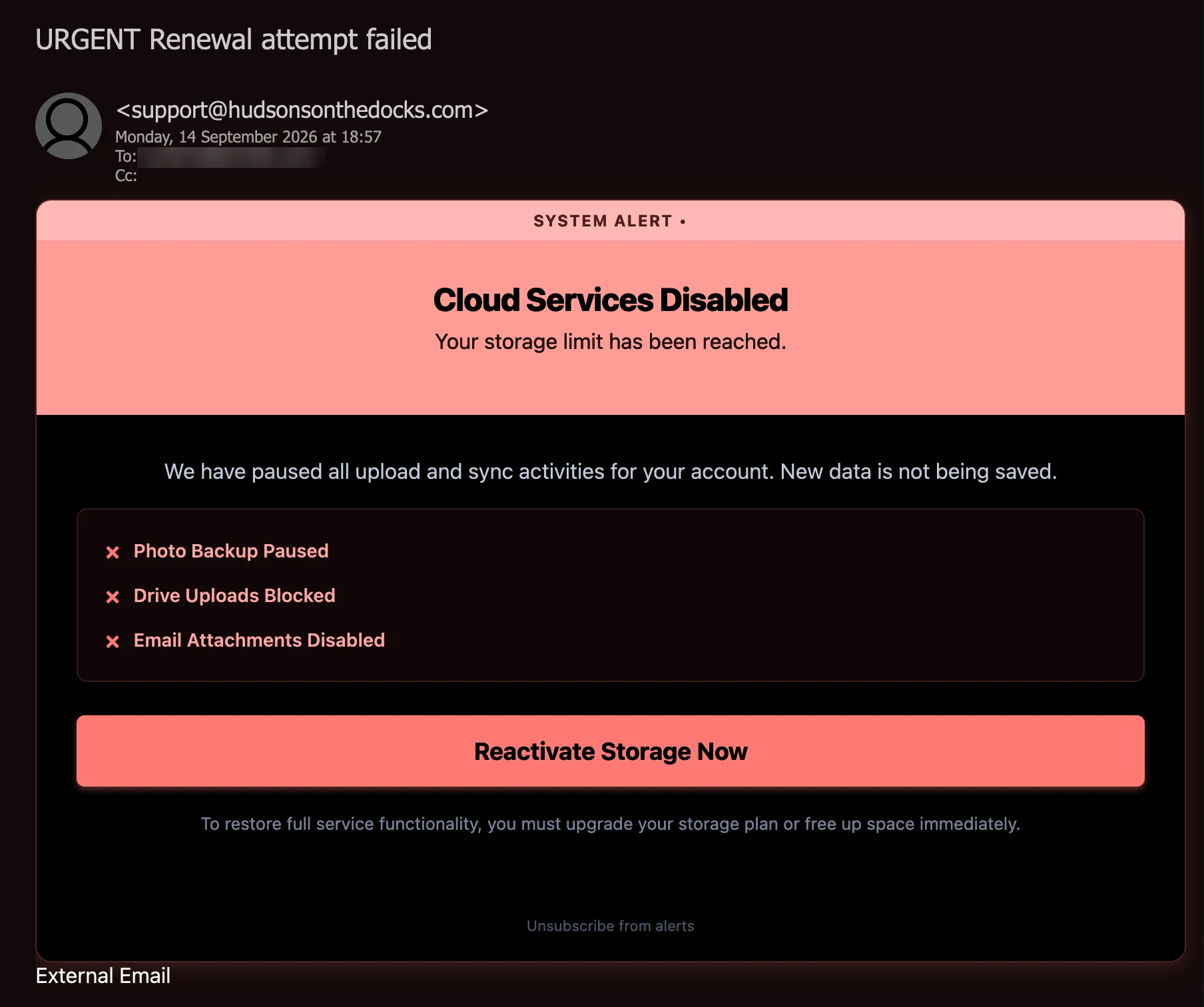
We have paused all upload and sync activities for your account. New data is not being saved. A storage-full alert that never names its provider, sent twice under two different stories — URGENT Renewal attempt failed from Billing Support, and Your account has been disabled from Payment System — from two unrelated business domains, with both of its links parked in a stranger's Google Cloud Storage bucket, and an unsubscribe link that hands you to a three-month-old domain asking you to type in your email address.
Complete Email
from: Billing Support support@hudsonsonthedocks.com
date: 09/14/2026 6:57 PM
subject: URGENT Renewal attempt failed
Email Body
SYSTEM ALERT •
Cloud Services Disabled
Your storage limit has been reached.
We have paused all upload and sync activities for your account. New data is not being saved.
✕ Photo Backup Paused
✕ Drive Uploads Blocked
✕ Email Attachments Disabled
Reactivate Storage Now
To restore full service functionality, you must upgrade your storage plan or free up space immediately.
Unsubscribe from alerts
Links
- Behind the Reactivate Storage Now button:
https://storage.googleapis.com/cloudstorage-juwd/index - Behind Unsubscribe from alerts:
https://storage.googleapis.com/cloudstorage-juwd/unsub
What the Sandbox Showed
The recipient detonated both links — the same two in each copy — in a secured sandbox and supplied its findings, with a screenshot of the page each link reached. Those screenshots are reproduced below, cropped to the part of the page that holds content. The analysis works from them; nothing was fetched from either link for this post.
Link 1: the button
The sandbox requested https://storage.googleapis.com/cloudstorage-juwd/index on 24 September 2026, ten days after the email arrived. Google Cloud Storage's own servers answered — the response carried the server headers Google's storage service uses — with an XML error, which the browser displayed as a document tree:
<Error>
  <Code>NoSuchKey</Code>
  <Message>The specified key does not exist.</Message>
  <Details>No such object: cloudstorage-juwd/index/</Details>
</Error>
The bucket was there. The object the button pointed to was not.

Link 2: the unsubscribe line
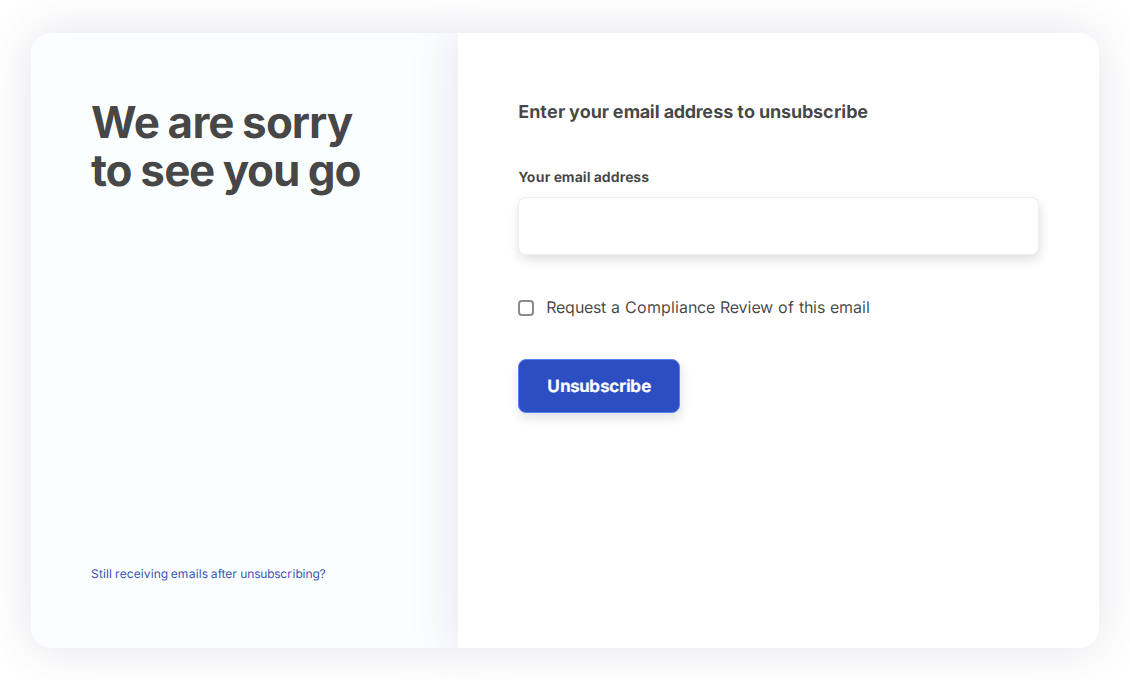
The bucket answered https://storage.googleapis.com/cloudstorage-juwd/unsub with an HTML page, and the browser finished on a different domain. The sandbox recorded the final address as https://www.coredatafye.com/o-vskv-d21-565eba6c9cf16f7ba68c389f154a1e5c, where the page read:
We are sorry to see you go
Enter your email address to unsubscribe
Your email address
(empty text box)
☐ Request a Compliance Review of this email
Unsubscribe
Still receiving emails after unsubscribing?
The sandbox extracted one link from the page, behind the Still receiving emails line: the same address with /complaint added.
Other Copies
A second copy of this email was also received. The body is identical, word for word, and so are both links, to the same two objects in the same bucket. Only the sender and the subject changed. Dates in this post refer to the copy shown above, which arrived on 14 September 2026.
Second copy
from: Payment System support@fetchyournews.com
subject: Your account has been disabled
The new sender is taken apart in Red Flag 1, and the new subject in Red Flags 2 and 6.
Red Flags
This is a storage-and-billing phish for a cloud service it never names — the same family as the storage-full warning analysed in August, from different senders, a different template and a different bucket. It arrived twice, from two senders under two subjects, with the body and both links unchanged. Its opening move is fear of loss: backups stopped, uploads refused, new data not saved. It offers a fix in one button and a way out in one link. Both lead into the same stranger's storage bucket, and the sandbox shows that the way out ends at a form asking for your email address. Everything below comes from the message, the recipient's report of the second copy, the sandbox's findings and the public registry records.
1. "Billing Support" and "Payment System", at Two Domains That Have Nothing to Do With Storage
- From: Billing Support
support@hudsonsonthedocks.com - From, second copy: Payment System
support@fetchyournews.com
The display names claim a billing department and a payment system. The addresses say whose: hudsonsonthedocks.com — Hudsons on the docks — and fetchyournews.com — fetch your news. Neither name has any connection to cloud storage, to billing, or to any provider the email could be about. A storage provider's billing notices come from the provider's own domain. A display name is free text, typed by the sender and verified by nobody; the part after the @ is the only part that says where a message came from, and in both copies it says somewhere else.
The public WHOIS and DNS records, looked up on 27 September 2026, describe two established domains, not disposable ones:
hudsonsonthedocks.comwas registered on 21 October 1999 through GoDaddy — nearly 27 years before this message — with the owner's details behind a privacy service. ItsSPFrecord authorises Microsoft 365's servers, among others, to send its mail.fetchyournews.comwas registered on 26 January 2010 through Tucows, with the owner's details redacted. Its mail is hosted by Rackspace.- Both publish a
DMARCpolicy ofp=none, which asks receiving servers to take no action when a message claiming the domain fails authentication, and both end theirSPFrecords in~all— a soft fail rather than a refusal.
That leaves two explanations for each copy, and neither the screenshot nor the report of the second copy can choose between them, because neither includes the full headers. Either the addresses were forged, and each domain's p=none policy gave the receiving server no instruction to refuse them; or real mailboxes on the domains were taken over and used to send. Mail from a hijacked account on an old, well-kept business domain arrives carrying that domain's years of good standing with reputation filters, which is exactly why it is worth borrowing. Either way, nothing about either domain connects it to cloud storage, and no storage provider's billing desk writes from them.
Put the two copies side by side and the pattern shows. The same body and the same two links went out from two unrelated domains, each under the mailbox name support@, each with a different department's name in front of it. The sender is the disposable part of this email. The bucket is the part the operator keeps.
2. One Body, Three Stories: A Failed Renewal, a Disabled Account, a Full Quota
- Subject: URGENT Renewal attempt failed
- Subject, second copy: Your account has been disabled
- Headline: Cloud Services Disabled — Your storage limit has been reached.
- Small print: "you must upgrade your storage plan or free up space immediately."
A failed renewal is a billing event: a payment did not go through, and the fix is to pay. A full quota is a capacity event: the account is paid up and simply full, and the fix is to delete something or buy more. A disabled account is a third thing again: an account its owner can no longer use at all. None of the three causes the others. The two subjects announce the first and the third; the body describes only the second, and never mentions a payment, a card, an amount, or a sign-in that no longer works. The renewal of what, attempted when, for how much, is never said, and neither is why the account was disabled.
The same body went out under both subjects, word for word. Nobody rewrote the message to fit its new subject line, because it never had to fit. The August specimen shows the same indifference from the other side: its subject said the storage was full, and its body said the payment had failed. Subjects and senders are swapped freely around a fixed body, because none of them is about the recipient. The subject is there to win the open; the body is there to justify the button.
3. A Storage Alert With No Provider, No Plan and No Numbers
- Headline: Cloud Services Disabled
- Services: Photo Backup Paused, Drive Uploads Blocked, Email Attachments Disabled
Try to name the company. The message never does. There is no logo, no product name, no legal entity and no footer — only Cloud Services, which is a category, not a provider. The three stopped services are the generic outline of a consumer cloud account — photo backup, a drive, email — the things one shared storage allowance typically covers. Named for no one, they fit whichever provider the reader already uses, and the reader supplies the brand.
What a real quota notice contains is missing entirely: whose account it is, how much space is used and out of what allowance, which plan the account is on, and what a larger one would cost. Your storage limit has been reached, without saying what the limit is, is a sentence that is true of no account in particular — which is what lets it be sent to every account on a list. The copy shown above went to a functional company mailbox of the kind published on a website: an address on a list, not a customer record.
4. Both Links Sit in a Stranger's Google Cloud Storage Bucket
- Button:
https://storage.googleapis.com/cloudstorage-juwd/index - Unsubscribe:
https://storage.googleapis.com/cloudstorage-juwd/unsub
Read each address from the left and stop at the first single slash. storage.googleapis.com is genuinely Google's: it is the public address of Google Cloud Storage, which anyone can use to publish files. Everything after the slash belongs to whoever created the bucket — here cloudstorage-juwd, a generic word with four random letters appended, the kind of name given to something meant to be used and replaced. Google's domain, certificate and reputation come with it, so a filter that judges links by their domain sees Google, and so does a reader who checks. This is the third bucket in this archive used this way, after flores in the August storage alert and claudesouth in the fake webmail portal.
A real storage provider sends you to its own website to manage your plan, not to an object called index in a public bucket. And both links here are in the same bucket: the button that "reactivates" your storage and the link that promises to stop the alerts were put there by the same hand. The second copy, from a different sender under a different subject, carries the same two links to the same two objects: whoever's name is on the envelope, the bucket stays the same.
The sandbox adds a detail no reader could see. When the button's link was detonated, on 24 September — ten days after the email arrived — Google answered NoSuchKey: the bucket still existed, but the object behind the button did not. Whether the operator removed it or it was taken down cannot be told from the response. What it does show is that the page behind the button was short-lived, as pages in campaigns like this typically are. A real provider's billing page does not vanish ten days after it sends you there.
5. The Unsubscribe Link Hands You to a Three-Month-Old Domain — and Asks Who You Are
- Final address:
https://www.coredatafye.com/o-vskv-d21-565eba6c9cf16f7ba68c389f154a1e5c - The form: "Enter your email address to unsubscribe"
Unsubscribe from alerts did not stop at Google. The page in the bucket passed the browser on to www.coredatafye.com, a domain that appears nowhere in the email. Its public records:
- Registered on 11 June 2026 through Network Solutions — 95 days before the email arrived.
- The registrant fields give a personal name, no organisation, and an address in Kyiv Oblast, Ukraine. Registrars do not verify them, and they say nothing reliable about who runs the page.
- Name servers at Bluehost, and a web address that, as of our lookup, points to a server at HostPapa, a commercial web host.
A three-month-old domain with no company behind it, reached through a stranger's bucket, is not a provider's preference centre. And look at what it asks for. The emailed link carries nothing but the word unsub — no token, no account reference, nothing that says which address clicked. So the page cannot know who you are, and asks you to type it in. A genuine unsubscribe link identifies the subscription by itself, so that one click is enough; Google and Yahoo have required bulk senders to support one-click unsubscribing since 2024. A page that needs your address typed into it is not removing you from a list. It is collecting the address — along with the fact that a person read the email, trusted its link, and typed it in.
The rest of the page is dressing. Request a Compliance Review of this email borrows the vocabulary of regulation, on behalf of a sender that gave no company name, no postal address and no identity at all — the things commercial-email law actually requires. Still receiving emails after unsubscribing? leads to a second page, at the same address with /complaint added, ready for the complaint the operator expects.
And a system alert has nothing to unsubscribe from. Notices about your own account — a failed payment, a full quota — are service messages, sent whatever your marketing preferences. An "alert" that offers to stop alerting you is a mailing-list email dressed as an account notice.
6. "URGENT" and "Immediately", With No Deadline — and a Free Fix It Will Not Let You Use
- Subject: URGENT
- Subject, second copy: Your account has been disabled
- Strip: SYSTEM ALERT •
- Button: Reactivate Storage Now
- Small print: "you must upgrade your storage plan or free up space immediately."
The pressure is all in the vocabulary: URGENT in capitals, SYSTEM ALERT, Disabled, Blocked, Paused, Now, immediately. None of it is attached to anything. There is no date by which something will happen, no consequence beyond what the email says has already happened, and no figure to check. Urgency with nothing behind it is a label, applied so that the reader acts before reading closely.
The headline says the services are Disabled and the button offers to Reactivate them, but the text beneath describes a full quota: uploads and sync paused, new data not saved. A full quota stops new data from coming in; it does not switch an account off, and its owner can still open, download and delete. The words are chosen to make a capacity limit read like a suspension. The second copy's subject finishes the job — Your account has been disabled — over a body that says no such thing.
The small print is more revealing still. It offers two fixes: upgrade your storage plan, or free up space. The second costs nothing, and a real provider's notice would link to the place where you do it. This one offers a single button, and it does not say Manage storage or Free up space; it says Reactivate Storage Now. The free option is mentioned so that the message sounds fair. The only way it offers out of the problem is the one that leads to the bucket.
How This Scam Works
The email is bait for one click, with a second click held in reserve for anyone who distrusts the first. Where the button led on the day was not observed — its page was gone when the link was detonated — but storage-and-billing lures of this family are well documented, and they typically run like this:
- The List: One unbranded template is sent to addresses bought or harvested in bulk. It names no provider, no plan and no recipient, so it reads as plausible to anyone with any cloud account — which is almost everyone.
- The Sender: The message goes out from mailboxes on established domains with no connection to the story — here,
support@addresses on domains registered in 1999 and 2010. These are typically hijacked small-business accounts, or forged addresses on domains whoseDMARCpolicy tells receivers not to act, so that each copy arrives carrying its domain's reputation. - The Hosting: The links are parked in a public Google Cloud Storage bucket, so link filters and readers alike see Google's domain. Objects in the bucket are short-lived: here the button's page was gone within ten days, and a new bucket or a new object typically carries the next wave.
- The Redirect: The page in the bucket typically does little but forward the visitor to a landing domain registered for the purpose, as the unsubscribe page here did. In the August specimen the link carried an affiliate network's campaign and offer IDs; networks of that kind commonly pay whoever supplies the traffic for each visitor or each sign-up.
- The Payment Page: The landing page is typically styled as a storage upgrade or a "renewal": a large discount, a small fee, a form for card details. The card is the prize, whether it is charged directly, enrolled in a recurring subscription disclosed only in small print, or sold on. Some variants ask for the cloud account's sign-in first.
- The Unsubscribe Trap: Recipients who would never press Reactivate but want the alerts to stop are handled by the second link. The form asks them to type their address, and each address typed confirms a live mailbox read by a person who follows links. Addresses like that are typically marked as responsive and mailed again, or sold to the next campaign.
- The Rotation: The sender and the subject are the cheapest parts to change, and they change first: the second copy here kept the body and both links, and swapped everything above them. Buckets and landing domains are typically replaced when they are reported. The template stays the same.
Conclusion and Recommendations
There is no cloud service, no failed renewal, no disabled account and no disabled storage. There are two borrowed senders, Billing Support and Payment System, on business domains registered in 1999 and 2010 that have nothing to do with storage; two subject lines telling different stories over one unchanged body; a template that cannot name its own provider; a public Google bucket whose page behind the button was gone within ten days; and an unsubscribe link that passes you to a three-month-old domain and asks you to type in your email address.
The design is competent, and both links really are on Google. Neither fact is verification. The message makes two requests — pay to reactivate, or tell us your address to leave — and neither is something a genuine service notice asks of you through a link in an email.
A storage notice that cannot name the provider, the plan or the problem is not about your storage. It is about your click.
Immediate Actions:
- Do Not Click "Reactivate Storage Now": Its page was gone ten days later, but the bucket's owner can put a new one at the same address at any time without changing the link that was mailed. A check made today says nothing about what the link served on the day it arrived.
- Do Not Use the Unsubscribe Link, and Never Type Your Address Into Its Form: For mail you never signed up for, unsubscribing is a reply. Use your mail client's report-phishing or block option instead.
- Do Not Reply: A reply goes to
hudsonsonthedocks.comorfetchyournews.com, business domains that either never sent these messages or have a mailbox in someone else's hands. Neither helps you. - Check Your Storage the Way You Normally Would: Open your provider's app, or type its address yourself. Your real usage and billing status are there, and thirty seconds settles it.
- Report It: Use the phishing report button so the sender and the links reach your gateway's blocklist. Google accepts abuse reports for content hosted in Cloud Storage buckets. Report the unsubscribe page's domain to its registrar, Network Solutions, at
domain.operations@web.com, and forward the message to CERT-In atincident@cert-in.org.in. If money was lost, use the National Cyber Crime Reporting Portal atcybercrime.gov.inor call the helpline 1930. - If Card Details Were Entered, Call the Bank Now: Block the card and dispute every charge, including small ones. A small first charge is often the start of a recurring subscription, not the end of the incident.
- If You Signed In Anywhere: From a trusted device, change that account's password, sign out of every session, and check its recovery email, recovery phone and mail forwarding rules. If the password is used anywhere else, change it there too.
Verification Steps:
- Make the Subject and the Body Tell the Same Story: A failed payment, a disabled account and a full quota are different events from different systems. A message that announces one and describes another is describing none of them.
- Ask Which Provider: Cloud Services is not a company. A real notice names its sender in the logo, in the footer, and in the domain it comes from.
- Look for the Numbers: A genuine quota notice shows your usage against your allowance, and a genuine billing notice names the plan, the amount and the card. A notice with none of them is not about your account.
- Read the Domain to the Right of the
@: Storage providers send billing mail from their own domains. Neitherhudsonsonthedocks.comnorfetchyournews.comis one, whatever the display name says. - Read a Link From the Left, and Stop at the First Single Slash:
storage.googleapis.com/is Google.cloudstorage-juwd/is a stranger's bucket. The host tells you who runs the server, not who wrote the page. - Treat an Unsubscribe Form That Asks for Your Address as a Collection Form: A genuine unsubscribe link already knows who you are.
Additional Protection Tips
- Check Storage and Billing Inside the Provider's App: Turn on quota warnings where your provider offers them. A warning that appears inside the app is one an attacker cannot forge by email.
- Know What You Pay For: Keep a list of your cloud subscriptions, their renewal dates and the card on each. A "renewal attempt failed" for a service you can name in a second is easy to check; one for a service you cannot name is easy to dismiss.
- Use a Password Manager: It offers a saved sign-in only on the domain it was saved for, so it stays silent on a lookalike page, however convincing the page looks.
- Move to Passkeys Where You Can: A passkey is bound to the real site and does not work on a copy of it.
- Turn On Time-of-Click Link Checking: Mail security that checks a link when it is clicked, and not only when the message arrives, sees what the reader would see at that moment. This button's page was gone ten days after delivery; a check made at a different moment can tell a different story.
- Give Shared Mailboxes a Rule: The people who watch functional inboxes see more of this mail than anyone. A standing rule — never act on account notices that arrive there, report them — costs nothing.
- Report, Don't Unsubscribe: Reporting teaches your mail system to recognise the campaign. Unsubscribing from a stranger's campaign teaches the stranger that your address works.
Remember: A service notice about your account knows your account: the provider, the plan, the usage, the amount. This one knew none of them, called itself a system alert, and still offered to unsubscribe you. An alert that wants your email address before it will let you leave is not an alert. It is a sign-up form for the next one.
