Phishing: Update payment details | Fake OpenAI ChatGPT Payment Declined Notice

At a glance
- Verdict
- PhishingGet the recipient to click Update payment details and enter card details or OpenAI credentials on a page hidden behind a Google redirect.
- Subject line
Update payment details- Claimed sender
- OpenAI
webmaster@cf7dc1921f.nxcli.io - Impersonates
- OpenAI — ChatGPT subscription 'Payment required' notice signed 'The OpenAI Team'
- Received
- · Published
- Related analyses
- Phishing: 🔔 Action Required: Storage 100% Full | Fake Cloud Services Payment Notice, Five Weeks Later
- Phishing: REMINDER: Your Domain <domain> has expired | Fake Squarespace Domain Renewal Notice
- Phishing: URGENT Renewal attempt failed | Fake Cloud Services Disabled Storage Alert
- Phishing: ⛔️ Warning! Your Cloud Storage Is Full | Fake Cloud Services Payment Failure Notice
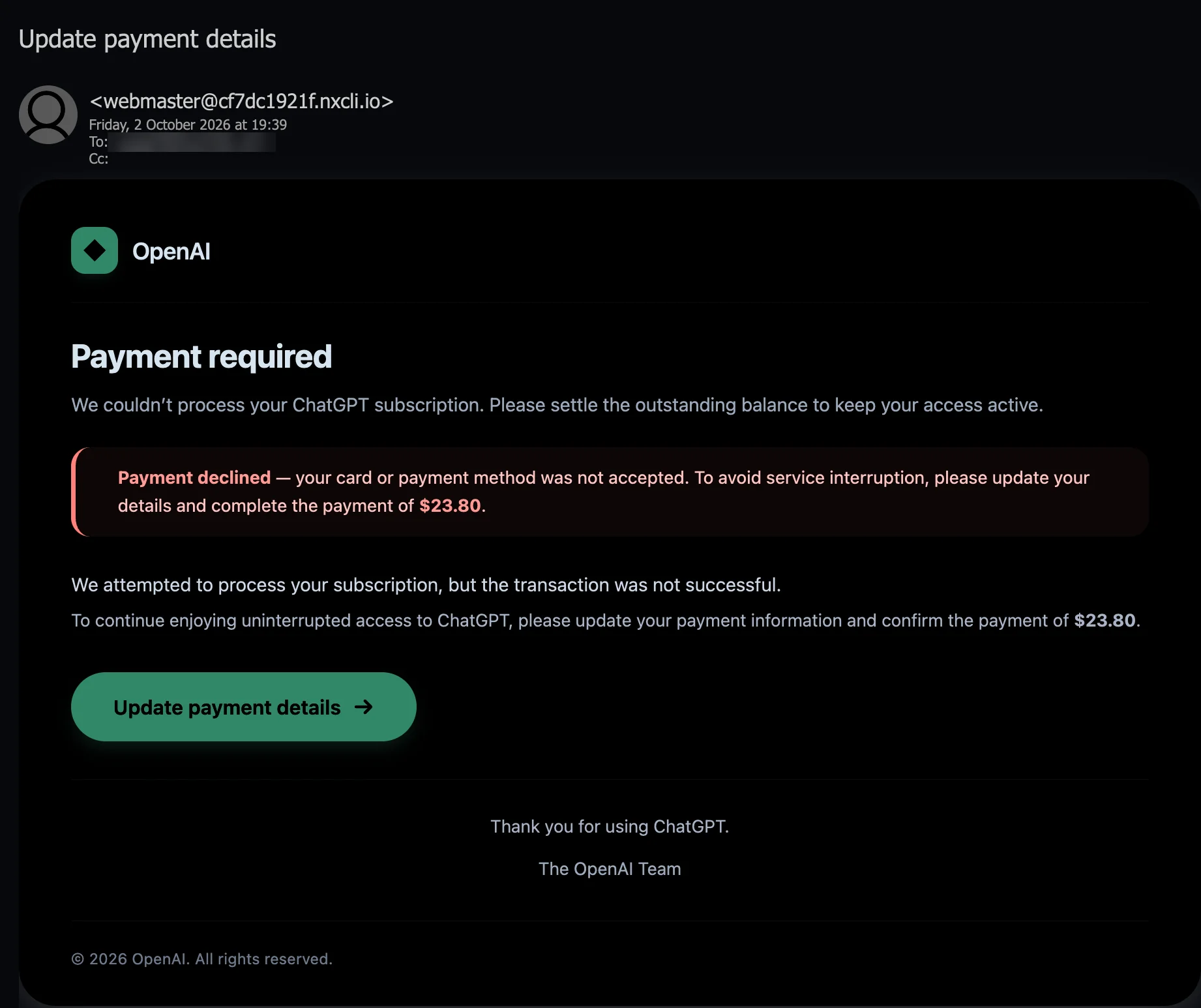
Display name and link address as reported by the recipient; the screenshot shows only the sender address, with the recipient mailbox blurred. The sender's subdomain did not exist in DNS when looked up on 16 October 2026.
Evidence: the message as received plus passive registry lookups; links and attachments are not opened. How we analyse a scam email.
We couldn't process your ChatGPT subscription. Please settle the outstanding balance to keep your access active. The notice that says so is signed The OpenAI Team, but it comes from a webmaster address under a web host's temporary site name that no longer exists, names no account, no plan and no card, wears a logo that is not OpenAI's, and sends its payment button through a Google redirect that does not say where it leads.
Complete Email
from: OpenAI webmaster@cf7dc1921f.nxcli.io
date: 10/02/2026 7:39 PM
subject: Update payment details
Email Body
OpenAI
Payment required
We couldn’t process your ChatGPT subscription. Please settle the outstanding balance to keep your access active.
Payment declined — your card or payment method was not accepted. To avoid service interruption, please update your details and complete the payment of $23.80.
We attempted to process your subscription, but the transaction was not successful.
To continue enjoying uninterrupted access to ChatGPT, please update your payment information and confirm the payment of $23.80.
Update payment details →
Thank you for using ChatGPT.
The OpenAI Team
© 2026 OpenAI. All rights reserved.
Link
Behind Update payment details, as reported by the recipient, is a single address 506 characters long. Its parts:
- Host:
notifications.googleapis.com - Path:
/email/redirect - Parameters:
t, 362 characters;r, 56 characters;s, 28 characters
The full address:
https://notifications.googleapis.com/email/redirect?t=AFG8qyXoeTSRlytvbXvoShLF0hlAjkZXax1Vdh3Odog07cpxPy7V7Q1OJGgQc7J3zbTsL4SDE3sAMfqfXuQsz8KZvA7bqMQOvyUK9-6bvmT1efhVCoYsIv4l8AbMkXRInsp3YbHN-5K7JXxbWCazWe6z2ICGS19gtKVcjVrywu_KQjEPHiQi_mQXkWoTWFzVSkXGA9uhJ-psoRMtQHtF1KyGNq8TsFR0drfOAiDkhQeV41CLEM6FGsk1huXZIuBkxzFjo8GmRG_faupPaE5wH3hdywm0wiURivsdesIYHMvQfzBD6d6QybZh8EP8YWYxj1csu2W2yvwHbrPS9eNdmjl2h0lhuDHbPdPcJl-L0A&r=eJzLKCkpKLbS1zc1skwzT0lJSzbRy6tIzsnUy8zXLyjRK8goAADHgQup&s=ALHZ2r5_3iai4uQ9kciU9ZPLvJXm
Red Flags
This is payment-failure phishing in a brand's name: a notice that a subscription payment has failed, a small sum to settle, and a button to settle it with. Its opening move is to make anyone who pays for ChatGPT, or whose company does, picture losing access, and then to offer a fix that takes a minute. The Cloud Services storage notices analysed since August run the same play under a brand they invented; this one borrows a real one. Everything below comes from the message, the recipient's report of its link, and public registry and DNS records looked up on 16 October 2026.
1. "OpenAI" at webmaster@cf7dc1921f.nxcli.io: a Web Host's Test-Site Address
- Display name, as reported: OpenAI
- From:
webmaster@cf7dc1921f.nxcli.io
Read the address from the right. nxcli.io was registered in December 2017 and is held today by Nexcess.net LLC, a web-hosting company, through the registrar Tucows. Hosting companies, Nexcess among them, give each customer's site a temporary address under one of their own domains, so the site can be built and tested before the customer's real domain is pointed at it. cf7dc1921f reads like one: ten random letters and digits, the label of a site rather than the name of anything. And webmaster is the generic mailbox name for whoever runs a website.
So the address says: the webmaster of some site, known only by a random label, on a hosting company's infrastructure. No part of it belongs to OpenAI. There is no openai.com in it, no chatgpt.com, nothing the company owns. OpenAI appears only in the display name, which the sender types and nobody checks. OpenAI does not bill its customers from a web host's test-site address.
2. A Sending Name That No Longer Exists, Under a Domain With No Mail Policy
The public records, looked up on 16 October 2026:
cf7dc1921f.nxcli.iodoes not exist. Asked directly, the name servers fornxcli.io, hosted at Cloudflare, answer that there is no such name, and public resolvers agree. It has no website, no mail server and no records of any kind.nxcli.iopublishes no SPF record and no DMARC policy. SPF is a domain's list of the servers allowed to send its mail; DMARC tells receiving servers what to do with mail that claims the domain but fails the checks. With neither in place, nothing the domain publishes tells a receiving server to refuse a message that merely claims one of its addresses.
What the records cannot say is what was there on 2 October. A site under that name may have sent the message and since been removed, or the name may only ever have been typed into the From line of a message sent from somewhere else. Only the message's full headers, which record the servers it passed through, could tell the two apart, and they were not captured for this post. Either way, the address did what it was chosen to do: it put a plausible-looking sender in front of the recipient for long enough to deliver one email, and two weeks later there is nothing left at it to check.
3. The Button Goes to Google, Not to OpenAI, and Does Not Say Where It Ends
- Button: Update payment details →
- Host:
notifications.googleapis.com - Path:
/email/redirect
Read the reported address from the left and stop at the first single slash: notifications.googleapis.com. That is genuinely Google's: googleapis.com was registered in 2005, and its registrant today is Google LLC. The path says what this address does: /email/redirect. It receives the click and passes it on. Where to is not written anywhere a person can read. The rest of the address is three encoded strings, t, r and s, 446 characters between them, and none of them shows, in any form a reader could recognise, where the click finally lands. It was not examined either: links in reported email are not followed for these analyses, and the strings were not decoded.
That is the point of putting Google in front. A mail filter that judges a link by its domain sees Google's, and so does a reader who rests the pointer on the button and reads the beginning of the address. This archive has seen the same choice before: the Cloud Services notices kept their pages in Google Cloud Storage buckets, and the fake Squarespace renewal notice sent its button through a share.google short link.
OpenAI has no reason to send its own customers to its own billing pages by way of a Google redirect, and the email offers none. A payment link that starts at a third party's redirect and hides its destination is reason enough to stop.
4. A Green Tile and a Diamond: Not OpenAI's Logo
- Logo in the email: a plain black diamond centred in a green rounded square, beside the word OpenAI
OpenAI's logo is an interlaced, six-sided knot. The mark in this email is a black diamond on a green tile, a shape that belongs to no one in particular, in the kind of green many readers associate with ChatGPT. It is the brand as seen from a distance, the right colour with the right word beside it, without the one element a company guards most closely. Whatever the reason for the substitution, a company's own billing email does not get its own logo wrong.
5. $23.80 for No Account, No Plan and No Card
- "complete the payment of $23.80", and again, "confirm the payment of $23.80"
- "your card or payment method"
A billing system writes from the account it is billing, and everything in a real notice comes from that record: whose account it is, the email address it is registered to, the plan, the billing period, the date the charge failed, the card it tried, usually shown by its last four digits, and a receipt or invoice number. ChatGPT is sold on several paid plans, for individuals and for teams, so even the plan's name would be a specific detail.
This email has none of it. It names no person and no account, no plan and no period, no date, no invoice and no card. It does not even know whether the payment method was a card: your card or payment method. What it has is a sum, $23.80, given twice in bold with nothing to show what it is made of: no price, no tax, no period. And it arrived in a company's functional mailbox. Nothing in it suggests the sender knew, or needed to know, whether anyone there pays for ChatGPT at all.
The small sum is part of the design. Twenty-odd dollars is an amount people settle without a second thought, and any page that takes a payment asks for the whole card, whatever the amount.
6. Four Ways to Say "Declined", Three Ways to Say "Hurry", and No Date
- "We couldn’t process your ChatGPT subscription."
- "Payment declined — your card or payment method was not accepted."
- "We attempted to process your subscription, but the transaction was not successful."
- "to keep your access active", "To avoid service interruption", "To continue enjoying uninterrupted access to ChatGPT"
Count the ways the email says one thing. The subscription couldn’t be processed; the payment was declined; the card was not accepted; the transaction was not successful. Four statements, one fact, and not a single detail about it. Then the pressure, three times over: keep access active, avoid service interruption, continue uninterrupted access.
What never appears is a date: not when the payment failed, not when access ends, not when the balance must be paid by. A billing system has those dates, because they are what it runs on, and it prints them. A template has none, so it fills the space with repetition, and the repetition does the job a date would do: it makes the problem feel current and the loss feel close.
7. "Complete the Payment" in the Email: One Link, and Nowhere Else to Go
- "please update your details and complete the payment of $23.80"
- "please update your payment information and confirm the payment of $23.80"
- Footer: © 2026 OpenAI. All rights reserved.
The email does not ask the reader to check their account. It asks them to update their payment details and pay, now, through its button, which is its only link. There is no link to the account, to a receipt, to OpenAI's help centre or to anyone who could be asked about the charge. The sign-off is The OpenAI Team, and the footer is a copyright line with no company address. Everything leads to the button, and the button leads to a page the email chooses.
Renewal payments really do fail: a card expires, or a bank's security check stops a charge, and OpenAI's help centre carries guidance on failed ChatGPT renewals. That is what makes this lure plausible, and also what makes it easy to check. A real failure belongs to the account, and the account is where to look: sign in at chatgpt.com, typed by hand, and open the subscription settings. A notice that offers its own payment page instead of the account is after the card, not the payment.
How This Scam Works
The email is bait for one click on Update payment details. Where the click goes was not examined (links in reported email are not followed for these analyses), so the steps below describe how payment-failure phishing in a brand's name typically works, not what this sender was seen to do.
- The List: Notices like this go to the mailboxes companies publish and to addresses bought or scraped in bulk; this copy reached a functional company mailbox. ChatGPT is used widely enough that a notice about it, sent to any business, stands a fair chance of reaching someone who pays for it, or who manages the card that does.
- The Sender: A disposable sending address, here a mailbox under a hosting company's temporary site name. Whether a site under that name was set up for the purpose, taken over, or only named in a forged From line, losing it costs the sender nothing. Two weeks later, the name was gone.
- The Disguise: OpenAI's name in the display name, the wordmark and the footer; a green tile where the logo should be; The OpenAI Team as the signature. Nothing in it is specific enough to be checked.
- The Pressure: A declined payment, a small sum and the threat of losing access, repeated, with no date to argue with.
- The Link: The button leads through a Google-owned redirect, so filters, and readers who glance at the address, see Google. The page at the far end belongs to the operator, who can change it, or show it only to some visitors, without changing a word of the email.
- The Checkout: Pages behind lures of this kind typically imitate a payment form: card number, expiry date, security code and billing address, sometimes behind a sign-in page that asks for the account's email address and password first. Some relay the bank's one-time code as it arrives, to approve a charge while the victim waits.
- The Prize: The card is worth far more than $23.80: stolen card details are typically used for fraud or sold on. An OpenAI sign-in can be worth more again. It opens the account's conversation history, which for many users holds pasted documents, code and business data, and the same sign-in typically opens OpenAI's developer platform, where API keys and billing settings live.
Conclusion and Recommendations
There is no failed renewal, no outstanding balance and no OpenAI behind this email. There is a template sent from a webmaster address under a hosting company's temporary site name that no longer exists, under a logo that is not OpenAI's, asking for $23.80 for no named account, plan or card, with one link, and that link routed through a Google redirect that does not say where it leads.
Real renewals do fail, and the email is counting on it. A real failed payment is in your account before it is in your inbox: check there, and nothing in this email matters.
Immediate Actions:
- Do Not Click Update payment details: The button leads through a Google redirect to a page you cannot see in advance. If a payment has failed, the account will say so.
- Do Not Reply: Nothing useful can come back, and a reply only tells the sender that someone reads the mailbox.
- Check the Subscription Yourself: Type
chatgpt.cominto the browser, sign in and open the subscription settings. If the plan is active and the payment method is current, the email is false. - Report It: Use your mail client's Report phishing option, so the next copy is filtered for everyone. Google, whose redirect the link runs through, takes reports through Google Safe Browsing's Report phishing page form. Forward the message to CERT-In at
incident@cert-in.org.in, and if money was lost, use the National Cyber Crime Reporting Portal atcybercrime.gov.inor call the helpline 1930. - If Card Details Were Entered, Call the Bank Now: Block the card and dispute every charge that follows, including small ones, which are often tests.
- If You Signed In Anywhere: From a trusted device, go to
chatgpt.comdirectly, change the password, sign out of every session and turn on multi-factor authentication. If the same account is used on OpenAI's developer platform, check it for API keys and billing changes you did not make.
Verification Steps:
- Read the Domain After the
@:nxcli.iobelongs to a web host, andcf7dc1921fis a site's random label. Nothing in the address is OpenAI's, and a display name that says OpenAI was typed by the sender. - Point Before You Click: On a computer, rest the pointer on the button and read the address from the left to the first single slash. A ChatGPT billing link that starts at
notifications.googleapis.comis not OpenAI's, and a link that passes through a trusted name on its way somewhere else is reason enough to stop. - Ask What the Notice Knows About You: A real billing notice knows the account, the plan, the date the charge failed and usually the last four digits of the card. This one knows none of them.
- Check Where It Arrived: Subscription notices go to the address the account is registered to. A billing notice in a mailbox that holds no subscription is not about your subscription.
- Compare the Logo: OpenAI's logo is an interlaced, six-sided knot. A diamond on a green tile is not it.
- Search the Wording: Paste We couldn’t process your ChatGPT subscription. Please settle the outstanding balance into a search engine. Templates like this are often reported word for word.
Additional Protection Tips
- Keep Each Subscription on One Known Address: Register paid services to named addresses, and keep a list of who pays for what. A billing notice that arrives anywhere else is not about your account.
- Use a Password Manager: It offers a saved sign-in only on the domain it was saved for, so it stays silent on a look-alike page, however convincing the page looks.
- Turn On Multi-Factor Authentication: On ChatGPT, and on every account that holds a payment method. A stolen password is then not enough on its own.
- Pay for Subscriptions With a Card You Can Limit: Many banks offer virtual cards or per-card limits for online payments. A card used only for subscriptions, with a low limit, caps what a phished number can cost.
- Judge a Link by Where It Ends, Not Where It Starts: A link on Google's, Microsoft's or any other trusted domain can still forward anywhere. If you cannot see where a click ends, do not click.
- Give Shared Mailboxes a Rule: Messages like this land in the mailboxes a company publishes, and the person who reads them is rarely the person who manages the subscriptions. Agree that billing notices are passed to whoever owns the account, never acted on from the email.
Remember: A failed payment is a fact in your account, not a button in an email. If the account shows nothing wrong, nothing is wrong, whatever the email says.
