Phishing: Tax Invoice Invoice No.*** Email ID:aOFLvjW | Fake GST e-Invoice With a Password-Protected ZIP

At a glance
- Verdict
- PhishingGet the recipient to unlock the attached ZIP 'invoice' with the emailed password and open its contents, hidden from the mail gateway's scanner.
- Subject line
Tax Invoice Invoice No.*** Email ID:aOFLvjW- Claimed sender
- GST e-Invoice Assistant
Eirena@fghrthonline.com - Impersonates
- No real organisation or personPersona: GST e-Invoice Assistant, the automated invoicing sender of an unnamed supplier in Bengaluru
- Received
- · Published
- Related analyses
- Phishing: Re: Payment Confirmation & Records | Fake SWIFT Advice PDF Attachment
- Phishing: कर अनुपालन की कमी और दंड सूचना / Tax Compliance Deficiency and Penalty Notice | Fake CPC Bengaluru 143(1) Intimation With a ZIP
- Phishing: कर वसूली एवं दंड सूचना | Fake Income Tax Department Tax Recovery and Penalty Notice With a ZIP Attachment
Attachment: GST_042_password(1961).zip, 477,197 bytes, not opened; its password is printed in the body and repeated in the filename. The recipient address was blurred.
Evidence: the message as received plus passive registry lookups; links and attachments are not opened. How we analyse a scam email.
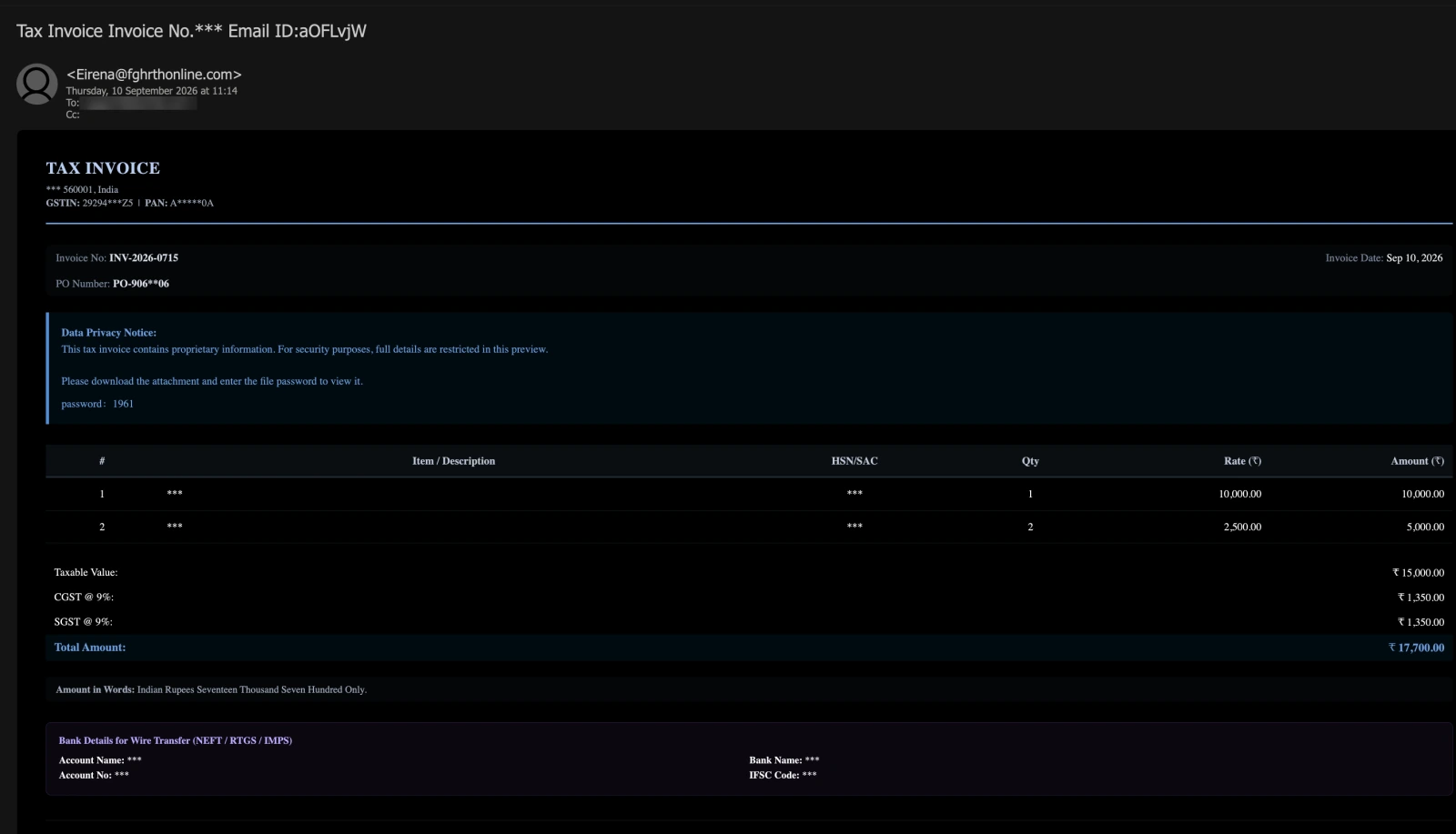
This tax invoice contains proprietary information. Please download the attachment and enter the file password to view it. A GST invoice that masks its supplier, its goods and its bank account, names no buyer, and arrives with a password-protected ZIP — whose password is printed in the email, and again in the attachment's own filename.
Complete Email
from: GST e-Invoice Assistant Eirena@fghrthonline.com
date: 09/10/2026 11:14 AM
subject: Tax Invoice Invoice No.*** Email ID:aOFLvjW
Email Body
TAX INVOICE
*** 560001, India
GSTIN: 29294***Z5 | PAN: A*****0A
Invoice No: INV-2026-0715
Invoice Date: Sep 10, 2026
PO Number: PO-906**06
Data Privacy Notice:
This tax invoice contains proprietary information. For security purposes, full details are restricted in this preview.
Please download the attachment and enter the file password to view it.
password: 1961
| # | Item / Description | HSN/SAC | Qty | Rate (₹) | Amount (₹) |
|---|---|---|---|---|---|
| 1 | *** | *** | 1 | 10,000.00 | 10,000.00 |
| 2 | *** | *** | 2 | 2,500.00 | 5,000.00 |
Taxable Value: ₹ 15,000.00
CGST @ 9%: ₹ 1,350.00
SGST @ 9%: ₹ 1,350.00
Total Amount: ₹ 17,700.00
Amount in Words: Indian Rupees Seventeen Thousand Seven Hundred Only.
Bank Details for Wire Transfer (NEFT / RTGS / IMPS)
Account Name: ***
Account No: ***
Bank Name: ***
IFSC Code: ***
Attachment
GST_042_password(1961).zip — ZIP archive, 477,197 bytes. The email says it is protected by the password printed in the body, 1961, which the filename repeats. It was not opened, and what it contains is not known.
Red Flags
This is malware-delivery phishing dressed as a supplier's GST tax invoice, and it is aimed at the people who pay invoices. The body is a competent piece of Indian invoicing — GSTIN and PAN, HSN/SAC codes, CGST and SGST at 9% each, NEFT, RTGS and IMPS, the amount in words — with every detail that would identify anyone replaced by asterisks, and, where the supplier's particulars should be, a password for the attached archive. It has the same shape as the Income Tax Department notice that arrived in August with a ZIP attached: an Indian tax document whose text says nothing and whose archive is said to hold everything. The archive was not opened for this analysis. Everything below comes from the message, the screenshot and the public registry records.
1. The Password Is Printed Beside the File It Protects — Twice
- Body: "Please download the attachment and enter the file password to view it." … password: 1961
- Attachment:
GST_042_password(1961).zip
A password protects a file from anyone who does not know it. This one is printed in the email that carries the file, and again in the file's own name, so anyone who can see the attachment can open it — including anyone the email is forwarded to. It keeps out no reader of the message. It keeps out one reader that is not a person: the mail gateway's scanner, which inspects attachments on the way in and, unless it goes looking for a password in the message text, cannot see inside an encrypted archive. That is the whole function of the password, and it is why the "invoice" is a ZIP at all. A one-page invoice does not need compressing. A ZIP can carry any kind of file, including the kinds a gateway strips on sight, and the password stops the gateway from seeing which kind it is carrying.
Genuine protected documents work the other way round. As the CPC Bengaluru post set out, the Income Tax Department's 143(1) intimations arrive as PDFs protected by the taxpayer's PAN and date of birth; banks protect e-statements with details they already hold about the customer. The password is a secret the recipient already has, and the message never states it. A password that has to travel with the document is not protecting the document from anyone who receives it.
The password line is also the one line in the invoice that looks typed rather than templated. Every other label — Data Privacy Notice:, Invoice No:, PO Number:, Taxable Value:, Account Name: — begins with a capital, and its colon sits against the word. password is lower-case, and its colon stands apart from the word, with a gap before 1961 about twice as wide as the gap after any other label. That is the spacing of a full-width colon (:), a colon set in a box the width of a whole character, which is what Chinese and Japanese keyboard input produces by default. It reads as a line added to a finished template by hand.
2. Everything You Could Check Is Masked. Everything You Could Not Is Shown.
- Masked: the supplier's name, the GSTIN
29294***Z5, the PANA*****0A, the purchase orderPO-906**06, every item description, every HSN/SAC code, the account name, the account number, the bank and the IFSC code. - Shown in full: a PIN code, an invoice number, a date, the quantities, the rates, the tax and the total.
- "This tax invoice contains proprietary information. For security purposes, full details are restricted in this preview."
Sort the fields by what each could be checked against, and the masking stops looking like privacy. A supplier's name can be searched. A GSTIN can be entered into the GST portal's public Search Taxpayer page, which returns the legal name and registration status behind it — which is exactly why a real supplier prints its GSTIN in full on every invoice. A PAN identifies a taxpayer. An IFSC code names a bank branch. A PO number can be matched against the buyer's own purchasing records, and item descriptions against what was ordered. Every one of those is hidden. What is left visible — an invoice number, a date, a total that adds up — could have been typed by anyone, and matches nothing anywhere.
The Data Privacy Notice offers a reason, and the reason does not survive a second reading. An invoice is not confidential from the buyer it is addressed to: the buyer is the one party entitled to every line of it. The email is not a preview of anything; it is the message, and the attachment is the only thing it offers. And the bank details — the part of an invoice that exists so that it can be paid — are hidden from the party supposedly being asked to pay. An invoice that conceals where the money should go is not trying to be paid. It is trying to be opened.
3. The Part of the GSTIN You Can See Is Already Invalid
- GSTIN:
29294***Z5 - PAN:
A*****0A
A GSTIN is not an arbitrary number. It is fifteen characters built to a fixed pattern: a two-digit state code, then the holder's ten-character PAN, then an entity number, a Z and a check character. A PAN is itself five letters, four digits and a letter. So the third to seventh characters of every valid GSTIN are letters, and they are the first five letters of the holder's PAN.
This GSTIN begins 29294. The 29 is Karnataka's state code, and it agrees with the Bengaluru PIN code 560001 on the line above it — the one pair of identifying details in the invoice that agree with each other, and together they point to nothing narrower than a postal district of central Bengaluru. The next three characters, 294, are digits, in positions where the PAN's letters must be. No GSTIN can take that form. And the PAN printed on the same line begins with A, which a GSTIN containing that PAN would have to show as its third character. The two numbers contradict each other before the asterisks begin.
The end of the string has the right shape — a Z and a check character — which suggests whoever wrote it knew roughly what a GSTIN looks like and filled the middle with numbers. It is the one identifier in the invoice left partly visible, and the visible part is enough to show that it identifies no one.
4. A Tax Invoice Billed to Nobody
- Bill to: nothing
- Tax: CGST @ 9% and SGST @ 9%
- PO Number:
PO-906**06
Under Rule 46 of the CGST Rules, a tax invoice must name its recipient — name, address and, for a registered business, GSTIN — because the buyer's claim to input tax credit rests on it. This invoice has no Bill To block, no Ship To, and no buyer anywhere between the supplier's line and the item table, where those details normally sit. It does not say who it is addressed to.
It assumes one anyway. The tax is split into CGST and SGST, which is how GST is charged when the supplier and the buyer are in the same state; a supply into another state carries IGST instead. So the invoice takes for granted a buyer in Karnataka while naming none. The tax treatment was settled before the recipient was chosen, because the same invoice goes to every recipient on the list, wherever they are.
The purchase order is the detail aimed most precisely at an accounts team. A supplier quotes the buyer's PO number so that the buyer can match the invoice to its own order. The PO is the buyer's own document; there is nothing in it to hide from the buyer. Masking two of its digits does one thing only: it stops the recipient from confirming, in their own system, that no such order exists — and leaves open the possibility that it might, which only the attachment can settle.
And the invoice did not go to an accounts address, or to anyone who could have raised a purchase order. It went to a general functional mailbox of the kind published on a company website.
5. A "GST e-Invoice Assistant" on a Keyboard-Mash Domain That Cannot Receive Mail
- Display name: GST e-Invoice Assistant
- From:
Eirena@fghrthonline.com
The display name is the name of a system. E-invoicing is the GST process in which a business registers each invoice on a government-notified Invoice Registration Portal and receives back a 64-character Invoice Reference Number — the IRN — and a digitally signed QR code, both of which are printed on the invoice. The name borrows that system's authority. The invoice itself carries no IRN, no acknowledgement number and no QR code in any part the screenshot shows. And the mailbox behind the "assistant" is a personal name, Eirena, at a domain with no connection to GST, to e-invoicing, or to any supplier.
fghrthonline.com is six letters from the middle of a keyboard — f, g, h along the home row, r and t above them, h again — with online added. The public WHOIS and DNS records, looked up on 27 September 2026:
- Registered on 21 February 2026 through Cloudflare's registrar, for one year — 201 days before this message was sent. It was not bought for the occasion, as the Income Tax campaign's
soyoyz.comwas, seventeen days before its send. It had been registered for more than six months: long enough that filters which treat newly registered domains with suspicion no longer do. - Registrant details redacted, apart from two self-declared fields: the country, Japan, and the state or province, entered in Japanese script as 東京都 — Tokyo. Registrars do not verify either, and neither says anything reliable about who sent the message.
- No
MXrecord and noArecord. The domain names no mail server and no web server. As of the lookup, a reply toEirena@fghrthonline.comhas nowhere to be delivered. - No
SPFrecord, and aDMARCrecord ofp=none— a policy that asks receiving servers to take no action when a message fails authentication.
An invoicing assistant whose address cannot receive a question about an invoice is not an invoicing assistant. The screenshot does not include the message's full headers, so whether it was sent by the domain's owner or forged in the domain's name cannot be told from it; with no SPF record and a DMARC policy of none, the domain gives receiving servers no grounds to refuse either.
6. Three Numbers for One Invoice, and a Random Tag in the Subject
- Subject:
Tax Invoice Invoice No.*** Email ID:aOFLvjW - Body: Invoice No:
INV-2026-0715 - Attachment:
GST_042_password(1961).zip
The subject hides the invoice number behind asterisks. The body prints it in full, as INV-2026-0715. The attachment is called GST_042, a number that appears nowhere else. A supplier's accounting system names the invoice, the subject line and the PDF from the same record, so all three agree. These were made separately and never reconciled. The subject also says Invoice twice: Tax Invoice and Invoice No. are two template fields placed side by side, with the number that should follow them masked.
The subject ends in Email ID:aOFLvjW — a label that in Indian English means an email address, followed by seven random letters that are not one. Strings like this are a common bulk-mailing device: each copy of the message gets a different one, so no two subject lines in the campaign are identical, and a filter watching for the same subject arriving in many mailboxes at once has nothing to match. The January 2025 "Pending lncoming" lure ended its subject the same way, with Message ID: and thirty-six random characters. A supplier sending one invoice to one customer has no use for a random tag. A mailer sending one template to a list does.
How This Scam Works
The email is bait for one action — typing four digits into an archive — and everything in it is arranged to make that action feel like procedure. What the archive holds was not observed here: it was not opened. But invoice-themed archives are a long-established way of delivering malware to businesses, and the sequence typically runs like this:
- The List: Company mailboxes are harvested from websites — support, info, sales — with no attempt to find the person who actually pays invoices. The template needs no names, because it names no one.
- The Template: An HTML invoice built for Indian accounts teams — GSTIN, PAN, HSN/SAC, CGST and SGST, NEFT/RTGS/IMPS, the amount in words — with every checkable field replaced by asterisks, and a subject line carrying a random tag so that no two copies match.
- The Wrapper: The payload is packed into an encrypted ZIP, and the password is printed in the email and in the filename. The encryption keeps the scanner out; the printed password lets the recipient in.
- The Question: A total, a masked purchase order and a masked supplier leave an accounts reader with one question — is this ours? — and the email offers exactly one place to find the answer.
- The Extraction: The recipient saves the archive, enters
1961and opens what is inside. In campaigns of this kind, the archive typically holds something dressed as the invoice: an executable with a PDF icon or a double extension such as.pdf.exe, a script, or a shortcut file that runs one. - The Foothold: Whatever runs, runs on the machine of someone who handles payments. The payloads common in invoice lures — remote-access tools and information stealers — typically go for what such a machine holds: saved browser passwords and sessions, banking and GST portal logins, and the mailbox that corresponds with every supplier and customer.
- The Use: Stolen access is typically turned into payment fraud — a supplier's bank details changed, genuine invoices redirected, the next lure sent from a real company's mailbox — or sold on to whoever will use it next.
Conclusion and Recommendations
There is no supplier, no buyer, no purchase order, no goods and no e-invoice. There is a keyboard-mash domain that cannot receive mail, an invoice template in which every field that could be checked has been blanked out, a GSTIN whose visible half is impossible, and a ZIP archive whose password is printed twice, so that the only thing it keeps out is the scanner.
The template is good. The arithmetic is right, the tax is split correctly for a same-state supply, the amount is written out in words the way Indian invoices do it, and the vocabulary — HSN/SAC, NEFT/RTGS/IMPS, IFSC — is the vocabulary of the people it is aimed at. None of that is verification. It is what makes the one request in the message — download it, enter the password, open it — feel like an ordinary afternoon's work.
A password sent with the file protects nothing from the person who receives it. It protects the file from the scanner.
Immediate Actions:
- Do Not Open the Attachment or Use the Password:
GST_042_password(1961).zipis the attack, and1961is the key to it. If the archive has been saved, delete it. If it has been extracted and anything inside was opened, treat the machine as compromised: disconnect it from the network, do not sign in to anything on it, and hand it to IT or security. From a different device, change every password that machine held or used — email, banking, GST and tax portals — and check the mailbox for new forwarding addresses and inbox rules. - Do Not Reply: There is no supplier to ask, and as of our lookup the sending domain cannot even receive mail. If a "resend", a reminder or a payment chaser follows, treat it as the same attack.
- Answer "Is This Ours?" From Your Own Records: If there is any doubt, search your own purchase orders and vendor ledger for a PO beginning
PO-906and an amount of ₹17,700. The answer is in your accounting system, never in an archive from a stranger. - Report It: Use the mail client's phishing report button rather than plain deletion, so the sender and the attachment reach the gateway's blocklist. Report the domain to its registrar's abuse desk,
registrar-abuse@cloudflare.com, and forward the message to CERT-In atincident@cert-in.org.in. If anything was opened or any money moved, use the National Cyber Crime Reporting Portal atcybercrime.gov.inor the helpline 1930. - Warn Whoever Pays Invoices: One line to the accounts team — an invoice that arrives as a password-protected ZIP is not an invoice — protects the colleagues who received the same message and have not opened it yet.
Verification Steps:
- Look Up the GSTIN, in Full: A real supplier prints its GSTIN complete, and the GST portal's Search Taxpayer page shows the legal name behind it. A masked GSTIN cannot be looked up, and that is why it is masked.
- Check the Shape of the Number: State code, then the PAN — five letters, four digits, a letter — then an entity number, a Z and a check character.
29294…fails at the third character. - Match the Invoice to an Order: No purchase order and no goods receipt means no invoice to process. An invoice that matches nothing you ordered is not a bill; it is a question the sender wants you to answer by opening the attachment.
- Read the Domain to the Right of the
@: A supplier invoices from its own domain or from the accounting software it uses.fghrthonline.comis neither. - Look for the IRN and QR Code on Anything Called an e-Invoice: A genuine GST e-invoice carries an Invoice Reference Number and a signed QR code from the Invoice Registration Portal. A self-described e-invoice with neither is not one.
- Treat a Password Sent With a File as a Warning: A protected document from your bank or the tax department uses a password you already know, and never states it in the email. A password printed next to the file is there for a different reason.
Additional Protection Tips
- Hold Password-Protected Attachments at the Gateway: Business mail platforms can quarantine attachments they cannot scan — Microsoft 365 through a mail-flow rule that matches password-protected attachments, Google Workspace through its setting for encrypted attachments from untrusted senders. For senders your organisation has never corresponded with, that one rule removes this technique entirely.
- Show File Extensions on Every Finance Workstation: Windows hides known file extensions by default, which is what lets
Invoice.pdf.exepass asInvoice.pdf. Turning extensions on in File Explorer costs nothing. - Give Supplier Invoices One Front Door: Tell suppliers where invoices go — a single accounts-payable address or a supplier portal — and treat an invoice that arrives anywhere else as unverified until someone has checked it.
- Enforce the Three-Way Match: Purchase order, goods receipt, invoice. An invoice that matches no order and no delivery is not processed, however it arrives and whatever it says, which leaves an invoice lure nothing to work with but curiosity.
- Confirm Every Change to a Supplier's Bank Details by Phone: Intrusions that begin with an invoice lure commonly end with a request to change where payments go. A call to a number already on file, before any change is accepted, stops that.
- Make It Safe to Say "I Opened It": Whatever an archive like this drops typically starts work at once; the window for containment is short. A team where a mistake can be reported immediately, without blame, isolates the machine in time.
Remember: An invoice is a document built to be checked. It says who is billing, who is being billed, for what, and where the money should go. This one hid all four, and offered a password instead. An invoice that will not tell you who sent it is not asking to be paid. It is asking to be opened.
