Phishing: REMINDER: Your Domain <domain> has expired | Fake Squarespace Domain Renewal Notice

At a glance
- Verdict
- PhishingGet the recipient to click Renew Domain and enter card details or Squarespace credentials on a page hidden behind a Google short link.
- Subject line
REMINDER: Your Domain <domain> has expired- Claimed sender
- Squɑrespɑce
noreply@hetecnology.com - Impersonates
- Squarespace — Squarespace 'Domain services' renewal reminder and invoice
- Received
- · Published
Display name as reported by the recipient; both letters in it that look like an a are the Latin letter alpha (U+0251). The recipient's domain is shown as <domain> and pixelated in the screenshots, along with the To address.
Evidence: the message as received plus passive registry lookups; links and attachments are not opened. How we analyse a scam email.
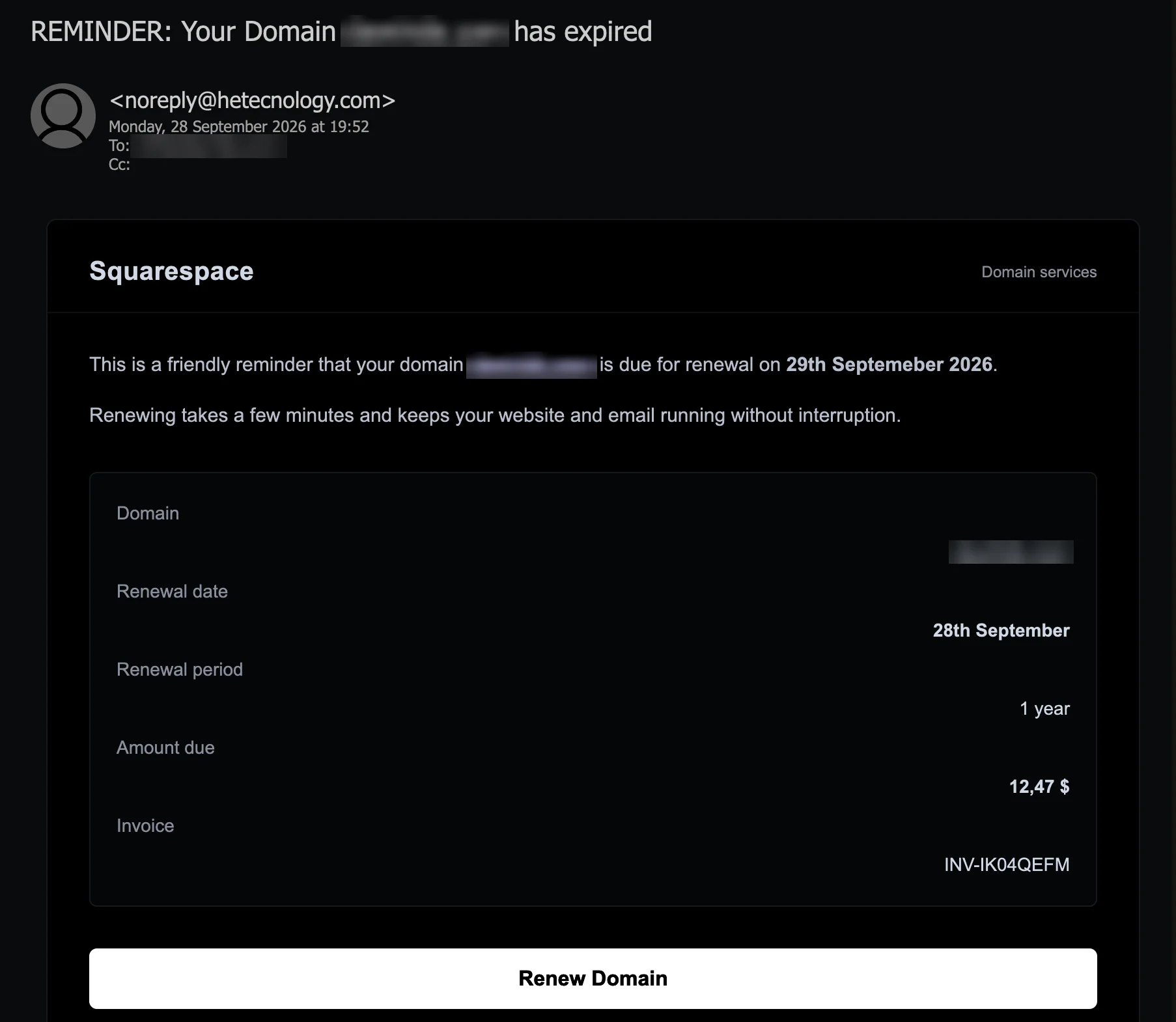
This is a friendly reminder that your domain <domain> is due for renewal on 29th Septemeber 2026. The notice that says so wears Squarespace's name spelled with a look-alike letter, comes from a domain registered in May that has no website, gives three different deadlines, and sends its renewal button through a Google short link — about a domain the public registry shows is paid up until 2033.
Complete Email
from: Squɑrespɑce noreply@hetecnology.com
date: 09/28/2026 7:52 PM
subject: REMINDER: Your Domain <domain> has expired
Email Body
Squarespace Domain services
This is a friendly reminder that your domain <domain> is due for renewal on 29th Septemeber 2026.
Renewing takes a few minutes and keeps your website and email running without interruption.
Domain
<domain>
Renewal date
28th September
Renewal period
1 year
Amount due
12,47 $
Invoice
INV-IK04QEFM
Renew Domain
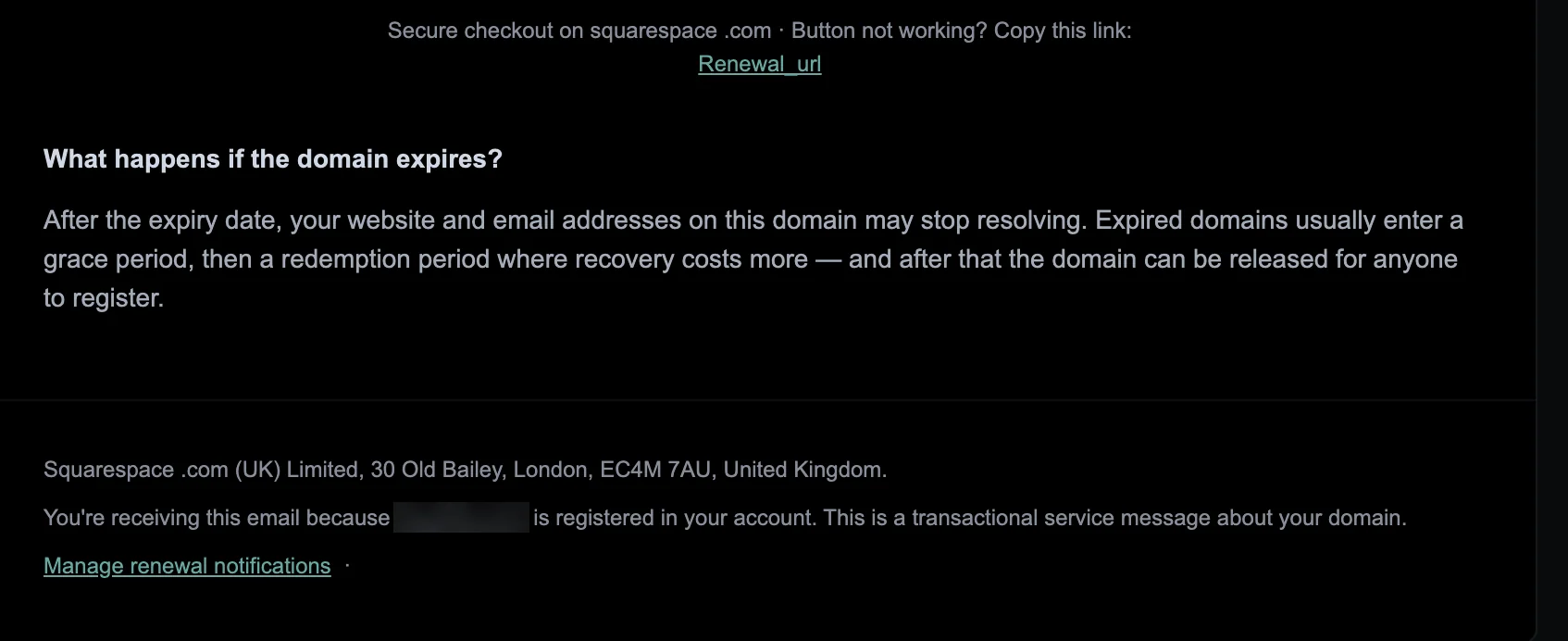
Secure checkout on squarespace .com · Button not working? Copy this link:
Renewal_url
What happens if the domain expires?
After the expiry date, your website and email addresses on this domain may stop resolving. Expired domains usually enter a grace period, then a redemption period where recovery costs more — and after that the domain can be released for anyone to register.
Squarespace .com (UK) Limited, 30 Old Bailey, London, EC4M 7AU, United Kingdom.
You're receiving this email because <domain> is registered in your account. This is a transactional service message about your domain.
Manage renewal notifications ·
Link
- Where the renewal link points, as reported by the recipient:
https://share.google/QeiWYiVnLtG1hVhpm
Red Flags
This is registrar-impersonation phishing: a renewal notice in a real registrar's name, about a real domain, asking for a small payment through a link. Its opening move is to make a business afraid of losing its website and email overnight, and then to offer a fix that takes a few minutes. This copy named the right registrar, which is what makes it worth reading closely, because nearly everything else in it can be checked, and fails the check. Everything below comes from the message, the recipient's report of its link, Squarespace's own help centre, the UK companies register and public registry records, looked up on 12 October 2026.
1. "Squɑrespɑce" — Neither a Is the Letter A
- Display name: Squɑrespɑce
- Fourth and ninth characters:
ɑ, U+0251 LATIN SMALL LETTER ALPHA - In the body, twice:
squarespace .com, with a space before the dot
The display name reads Squarespace. It is not Squarespace. Both letters that look like an a are the Latin alpha, a character from the phonetic alphabet that most fonts draw as a single-storey a. To a person scanning an inbox, the name reads correctly. To software that compares text, it is a different word, so a filter that looks for mail using the name Squarespace from an address that does not belong to Squarespace finds nothing to match.
The body does the same to the web address. Secure checkout on squarespace .com and Squarespace .com (UK) Limited both put a space before the dot. A space is enough to stop a mail program from turning the name into a link, and to stop a filter that searches for the string squarespace.com, while a reader's eye passes straight over it. A company does not misspell its own name in its own sender line and its own footer. When the brand's name is altered by a single character in the From line and in both mentions of its web address, the alteration is the point.
2. hetecnology.com: Under Five Months Old, No Website, Built to Send Mail
- From:
noreply@hetecnology.com
The sending domain has no connection to Squarespace, and its name means nothing in particular: it reads like a misspelling of technology. Its public records:
- Registered on 5 May 2026, 146 days before the email arrived, through PDR Ltd. (PublicDomainRegistry.com), with the registrant's name withheld and its name servers at Cloudflare.
- No website. Neither
hetecnology.comnorwww.hetecnology.comhas an address record, whether asked through a public resolver or at the domain's own name servers. - Everything mail needs. A mail server,
mail.hetecnology.com; an SPF record,v=spf1 mx -all, which authorises that server and no other to send the domain's mail; and a DMARC record. The mail server's address sits in a block that the RIPE database, the registry for European IP addresses, lists under the network name Prepaid-Hoster, with an address in Grömitz, Germany.
That is the profile of a domain set up to deliver email that passes authentication checks, and to do nothing else. Passing those checks proves that a message came from hetecnology.com. It says nothing about Squarespace. Squarespace's help centre publishes the addresses it sends from — addresses at squarespace.com, mail.squarespace.com and squarespace.info, and a few named partner services — and hetecnology.com is not among them.
3. The Registry Says the Domain Is Paid Up Until 2033
- Subject: has expired
- First line: due for renewal on 29th Septemeber 2026
- Public registry record for the recipient's domain: registrar Squarespace Domains II LLC; registered until April 2033
Domain registration records are public. A WHOIS or RDAP lookup, free and a few seconds long, shows any domain's registrar and the date its registration runs out. For the domain this email is about, the record does name Squarespace's registrar, Squarespace Domains II LLC: the sender picked the right brand. It also gives the expiry date, and that date is in April 2033 — more than six years after the date in the email, and in a different month. A domain's renewal date falls on the anniversary of its registration, renewal after renewal, and this domain's anniversary is in April. No renewal of it can fall due in September.
The right brand is what makes this copy dangerous. Whether the sender looked the registrar up or simply sends Squarespace's name to everyone — Squarespace became the registrar for millions of domains when it took over Google Domains' customers in 2023 — cannot be told from one message. Either way, a renewal notice that names your real registrar feels as if it knows your account. It does not know the one thing your account would: the date.
4. Expired, Due Tomorrow, Due Today — Three Deadlines in One Notice
- Subject: REMINDER: Your Domain
<domain>has expired - First line: This is a friendly reminder that your domain
<domain>is due for renewal on 29th Septemeber 2026. - Details panel: Renewal date: 28th September
- Received: Monday, 28 September 2026, 7:52 PM
The subject says the domain has already expired. The first line calls the message a friendly reminder that renewal is due on 29 September, the day after it arrived, and misspells the month. The details panel gives the renewal date as 28 September, the day it arrived, with no year at all. One message, three states: expired, due tomorrow, due today.
A registrar's notice is generated from the registration record, and the record holds one date, so its notices cannot disagree with themselves. A template can, because each line is written for its effect rather than read from anywhere: the subject to alarm, the opening to sound routine, the panel to look like data. And no billing system misspells the name of a month.
5. "Secure Checkout on squarespace .com" — the Link Goes to share.google
- Under the button: Secure checkout on squarespace .com
- Where the renewal link points, as reported:
https://share.google/QeiWYiVnLtG1hVhpm
The line beneath the button promises checkout on Squarespace's own site. The link does not go there. Read the reported address from the left and stop at the first single slash: share.google. That is a genuine Google domain, the short-link address Google's app has used since 2025 when someone shares a page or a search from it. A link on it forwards whoever opens it to the destination it was made for, and the address itself says nothing about what that destination is.
That is why it is there. A filter that judges a link by its domain sees Google's, and so does a reader who points at the button. Security researchers have reported share.google links hiding the destinations of phishing campaigns since late 2025, in some cases sending automated scanners to harmless pages and real visitors to phishing pages. Where this one leads was not examined: links in reported email are not opened for these analyses. For this purpose it does not need to be. A registrar takes payment for a renewal on its own site, and the email itself says the checkout is on squarespace .com. The link says otherwise.
6. "Copy This Link: Renewal_url" — a Merge Field Left Unfilled
- Button not working? Copy this link:
Renewal_url - Manage renewal notifications ·
A genuine notice prints the full address under its button, so that a reader whose button does not work can read it, copy it and check it. Here the place for the address holds the name of a template field: Renewal_url, the placeholder the sending software was meant to replace with a link, left exactly as it was typed. The same software filled the recipient's domain into the subject, the body and the footer — four places — and missed this one.
The footer has a smaller seam of the same kind: Manage renewal notifications is followed by a separator dot with nothing after it, where something else was evidently meant to follow. Unfilled fields and dangling separators are what a mass-mailing template leaves behind. A registrar's billing system, which sends notices like this every day, does not.
7. "12,47 $" — an Invoice for No One
- Amount due: 12,47 $
- Invoice:
INV-IK04QEFM
The amount is written with a decimal comma and the currency sign after the number. That is how French and several other European languages write money; an invoice written in English would normally say $12.47, and would usually say which dollar it means.
Around the amount, nothing ties the invoice to anyone: no account name, no customer name, no greeting, no card on file, no billing address. The invoice number refers to nothing the reader can look up, because the only place offered to look it up is the link. The small sum is part of the design. Twelve dollars is an amount people pay without a second thought, and any page that takes a payment asks for the whole card, whatever the amount.
8. The Footer's Company Is Not on the UK Register
- Footer: Squarespace .com (UK) Limited, 30 Old Bailey, London, EC4M 7AU, United Kingdom.
Every UK company is on the Companies House register, which anyone can search free on GOV.UK. As of 12 October 2026, the register has no company called Squarespace.com (UK) Limited. The one active company there with Squarespace in its name, Squarespace UK Limited, gives its registered office as 10 John Street, London, not Old Bailey. And the public registry record names the registrar of the domain this email is about as Squarespace Domains II LLC, a US company.
A postal address in a footer costs nothing to invent, and it is the part of an email a reader is least likely to check, which is exactly why it is worth checking. A company name and an address that the national register does not know are not a company.
How This Scam Works
The email is bait for one click on Renew Domain. What the link served was not examined — links in reported email are not opened for these analyses — so the steps below describe how registrar-impersonation phishing of this kind typically works, not what this sender was seen to do.
- The Target: Domain owners are easy to find. A company's website names its own domain and usually a contact mailbox, and a public registry lookup names the domain's registrar. Notices like this one typically go to those published mailboxes, with the domain merged into the subject and the body.
- The Sender: A fresh domain with a generic name is registered weeks or months ahead and given exactly the records needed to deliver mail and pass authentication — a mail server on rented hosting, an SPF record naming it, a DMARC record — and no website. This one was 146 days old.
- The Disguise: The brand's name is written so that it reads correctly and compares differently: a look-alike letter in the display name, a space before .com in the body. Filters matching the brand's name or web address do not fire.
- The Pressure: The notice says the domain has expired, or is about to, and that renewing takes a few minutes. The amount is small. The paragraph about grace and redemption periods is true of domains in general, which makes the rest sound informed.
- The Link: The button leads through a short link on a trusted domain, here Google's, so that link filters see a reputable name. The page it leads to belongs to the operator, who can change it, or show it only to some visitors, without changing a word of the email.
- The Checkout: Pages behind lures of this kind typically imitate the registrar's sign-in, its checkout, or both. A sign-in page collects the account's email address, password and one-time code; a checkout collects the card number, expiry date and security code.
- The Prize: The card is worth more than twelve dollars, and the registrar account is worth more than the card. Whoever controls a registrar account typically controls the domain's DNS: where its website points and where its email is delivered. That means the company's incoming mail, the password-reset messages for every service registered to its addresses, and, through the account's transfer settings, the domain itself.
Conclusion and Recommendations
There is no expired domain, no invoice INV-IK04QEFM and no Squarespace behind this email. There is a template sent from a domain registered in May with no website, under a display name that only looks like Squarespace's, giving three deadlines that contradict each other and a registry record that contradicts all three, with a placeholder where its fallback link should be, a UK company the UK register does not know, and a renewal button routed through a Google short link instead of to Squarespace.
This copy named the recipient's real registrar, which takes one public lookup or a lucky guess. It got the expiry date wrong, which the same lookup would have shown. Check the date in your registrar account, never in the email, and it stops mattering how much a stranger knows.
Immediate Actions:
- Do Not Click Renew Domain or
Renewal_url: Both are links, and the renewal link leads through a Google short link to a page you cannot see in advance. If the domain needs attention, the registrar account will say so. - Do Not Reply: A reply goes to the sender's own mail server and confirms that the mailbox is read.
- Check the Domain in Your Registrar Account: Type the registrar's address yourself or use a bookmark, sign in, and read the domain's expiry date and billing status there. Thirty seconds settles it.
- Report It: Use your mail provider's Report phishing option. Squarespace explains how to report email that impersonates it in its help centre article I received a suspicious email. Is it from Squarespace? The sending domain can be reported to its registrar, PDR Ltd., at
abuse-contact@publicdomainregistry.com. Forward the message to CERT-In atincident@cert-in.org.in, and if money was lost, use the National Cyber Crime Reporting Portal atcybercrime.gov.inor call the helpline 1930. - If Card Details Were Entered, Call the Bank Now: Block the card and dispute every charge, including small ones.
- If You Signed In Anywhere: From a trusted device, go to the registrar's site directly, change the password, sign out of every session and check two-step verification. Then check the domain itself: its name servers, DNS records, email forwarding, contact details and transfer lock. Any change you did not make is the attack.
Verification Steps:
- Look Up the Expiry Date Yourself: Any public WHOIS or RDAP lookup shows a domain's registrar and expiry date in seconds. A notice whose date disagrees with the registry is wrong.
- Compare the Sender With the Brand's Own List: Squarespace's help centre lists the addresses it sends from.
hetecnology.comis not on it, and the display name in front of an address is evidence of nothing. - Distrust a Name That Looks Slightly Off: If a sender's name looks oddly drawn, paste it into a search box or a Unicode inspector. A look-alike letter, such as a Latin alpha or a Cyrillic а, makes a different word that only looks the same.
- Point Before You Click: On a computer, rest the pointer on the button and read the destination at the bottom of the window. A registrar's renewal link goes to the registrar's own domain. A short link in a billing email, on any domain, Google's included, is reason enough to stop.
- Read Every Date in the Message: A real notice states one deadline. Two different dates, or a subject that says expired above a body that says due, is a template.
- Check the Company in the Footer: UK companies can be searched free on the Companies House register on GOV.UK, and most countries have an equivalent. A company the register does not know did not send you an invoice.
- Know What Squarespace Never Asks For: Its help centre lists your full credit card number and your password under Information we'll never ask you for.
Additional Protection Tips
- Renew for Several Years: A domain paid up years ahead makes an expires tomorrow email obviously false. This one failed on exactly that.
- Turn On Auto-Renew and Keep the Card Current: Renewal then happens inside the account. If a payment ever fails, the account shows it; act there, not in an email.
- Lock Down the Registrar Account: Turn on two-step verification, preferably with a passkey or security key, and keep the domain's transfer lock on. The registrar account controls the domain's website and email, so protect it as you would the company's email administrator account.
- Use a Password Manager: It offers a saved sign-in only on the domain it was saved for, so it stays silent on a look-alike page, however convincing the page looks.
- Know Your Domains: Keep a list of every domain the company owns, with its registrar, its expiry date and the email address on the account. A notice that matches none of it is not about your domain.
- Brief Whoever Reads the Shared Inboxes: Messages like this land in the mailboxes a company publishes, and the person who reads those is often not the person who manages the domain. Agree that renewal and billing notices are passed to whoever manages the domain, never acted on from the email.
Remember: Your registrar already knows when your domain expires, and so does the public registry. A renewal notice that disagrees with both, or with itself, is not a renewal notice.
