Phishing: Please review and sign your document | Fake DocuSign Secure Portal

At a glance
- Verdict
- PhishingGet the recipient to click a fake DocuSign 'Review & Sign' button and enter their password on a CDN-hosted login page.
- Subject line
Please review and sign your document- Claimed sender
- Admin HR™®
account@ptlautans.comReply-to:account@ptlautans.com - Impersonates
- DocuSign — DocuSign 'Secure Portal' envelope notification for an Internal Audit / Q1 2026 financial review documentPersona: Admin HR
- Received
- · Published
- Known variants
- Related analyses
- Phishing: Account Activity Notification, Debit Your Account | Fake Intuit QuickBooks Debit Alert
- Phishing: Action Required: Dewiride technologies private limited Employee Salary Adjustment Contract Document September 16, 2026 | Fake HR DocuSign Notice With a QR-Code PDF
- Phishing: [MetaMask] New Device Confirmation
- Phishing: Someone tried to log into your account, user ID:#4976302
- Phishing: Unrecognized device signed in to your Stripe account
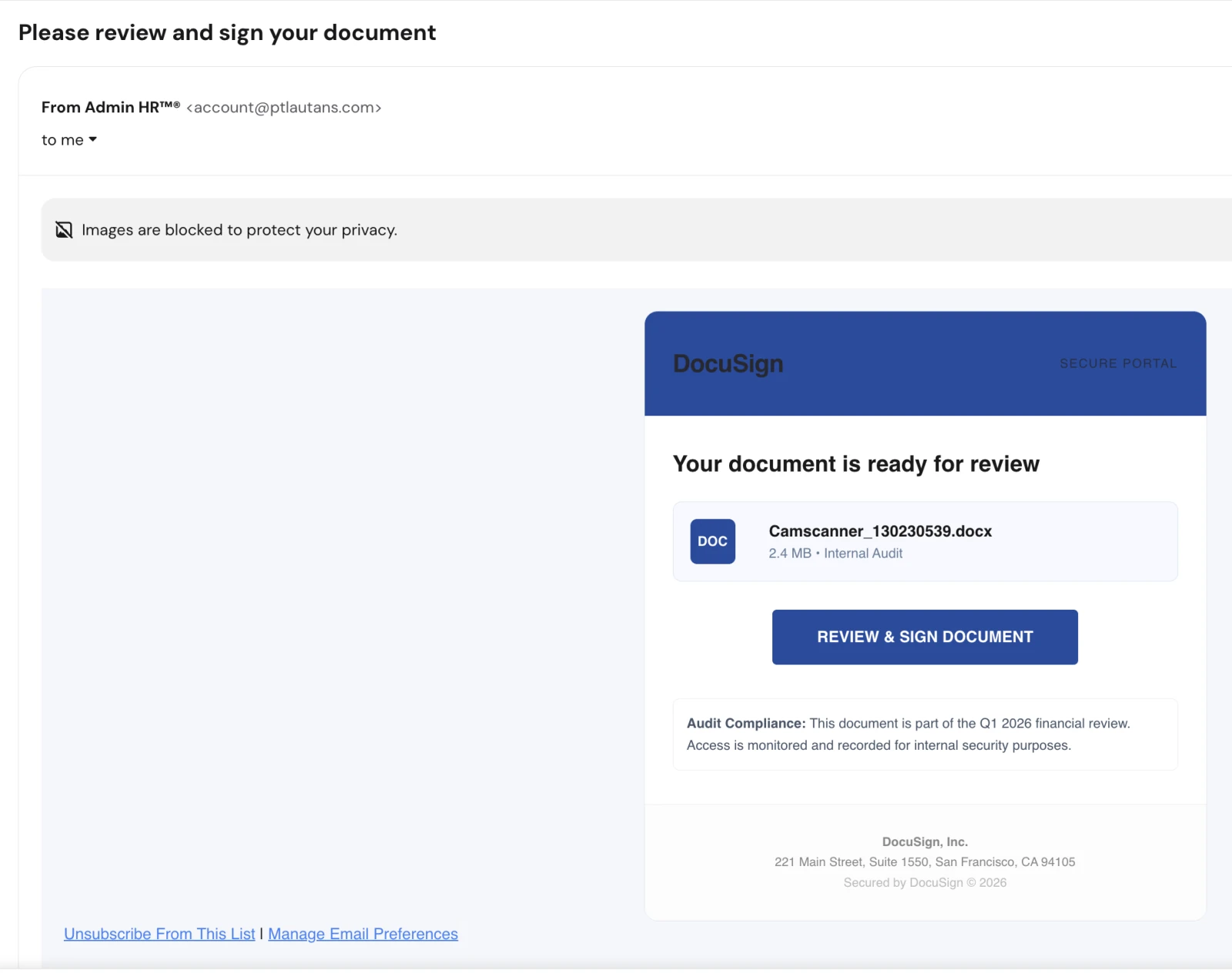
The 'Camscanner_130230539.docx (2.4 MB)' file card is rendered HTML in the body; there is no real attachment.
Evidence: the message as received plus passive registry lookups; links and attachments are not opened. How we analyse a scam email.
Your document is ready for review. A counterfeit DocuSign notification whose "Review & Sign" button leads to a CDN-hosted credential harvesting page with your own address baked into the link.
Complete Email
from: Admin HR™® account@ptlautans.com
to: info@jd-bots.com
reply-to: account@ptlautans.com
date: 07/22/2026 6:23 AM
subject: Please review and sign your document
Email Body
DocuSign — SECURE PORTAL
Your document is ready for review
DOC — Camscanner_130230539.docx
2.4 MB • Internal Audit
REVIEW & SIGN DOCUMENT
Audit Compliance: This document is part of the Q1 2026 financial review. Access is monitored and recorded for internal security purposes.
DocuSign, Inc.
221 Main Street, Suite 1550, San Francisco, CA 94105
Secured by DocuSign © 2026
Unsubscribe From This List | Manage Email Preferences
Where the links actually go:
- Review and Sign Document:
https://south3.b-cdn.net/#info@jd-bots.com - Unsubscribe from Mailing List:
https://south3.b-cdn.net/#info@jd-bots.com - Manage Email Preference:
https://south3.b-cdn.net/#info@jd-bots.com
Red Flags
This is brand-impersonation credential phishing. DocuSign is one of the most heavily abused brands in email attacks precisely because a signature request is a request nobody feels entitled to ignore — it looks like work, it looks routine, and clicking feels like doing your job. Every visual cue in this message is HTML painted to look like a DocuSign notification. None of it comes from DocuSign.
1. The Sending Domain Has Nothing To Do With DocuSign
- Sender:
account@ptlautans.com - Reply-to: the same generic
account@ptlautans.commailbox
Genuine DocuSign envelope notifications originate from docusign.net — most commonly dse@docusign.net or dse_na*@docusign.net. ptlautans.com is an unrelated domain being used to send mail on behalf of a brand it has no connection to. Nothing else in this email matters once that is established.
2. "Admin HR™®" Is Not a Real Sender
- A display name carrying both a trademark and a registered-trademark symbol on the words "Admin HR" is meaningless. Neither symbol applies to an internal department, and no organisation brands its HR mailbox this way.
- The symbols exist for one reason: to survive text-matching spam filters that look for the exact string "DocuSign" or "HR" in the From field, while still reading as official to a human.
- HR does not circulate financial audit documents. The display name says HR, the document says "Internal Audit," and the body says "financial review" — three different departments in one short email.
3. Every Link Points to the Same Non-DocuSign Address
- "Review & Sign Document," "Unsubscribe From This List," and "Manage Email Preferences" all resolve to the identical URL:
https://south3.b-cdn.net/#info@jd-bots.com. - In real bulk mail, those three links are always different — unsubscribe and preference-centre URLs carry their own tokens and land on separate pages. Identical destinations mean the footer is decoration, copied in to make the message look like legitimate marketing infrastructure.
- The footer is also bait. Attackers know a cautious reader may reach for "Unsubscribe" instead of the main button. Here, that instinct leads to exactly the same trap.
4. b-cdn.net Is a CDN Pull Zone, Not a Signing Portal
b-cdn.netis the hostname space handed out by a commercial content delivery network. Anyone can register a pull zone on it in minutes, for a few dollars, with no identity verification.south3is a throwaway subdomain label. It carries no brand, no company name, and no relationship to the content it is serving.- Attackers favour this because the parent domain is legitimate and widely used, so blocklists are reluctant to ban it outright and the TLS certificate is genuine — the padlock in the address bar will look perfectly normal on the phishing page.
5. Your Own Email Address Is Baked Into the Link
- The URL ends with
#info@jd-bots.com— the recipient's address, appended as a URL fragment. - When the page loads, JavaScript reads that fragment and pre-fills the login form with your address, so the fake sign-in screen greets you by name and asks only for your password. That single detail does enormous psychological work: a page that already knows who you are feels like a page you have logged into before.
- Fragments are never transmitted to the web server, only handled in the browser — which is exactly why attackers use them. It keeps the target list out of server logs and out of the reach of URL-inspection tooling that only examines the path.
6. The Attachment Does Not Exist
Camscanner_130230539.docxat "2.4 MB" is rendered HTML text inside the email body, complete with a drawn "DOC" icon. There is no real attachment on this message — the file card is a picture of a file card.- The name is incoherent on its face: CamScanner is a phone document-scanning app, and its output has nothing to do with a DocuSign envelope, an internal audit, or a financial review.
- DocuSign does not work this way. Real envelopes are reviewed and signed on DocuSign's own web platform; the notification email does not ship the document as a Word file, and certainly not as a random scan.
7. The Audit Story Contradicts Itself
- "Q1 2026 financial review" in an email sent on 22 July 2026. Q1 closed nearly four months earlier — no live quarterly review is chasing signatures that far out of cycle.
- "Internal Audit" arriving from an external, unrelated domain is a contradiction in terms. Internal audit documents circulate internally.
- The message names no auditor, no document owner, no company, and no signer. A genuine signature request tells you who sent it, what you are signing, and on whose behalf.
8. Surveillance Language Used as a Deterrent
- "Access is monitored and recorded for internal security purposes." This sentence has no operational meaning here, and it is not there to inform you.
- It is a compliance-pressure device: it implies you are already being watched, that your non-response is being logged, and that questioning the email would itself be conspicuous. Its purpose is to stop you walking down the hall to ask whether the audit is real.
9. Sent to a Public, Generic Inbox
- The recipient is
info@— a published, general-purpose company address. DocuSign envelopes are addressed to a named individual signer who was specifically added to the envelope by the sender. - Nobody adds a shared
info@mailbox as a signatory to a confidential financial audit document. The address was scraped from a website, not selected by a colleague.
10. A Real Address, Borrowed
- 221 Main Street, Suite 1550, San Francisco, CA 94105 is a genuine DocuSign corporate address, copied verbatim into the footer.
- Correct-looking legal boilerplate is the cheapest legitimacy an attacker can buy — it is public information, and it costs nothing to paste. A real address in the footer proves nothing about who sent the email.
11. What Is Missing Is as Telling as What Is Present
- No envelope ID or security code. Every genuine DocuSign notification carries a unique envelope identifier, and many carry an access code the sender communicates separately.
- No sender identity. Real notifications state plainly: "[Name] from [Company] sent you a document to review and sign." This one names nobody.
- No document title. "Your document" — the attacker does not know what you would plausibly be signing, because this same email went to thousands of scraped addresses.
How This Scam Works
The email is a single-click funnel. Everything before the button exists only to make the button feel safe to press.
- The Lure: A signature request creates obligation without alarm. It is a normal work task, so scepticism never engages the way it would for a payment request or a password warning.
- The Redirect: The button opens
south3.b-cdn.net, a CDN-hosted page carrying a valid TLS certificate. The browser shows a padlock and no warning, because nothing about the transport is wrong — only the destination. - The Personalised Trap: The page reads your address out of the URL fragment and renders a sign-in form that already knows you. Many variants show a blurred, watermarked "document" behind the login box, so the credential prompt appears to be the only thing standing between you and a file you can already see.
- The Harvest: Whatever you type — Microsoft 365, Google Workspace, or DocuSign credentials — is transmitted to the attacker. More capable kits proxy your login through to the real provider in real time, capturing the session cookie and defeating multi-factor authentication in the process.
- The Cover: After submission the page usually forwards you to the genuine
docusign.com, or shows a bland "document expired" notice. You conclude the link was broken; you do not conclude you were phished. - The Payload: With a working session the attacker reads your mailbox, sets forwarding or inbox rules to hide their own replies, and studies live invoice and payment threads.
- The Escalation: The compromised mailbox becomes the launch point — the same phishing email is resent to your real contacts, now genuinely from you, and any invoice in flight becomes a candidate for redirected payment. This is how one careless click becomes a business email compromise.
Conclusion and Recommendations
This is not a document awaiting your signature. It is a mass-mailed HTML replica of a DocuSign notification, sent from an unrelated domain, pointing at a disposable CDN-hosted page built to capture your password with your own email address pre-filled to make it convincing.
Immediate Actions:
- Do Not Click Any Link — Including Unsubscribe: All three links in this message lead to the same phishing page. There is no safe link here.
- Do Not Reply: The reply-to is the attacker's own mailbox. A response confirms a live, human-attended inbox and invites a more targeted follow-up.
- Report It as Phishing: Use the report button in your mail client rather than simply deleting, so your provider learns the sender and the destination.
- If Someone Already Clicked and Entered a Password: Treat it as a live compromise. Change the password immediately from a different device, revoke all active sessions and refresh tokens, re-register MFA, and then audit mailbox rules and forwarding addresses — attackers plant those within minutes, and they survive a password reset.
- Warn Whoever Monitors the Shared Inbox: Generic
info@andaccounts@mailboxes are the front line, and the people watching them are often the least equipped to inspect a header.
Verification Steps:
- Go to the Source, Never the Email: If you genuinely expect a document, type
docusign.comyourself and sign in. Real envelopes always appear in your DocuSign account — that is the point of the platform. No account, no envelope, no document. - Hover Before You Click: Read the actual destination in the status bar or preview. Anything that is not
docusign.netordocusign.comis not DocuSign. On mobile, press and hold the link to reveal the URL instead of tapping it. - Read the Domain Right to Left: In
south3.b-cdn.net, the real owner isb-cdn.net. Everything to the left is chosen freely by whoever bought the subdomain. Brand names appearing on the left of a URL mean nothing. - Confirm Out of Band: Ring the supposed sender on a number you already had — never one from the email — and ask whether they sent a document. Ten seconds of conversation defeats the entire attack.
- Check the Envelope Code: Genuine DocuSign email carries a unique envelope ID you can enter at
docusign.comto retrieve the document independently of any link.
Additional Protection Tips
- Treat "Sign This Document" With the Same Suspicion as "Reset Your Password": Both end at a login form. The signature framing is simply a gentler way to get you there.
- Deploy Phishing-Resistant MFA: App-based codes and SMS can be relayed in real time by modern phishing kits. FIDO2 security keys and passkeys cannot — they are cryptographically bound to the real domain and will not authenticate against a lookalike, no matter how convincing the page.
- Use a Password Manager as a Domain Check: It will not autofill credentials on
b-cdn.net, because that is not where they were saved. A form that suddenly requires manual typing is a warning worth listening to. - Be Sceptical of Compliance and Audit Framing: Language about monitoring, auditing, and recorded access is engineered to make you comply quietly. Legitimate internal processes expect and welcome verification questions.
- Block Newly Observed and Low-Reputation Domains at the Gateway: Disposable CDN subdomains and freshly registered hosts are prime phishing infrastructure. Category-based web filtering catches a great deal of this before a user ever sees the page.
- Run Regular Simulations: Brand-impersonation lures like this one are the most-clicked category in almost every phishing simulation. Practice, not policy, is what changes the click rate.
Remember: A padlock proves the connection is encrypted, never that the destination is honest. Read the domain, not the design — anyone can copy DocuSign's logo, but nobody else can send from DocuSign's domain.
