Phishing: Re: Payment Confirmation & Records | Fake SWIFT Advice PDF Attachment

At a glance
- Verdict
- PhishingGet the recipient to open a PDF 'SWIFT advice' whose embedded link harvests mailbox credentials for later invoice fraud.
- Subject line
Re: Payment Confirmation & Records- Claimed sender
- Elena Gilbert
admin@omarstore.shopReply-to:admin@omarstore.shop - Impersonates
- No real organisation or personPersona: Elena Gilbert (signs off as Gilbert Elena)
- Received
- not recorded · Published
- Related analyses
- Phishing: Account Activity Notification, Debit Your Account | Fake Intuit QuickBooks Debit Alert
- Phishing: Action Required: Dewiride technologies private limited Employee Salary Adjustment Contract Document September 16, 2026 | Fake HR DocuSign Notice With a QR-Code PDF
- Phishing: 🔔 Action Required: Storage 100% Full | Fake Cloud Services Payment Notice, Five Weeks Later
- Phishing: New VM Recordlng Recelved - MSG 00:01:30 Ref:9b4e56919bf06b17b131774fd036e27fed8e7e00
- Phishing: Re: Advice - Remittance 86,000 Process for Dewiride:MDT _Ref.c0670a134f064f87e93021f312960a6d
- Phishing: Re: Priority Notice - Review Doc_Xerox File Shared to Dewiride:MDT _Ref.59b43df15d05ddab0f8bc1bd9cc74524
- Phishing: Tax Invoice Invoice No.*** Email ID:aOFLvjW | Fake GST e-Invoice With a Password-Protected ZIP
- Phishing: ⛔️ Warning! Your Cloud Storage Is Full | Fake Cloud Services Payment Failure Notice
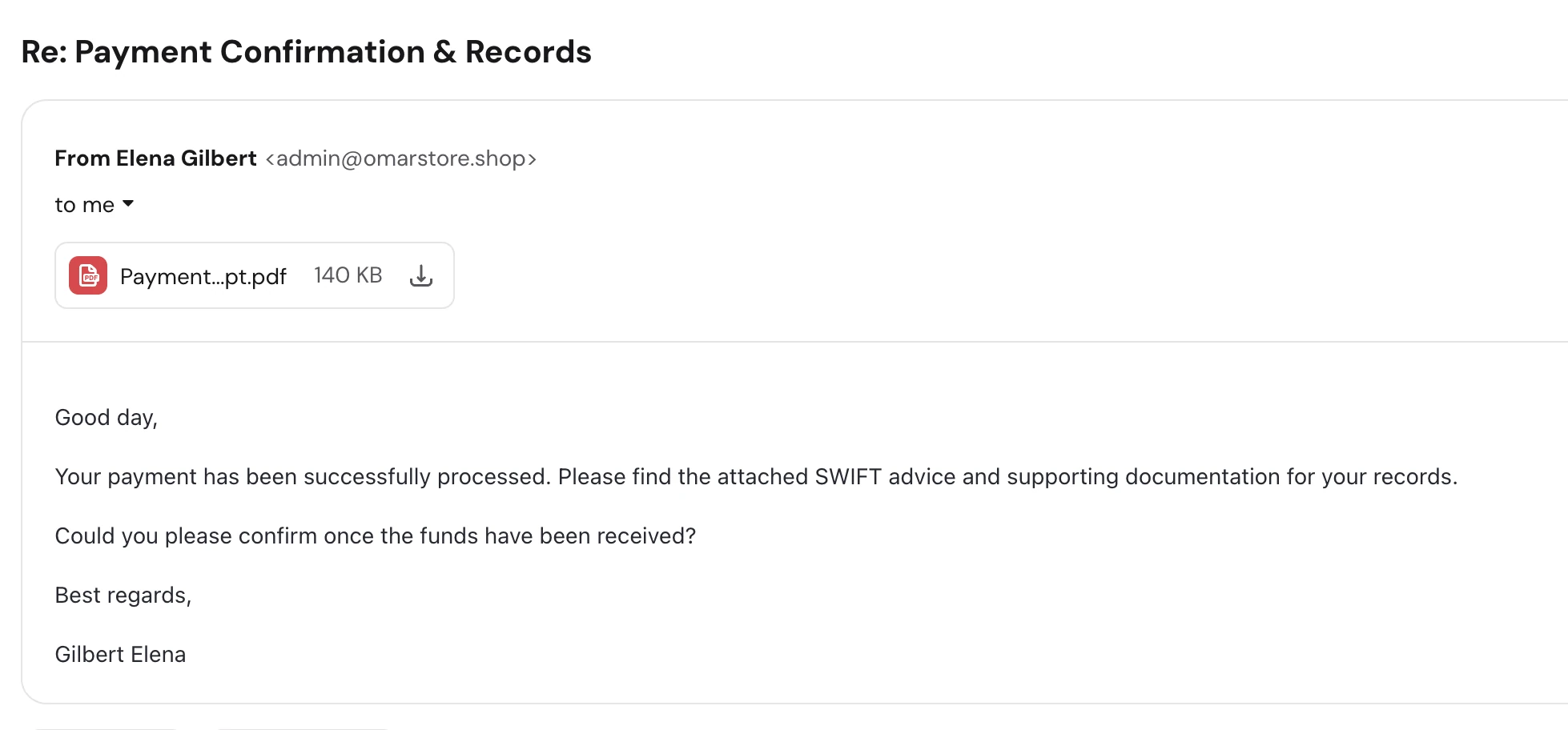
The header block has no date line; the receipt date was not recorded. Attachment: Payment…pt.pdf (name truncated by the mail client), 140 KB.
Evidence: the message as received plus passive registry lookups; links and attachments are not opened. How we analyse a scam email.
Your payment has been successfully processed. Please find the attached SWIFT advice and supporting documentation for your records. Four lines of flawless business English, a Re: subject line for a conversation that never happened, and a 140 KB PDF that is the entire attack.
Complete Email
from: Elena Gilbert admin@omarstore.shop
reply-to: admin@omarstore.shop
subject: Re: Payment Confirmation & Records
Attachment: Payment…pt.pdf — 140 KB
Email Body
Good day,
Your payment has been successfully processed. Please find the attached SWIFT advice and supporting documentation for your records.
Could you please confirm once the funds have been received?
Best regards,
Gilbert Elena
Red Flags
This is an attachment-delivery phish dressed as a remittance advice, and its opening move is to tell you that money is already on its way to you. There is nothing to click, nothing being demanded, and nothing that reads as a threat. The grammar is clean, the tone is correct for corporate finance, and the whole message is four short lines. Every technique that awareness training teaches you to look for — the misspelling, the countdown, the shouting capitals, the suspicious link — is deliberately absent.
That absence is the design. The message body is not the attack; it exists only to make opening the PDF feel like the obvious, professional, faintly obligatory thing to do. Everything that can be checked about this email contradicts what it claims to be, and all of it is visible before the attachment is touched.
1. "Re:" on a Conversation That Never Happened
- subject: Re: Payment Confirmation & Records
Re: is a reply prefix. It means the sender is responding to something you wrote. Search your sent folder and there is nothing there — no thread, no earlier message, no quoted text below the signature, no On [date], you wrote: block. A genuine reply carries its history; this one is four lines with nothing beneath them.
This is fake thread-hijacking, and it is one of the most effective tricks in the payment-fraud playbook because it works on two levels at once. On yours, it plants a false memory: Re: implies context you have simply forgotten, and busy people are far more willing to believe they lost track of a thread than that a stranger is lying to them. On your mail server's, it borrows the reputation that real conversations earn — reply-prefixed subjects are statistically less likely to be scored as unsolicited, because most of them genuinely are replies.
The real version of this attack begins with a compromised mailbox and injects itself into a live thread with authentic quoted history. This is the cheap imitation: the prefix without the conversation. It costs the attacker one word and buys them the benefit of the doubt.
2. The Sender's Name Is Written Backwards
- from: Elena Gilbert
admin@omarstore.shop - sign-off: Gilbert Elena
The header says Elena Gilbert. The signature four lines later says Gilbert Elena. Same two words, reversed, in a message short enough to read in one glance.
A real person does not get their own name wrong between the From field and their own sign-off. What produces this is a bulk-mailing template where the display name and the signature line are separate variables filled from the same two-column list, with no agreement about which column holds the given name. Copies of this campaign going to other recipients carry other names, generated the same way and just as likely to be scrambled.
It is also worth naming what the name itself is. Elena Gilbert is the lead character of The Vampire Diaries — a name pulled from television, not from a payroll. Attackers reach for fictional and celebrity names constantly, because inventing a plausible one takes thought and borrowing one takes none. If a sender's name feels oddly familiar and you cannot place them professionally, try placing them somewhere else.
3. A SWIFT Advice From a Retail Shop Domain
admin@omarstore.shop
SWIFT is the interbank messaging network that moves international wire transfers. A SWIFT advice — an MT103, in the jargon — is a confirmation document that a bank generates and a bank sends. It comes from a financial institution's own domain, or from the treasury department of the company that instructed the payment, on that company's domain.
It does not come from omarstore.shop. The name says store, the TLD says shop, and neither says bank, treasury, or accounts payable. .shop is one of the cheap generic top-level domains — registrable in minutes, for a few dollars, with no verification of who you are or what you do. That combination of low cost and instant availability is precisely why it is used for disposable sending infrastructure.
The local part compounds it. admin@ is a systems mailbox. Nobody in a finance function sends remittance advices from admin@; they send them from their own named mailbox, or from a shared accounts@ or ap@ address that identifies the department. A person calling themselves Elena Gilbert sending from admin@ is a third mismatch inside a single header line.
4. A Payment Notification That Names No Payment
This is the flag that settles the matter without opening anything. Every remittance advice ever written exists to communicate a specific set of facts. Count what this one contains:
| A real payment confirmation states | This email states |
|---|---|
| The amount and currency | nothing |
| The invoice or PO number being settled | nothing |
| The paying company's name | nothing |
| The value date of the transfer | nothing |
The SWIFT reference or UETR | nothing |
| The beneficiary account it was sent to | nothing |
Not one checkable fact. Not even the name of the company that supposedly paid you. Every reference is a placeholder: your payment, the attached SWIFT advice, supporting documentation, the funds.
That vagueness is structural, not careless. The sender does not know who you are, what you sell, whether anyone owes you money, or what currency you invoice in — this went to a scraped list of business addresses, and the same four lines have to survive landing in thousands of unrelated inboxes. The email is empty because it has to be. And notice where the emptiness pushes you: the only place any of those missing details could possibly be is inside the attachment. The body is written to be uninformative so that opening the PDF becomes the natural next step.
5. "Please Confirm Once the Funds Have Been Received"
- Could you please confirm once the funds have been received?
This single question is the most carefully engineered sentence in the message, and it is doing three jobs simultaneously.
It manufactures an obligation. Someone has apparently just paid you and is politely asking for an acknowledgement. Ignoring it feels rude and unprofessional, and that discomfort is the pressure — no deadline required, no threat required. Courtesy is a more reliable lever than fear on people who deal with suppliers and customers all day.
It provides the pretext for opening the attachment. You cannot confirm receipt of funds you have not identified, and nothing in the body identifies them. The question makes the PDF feel necessary rather than optional.
It qualifies you as a live target. Any reply proves an attended human mailbox at a real organisation, and it opens a correspondence in which the attacker's next message — the one with the corrected bank details, or the resent document, or the link to the secure portal — arrives inside a thread you started. That is far more dangerous than any cold email, because you already believe you are talking to a person about a real transaction.
6. The Attachment Filename Is Truncated on Purpose Elsewhere, and Meaningless Here
Payment…pt.pdf— 140 KB
The mail client has abbreviated the middle of the name, but what survives at both ends is enough. It begins with Payment and ends in pt — the tail of Receipt, Payment Receipt, or a similar generic label. There is no invoice number in it, no date, no company name, no reference.
Compare that to how real financial documents are named. Banks and accounting systems generate filenames built from data — MT103_20260826_REF884213.pdf, RemittanceAdvice_INV-2026-0413.pdf — because the filename is how the document is filed and retrieved later. A payment document whose name contains no payment identifier was not produced by a payment system. It was named to be opened, not to be filed.
The 140 KB size is consistent with a short PDF carrying an embedded image or an interactive element, which is exactly the shape of a document whose only real content is a button.
7. A PDF Is a Delivery Mechanism, Not a Safe Format
The most dangerous assumption this email relies on is the widespread belief that a PDF is inert — that documents are safe and only executables are risky. Attachment-based campaigns exist because that belief is wrong, and a PDF arriving from an unverified sender is an active threat by default.
What a malicious PDF in this genre typically does:
- Carries a link, not a payload. The commonest build is a near-blank page showing a blurred document thumbnail and a View Document or Unlock SWIFT Advice button. The button opens a cloned Microsoft 365, Adobe, or DocuSign sign-in in your browser. The PDF exists purely to move the phishing link out of the email body, where mail-security scanners would have read it, and into an attachment, where many of them do not look.
- Uses a QR code. A growing variant renders the destination as a QR code, pushing you onto a personal phone that has none of your organisation's link filtering, endpoint protection, or logging.
- Phones home when opened. Remote images and other external references confirm the moment the file is opened, from which IP, with which reader — turning your address from scraped into verified and attended.
- Exploits the reader itself. Less common but far worse, a crafted PDF can attack an unpatched PDF renderer or its JavaScript engine directly, executing code with no click beyond opening the file.
Whichever build this one is, the four lines above it exist to make you open it. That is the whole job of the email.
8. Nothing About the Message Is Specific to You
- Good day,
No name, no company, no role. "Good day" is not how a counterparty who just wired you money opens a message; it is what a template produces when the sender has an address and nothing else. It is also a greeting far more common in machine-assisted business English than in native correspondence, which fits a campaign written once and sent everywhere.
Put it beside the other blanks and the pattern completes itself. No recipient name, no company name, no amount, no invoice number, no sender's real employer, no thread history. Six empty fields, one filled attachment. Everything the attacker could not know was left out, and the one thing they control was attached.
How This Scam Works
The email is a wrapper. It asks for nothing, threatens nothing, and links to nothing, which is exactly why it reads as harmless — and exactly why it survives filters built to look for asks, threats, and links.
- The List: Business addresses are harvested from websites,
WHOISrecords, LinkedIn, leaked breach data, and directory listings. Finance, accounts, and sales mailboxes are the priority, because those are the people for whom an unexpected payment notification is routine rather than remarkable. - The Infrastructure: A cheap
.shopdomain is registered, or an existing small store's mailbox is compromised. Either way the attacker gets a domain that passesSPFandDKIMchecks — authenticated mail from a real domain, which is why "it passed authentication" is not the reassurance it sounds like. Authentication proves the sender controls the domain. It says nothing about who they are. - The Blast: The same four lines go out to thousands of addresses with
Re:in the subject, a rotating fictional name in the From field, and the PDF attached. No personalisation is attempted, because personalisation requires data the attacker does not have. - The Open: The recipient sees money arriving, no demand, and a polite request. Opening a PDF feels like a smaller act than clicking a link — most people have been trained to fear links and never trained to fear documents.
- The Redirect: The PDF presents a blurred preview and a button. Clicking leaves the document and opens a cloned Microsoft 365 or Adobe sign-in page, often pre-filled with the recipient's email address so it looks like a session that has merely timed out.
- Credential Capture: Username and password go to the attacker's server. Competent kits forward them to the real service immediately, so the victim receives a genuine login and a genuine document, and nothing appears to have gone wrong.
- MFA Interception: If two-factor is enabled, the fake page asks for the code and relays it live, or replays the stolen session cookie. A code typed into a phishing page is a code handed over while it is still valid — which is why app and SMS codes slow this attack down rather than stopping it.
- Mailbox Reconnaissance: Inside the mailbox, the attacker reads quietly for days or weeks: who your suppliers are, what your invoices look like, who approves payments, what the finance team's phrasing sounds like, and when the large transfers happen. A hidden inbox rule is created to divert replies containing words like invoice, payment, or bank into an ignored folder.
- The Real Payday: A genuine invoice thread is then hijacked from your own account, with your own signature and your own writing style, carrying changed bank details. Your customer pays the attacker. This is business email compromise, it is the single most expensive category of email crime by loss volume, and the four polite lines above were its first step.
- Resale and Reuse: The credentials are replayed against your other services and sold on. Where the password was reused, the compromise leaves email entirely.
Conclusion and Recommendations
There is no payment, no SWIFT advice, no supporting documentation, and no Elena Gilbert. There is a disposable .shop domain, a name lifted from a television series and written backwards between the header and the signature, a Re: prefix for a conversation that never took place, and a PDF that is the only real content in the message.
What makes this specimen worth studying is how little it does. It contains no misspelling to notice, no deadline to resist, and no link to hover over. The three checks most people rely on all come back clean, because the attack was built to leave them nothing to find. The one question it cannot survive is the simplest: which payment? Not the amount, not the invoice, not even the company that supposedly sent the money — the email cannot name any of it, and a genuine payment confirmation is nothing but those details. An email about money that cannot name the money is not about money. It is about the attachment.
Immediate Actions:
- Do Not Open the Attachment: The PDF is the attack in its entirety. Opening it can confirm your address as live, and the button inside it is a credential-harvesting page. If you need to know what it contains, send it to your security team or detonate it in an isolated sandbox — never open it on the machine you work from.
- Do Not Reply: The reply-to is the attacker's own mailbox. Replying to ask "which payment is this?" hands them a confirmed, attended, human-operated business mailbox and opens a thread they will use for everything that follows.
- Do Not Forward It to Colleagues to Ask: Forwarding moves the live attachment deeper into your organisation and strips the original headers that make it identifiable. Report it through your mail client's phishing button instead, which preserves the headers and alerts the people who can block the sender.
- Check Your Bank, Not the Email: If a payment genuinely landed, it is in your bank account and your accounting system. Look there. Thirty seconds of independent checking settles the only question the email raised, and it is the one action the attacker cannot influence.
- Report and Delete: Mark it as phishing so the sending domain is scored, and report
omarstore.shopto its registrar for abuse. If the domain belongs to a real store whose mailbox was compromised, they are a victim too — and they will not learn it from the mailbox that is sending this. - If Anyone Opened It and Signed In, Move Immediately: Change the account password from a device you trust, revoke every active session and refresh token, re-verify MFA, and then audit the mailbox for rules and forwarding addresses you did not create — that hidden rule is how the attacker stays invisible after the password is changed. Check for newly registered MFA methods and OAuth app grants at the same time.
- If a Password Was Reused Anywhere, Change It There First: That is usually where the real loss lands.
Verification Steps:
- Ask "Which Payment?" Before Anything Else: Amount, currency, invoice number, paying company, value date. A remittance advice missing all five is not a remittance advice. This single question defeats the entire genre, and it requires opening nothing.
- Check Whether a
Re:Has a Thread Behind It: Search your sent folder for the subject line and scroll below the signature for quoted history. A reply with no conversation attached is a claim about the past, not evidence of one. - Read the Domain After the
@, Never the Display Name: "Elena Gilbert" is free text the sender typed.omarstore.shopis not. Then ask whether that domain plausibly sends this kind of message: a bank advice from a shop domain answers itself. - Compare the Header Name Against the Signature: They should match. When they do not — reversed, misspelled, or a different person entirely — you are looking at a template, and templates are not sent by individuals.
- Treat Attachments With the Suspicion You Give Links: A PDF, a
.docx, an.htmlfile, and a.zipare all delivery mechanisms. The reason attachments are used at all is that many mail filters read link destinations in the body and cannot read inside a file. - Look at the Filename for a Reference Number: Financial systems name documents after the transaction. A generic
Payment...pt.pdfwas named by a person who wanted it opened, not by a system that needed it filed. - Verify Out of Band, Through a Number You Already Have: If a supplier or customer appears to have paid you, call them on the number in your own records — never one supplied by the email. Two minutes on a phone line resolves what no amount of reading the message can.
- Remember That Passing Authentication Proves Nothing About Identity:
SPF,DKIM, andDMARCconfirm that the sender controls the domain they sent from. An attacker who registeredomarstore.shopthis morning controls it completely and will pass all three.
Additional Protection Tips
- Make Bank-Detail Changes Require a Callback, Always: The one control that stops business email compromise from becoming a loss is a written rule that no change to payment details is ever actioned on an email, however convincing the thread — only after a voice call to a number held in your own records, made by someone other than the person who received the request. Every other defence on this list slows the attack down. This one ends it.
- Use a Password Manager as a Phishing Detector: A manager offers credentials only on the exact domain it saved them against. When it silently declines to fill a sign-in page reached from inside a PDF, it has just made the domain judgment that humans get wrong and software never does.
- Move to Passkeys or Hardware Keys: Codes typed into a cloned page are relayed in real time. Passkeys and
FIDO2keys are cryptographically bound to the real domain and simply do not work on a copy, which makes them the only defence that stops credential phishing outright rather than delaying it. - Audit Mailbox Rules on a Schedule, Not Just After an Incident: Auto-forwarding to an external address and rules that file messages containing invoice, payment, or bank into a folder nobody reads are the signature of an intruder who is already inside. Most organisations discover them only after the money is gone.
- Turn Off Automatic Content and Preview for External Mail: Blocking remote images and disabling automatic attachment preview removes the silent open-confirmation that turns a scraped address into a verified one.
- Tag External Email Visibly: A banner marking mail from outside the organisation makes a fake internal or fake-counterparty message obvious at a glance, and it is a configuration change rather than a training programme.
- Reconcile Payments in the Accounting System, Never in the Inbox: If receipts are confirmed against the bank feed as a matter of routine, an emailed claim that money arrived has nothing to act on. The fake cloud storage payment failure notice worked the same way in reverse — invent a billing event the recipient cannot immediately check, and the pretext does the rest.
- Treat Clean Writing as Neutral Evidence: Correct grammar, professional tone, and a short polite message prove only that the sender can write. Machine translation and language models have made fluency free, and "look for bad English" is now the least reliable check available. The pixel-perfect WordPress.com renewal notice had no errors either.
- Build a Reporting Habit, Not Just a Detection Habit: A one-click report button and a standing promise that admitting a click is met with help rather than blame is worth more than any poster. This class of attack is defeated in the minutes between the open and the disclosure.
Remember: A real payment confirmation names the amount, the invoice, the payer, and the date, and every one of those facts can be checked in your bank account without opening anything. This one named nothing at all and put a document where the details should have been. When an email about money is empty and the attachment is the only place the answers could be, the attachment is not the evidence — it is the attack.
