Phishing: No. TAX/PEN/2026-1422 | Fake Income Tax Department Notice Hiding a ZIP From Scanners

At a glance
- Verdict
- PhishingGet the recipient to download a ZIP named like a PDF, from a link that hides from security scanners, and run whatever it contains.
- Subject line
No. TAX/PEN/2026-1422- Claimed sender
- Income Tax Department
showoxb@outlook.com - Impersonates
- Income Tax Department (India) — Income Tax Department, Ministry of Finance, Office Memorandum 'Tax Compliance Deficiency Notice' No. TAX/PEN/2026-1422, signed by an unnamed Assistant Commissioner of Income Tax
- Received
- · Published
- Known variants
- Phishing: कॉर्पोरेट टैक्स नियमों का पालन न करने के संबंध में 2026 का नोटिस | Fake Income Tax Department Court Notice
- Phishing: Audit Notification | Fake Income Tax Department Penalty Notice
- Phishing: Judicial Notice | Renda Tax Department, Government of India - A Brazilian Template With India Pasted In
- Phishing: Notice from Tax Departmen | Fake Court Notice, a Disk Image, and a Side-Loaded WeChat Binary
- Phishing: Notice from Tax Departmen | Fake Court Notice Resent With the Same Case Number and a Hearing Already Past
- Phishing: कर अनुपालन की कमी और दंड सूचना / Tax Compliance Deficiency and Penalty Notice | Fake CPC Bengaluru 143(1) Intimation With a ZIP
- Phishing: कर अनुपालन की कमी और दंड सूचना / Tax Compliance Deficiency and | Fake Income Tax Department Penalty Notice
- Phishing: कर वसूली एवं दंड सूचना | Fake Income Tax Department Tax Recovery and Penalty Notice With a ZIP Attachment
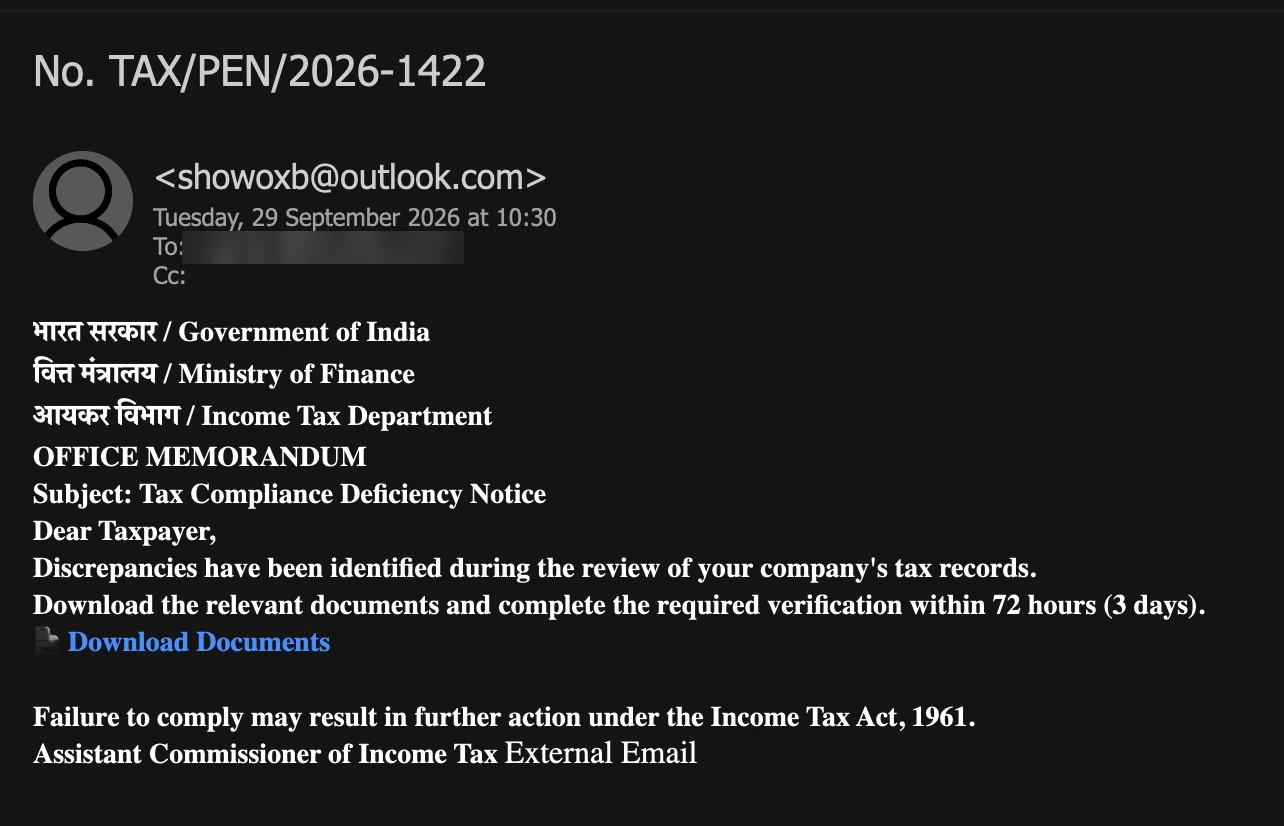
Display name and link address as reported by the recipient; the screenshot shows only the sender address, with the recipient mailbox blurred.
Evidence: the message as received, passive registry lookups, and the results of a detonation the recipient ran in a secured sandbox; the analysis itself opens nothing. How we analyse a scam email.
Discrepancies have been identified during the review of your company's tax records. That sentence is almost all there is to the fourth draft of a forged Income Tax Department notice this archive has followed since August. Every section number, office, officer's name and amount that the earlier drafts quoted is gone; the 72-hour clock and the link remain. The link asks for a ZIP archive named like a PDF, on a name handed out under eu.cc, and when the recipient detonated it in a secured sandbox, the server sent back a page instead: Access Denied. Hosting/VPN IP detected. Only real users are allowed.
Complete Email
from: Income Tax Department showoxb@outlook.com
date: 09/29/2026 10:30 AM
subject: No. TAX/PEN/2026-1422
Email Body
भारत सरकार / Government of India
वित्त मंत्रालय / Ministry of Finance
आयकर विभाग / Income Tax Department
OFFICE MEMORANDUM
Subject: Tax Compliance Deficiency Notice
Dear Taxpayer,
Discrepancies have been identified during the review of your company's tax records.
Download the relevant documents and complete the required verification within 72 hours (3 days).
📄 Download Documents
Failure to comply may result in further action under the Income Tax Act, 1961.
Assistant Commissioner of Income Tax
Link
- Behind Download Documents, as reported by the recipient:
https://tcsxin.eu.cc/files/20260929662124.PDF.zip
What the Sandbox Showed
The recipient detonated the link in a secured sandbox and supplied a screenshot of what came back. The link names a ZIP file; the server answered with a web page instead, white and otherwise empty. The screenshot below is cropped to the part that holds text. The analysis works from it; nothing was fetched from the link for this post.
Access Denied
Hosting/VPN IP detected. Only real users are allowed.

There was no file, no notice, no government branding and no reference number: a heading and one sentence.
Red Flags
This is government-impersonation phishing, and the fourth draft of one notice. The Audit Notification of 9 August, the penalty notice No. TAX/PEN/2025-142 of 7 September and the CPC Bengaluru intimation of 17 September came before it. Its opening move is theirs: an accusation from the tax authority, a deadline, and one link to make the problem go away. This draft is the shortest of the four, and its link is the part that has changed: it checks who is asking before it hands anything over. Everything below comes from the message, the recipient's report of the link and sandbox screenshot, the earlier drafts, and public registry and DNS records looked up on 12 October 2026.
1. "Only Real Users Are Allowed": the Link Turns Security Tools Away
- Link text: Download Documents
- Link:
https://tcsxin.eu.cc/files/20260929662124.PDF.zip - What the sandbox was shown: Access Denied. Hosting/VPN IP detected. Only real users are allowed.
The link asks for a file, and it did not fail. A server answered it, but not with the file. A plain file server hands a file to anyone who asks for it; this one sent the sandbox a web page instead. By its own account, it had looked at the address the sandbox was connecting from, classed it as a hosting provider's or a VPN's, and refused. The refusal carries no government branding, no reference number and no word about where the documents went.
Consider who connects from hosting and VPN addresses. Mail gateways that scan links on arrival, URL-reputation services, sandboxes and security researchers typically work from data centres and cloud networks. Recipients typically read their mail over an office line, home broadband or mobile data. The filter separates the two, and its sentence says which side it serves: real users are the people the email was sent to, and anyone checking the link is treated as the impostor. Security researchers have documented this kind of filtering in phishing campaigns for years, often under the name cloaking. A page that shows scanners an empty refusal gives them nothing to flag, so the link keeps a clean record while the people it was written for are let through.
That has a practical consequence. A link that a tool checked and found harmless may only have been shown this page. It is also why the sandbox never received the archive: what the server hands a visitor it lets through, and what the ZIP contains, were not observed, and files from reported email are not opened for these analyses.
A genuine notice has nothing to hide from a security scanner. It sits in the taxpayer's own e-Filing account, behind the taxpayer's own sign-in, not behind a filter that sorts visitors into real and fake. A link that hides from the tools built to check it has already told you what it is.
2. tcsxin.eu.cc: a Name Handed Out Under eu.cc, With No Registry Record of Its Own
- Link domain:
tcsxin.eu.cc - Server address:
103.70.77.190
Read the domain from the right. It ends in .cc, the country-code domain of the Cocos (Keeling) Islands, an Australian territory in the Indian Ocean, whose registry Verisign runs. eu.cc is a single domain within it. The .eu is only part of that one name: it has nothing to do with the European Union's .eu domain, which EURid runs. tcsxin is a name handed out beneath eu.cc by whoever operates it. Security vendors' listings describe eu.cc as a commercial service that hands out such names, and have flagged other names under it for phishing.
The public records, looked up on 12 October 2026:
- No registry record. The
.ccregistry has no entry fortcsxin.eu.cc; a WHOIS query returns No match. There is no creation date, no registrar and no registrant to look up. The only record a WHOIS lookup finds is the one foreu.cc, created in 1997 and held today through the registrar SevenX LLC. - Its own name servers. The servers that answer for
eu.ccdelegatetcsxinto separate name servers atshare-dns.comandshare-dns.net, so the name works as a domain in its own right, with records set by whoever holds it. - A server in Hong Kong. The name points to
103.70.77.190, in an address block that APNIC, the registry for Asia-Pacific IP addresses, lists in Hong Kong under the network name Netsec, routed by 8 Cloud Limited (AS963).
A name like this can borrow the standing of a domain registered 29 years ago while leaving no record of its own to check, which suits a campaign that changes its link with every draft: this notice's four drafts have pointed at four different domains. The Income Tax Department's site is incometax.gov.in, and names under gov.in are issued only to verified government bodies. The department's documents do not sit on a name someone was handed under eu.cc.
3. "Income Tax Department" at showoxb@outlook.com: a Fourth Outlook Mailbox for One Notice
- Display name, as reported: Income Tax Department
- From:
showoxb@outlook.com
The display name claims the whole department. The address is a free Outlook.com mailbox, the kind anyone can open in a minute, and its local part, showoxb, is seven letters that mean nothing. The Income Tax Department writes from its own gov.in domains, such as incometax.gov.in. It does not correspond from a consumer webmail account, and a display name, which the sender types and nobody checks, cannot make it so.
Set the four drafts side by side:
- 9 August: Internal Audit Team at
juanatanyadrpz@outlook.com - 7 September: Raj Kumar Sharma at
fanniepwkm@outlook.com - 17 September: Raj Kumar Sharma at
pzdu83934175@outlook.com - 29 September: Income Tax Department at
showoxb@outlook.com
The name in front has risen from a team to an officer to the department itself. The address behind it has never left outlook.com, and no two drafts have come from the same mailbox: each is opened, used and dropped, and the template is kept. The 7 and 17 September drafts sent replies to the same anonymous vfemail.net address; whether this copy carried a reply-to address was not recorded.
4. TAX/PEN/2026-1422: a Penalty Reference on a Notice That No Longer Mentions a Penalty
- Subject: No. TAX/PEN/2026-1422
- Title in the body: Subject: Tax Compliance Deficiency Notice
The whole subject line is a reference number, and not a real one. TAX for tax and PEN for penalty is an English mnemonic of the kind a person invents to make a document look filed. Since 1 October 2019, under CBDT Circular No. 19/2019, every notice, order, summons or letter issued by an income-tax authority must carry a computer-generated Document Identification Number, and a communication without one is treated as invalid and deemed never to have been issued. A DIN can be checked without signing in, on the e-Filing portal's Authenticate Notice/Order Issued by ITD service. This message has no DIN, so there is nothing to check, and the reference it has instead can be checked nowhere.
The reference has a history. The 7 September draft printed No. TAX/PEN/2025-142 at the top of its body, dated the year before it was sent. Here it has moved into the subject line, the year has been brought up to date, and the number has gained a digit. Meanwhile the notice it belongs to has lost its penalty. The August and 17 September drafts were titled Tax Compliance Deficiency and Penalty Notice, and the 7 September draft's subject broke off on the word and, just before it. Here the title is Tax Compliance Deficiency Notice, and the body mentions no penalty, no section and no amount. The PEN survives only in the reference, carried over from a draft that had a penalty to refer to. A real reference is generated from the case it belongs to. This one belongs to an earlier draft.
5. An Office Memorandum to "Dear Taxpayer", Signed by a Rank Without a Name
- OFFICE MEMORANDUM
- Dear Taxpayer,
- Signature: Assistant Commissioner of Income Tax
Each of these three lines is the wrong shape for a tax notice.
The form. In the Government of India's own office procedure, an office memorandum is the form used for correspondence between ministries and departments, and sometimes with the government's own employees. It is not how the department serves anything on a taxpayer. That is done by a notice issued under a specific section of the Act, which says which section it is.
The addressee. A notice concerns one assessee and says so: the name, the PAN, the assessment year. Dear Taxpayer is what a sender writes when it has none of them. The body goes on to your company's tax records and never says which company.
The signature. Assistant Commissioner of Income Tax is a real rank, held by a great many officers across India. With no name, no ward or circle, no office and no contact details, it identifies none of them. The August draft at least put a name above it, Raj Kumar Sharma; here the rank stands alone. A genuine notice says which authority issued it, because the taxpayer has the right to answer that authority. Nobody can answer a rank.
6. Assembled From Earlier Drafts, Minus Everything That Could Be Checked
Almost every line of this message has appeared before, in one of the three earlier drafts:
| In this email | Earlier |
|---|---|
| The letterhead, भारत सरकार / Government of India to आयकर विभाग / Income Tax Department | 7 September, word for word |
| OFFICE MEMORANDUM | 9 August |
The TAX/PEN/ reference | 7 September |
| Tax Compliance Deficiency | 9 August and 17 September, followed by and Penalty Notice |
| Discrepancies have been identified | 17 September |
| within 72 hours (3 days) | 9 August and 7 September |
| Download Documents, behind a document emoji | 9 August |
| Assistant Commissioner of Income Tax | 9 August, under the name Raj Kumar Sharma |
What has not come back is just as telling. Each earlier draft made claims a reader could check, and each claim failed the check: a penalty under Section 271(1)(c), which does not apply to any assessment year from 2017-18 onwards; a prosecution threat under the wrong section; an Enforcement Division that the Income Tax Department does not have, at Aayakar Bhawan, New Delhi; a memorandum dated two months before it was sent; a CPC Bengaluru demand of ₹2,73,250 with a fabricated DIN and a Section 234F late fee of ₹10,000, twice the ceiling that has applied since AY 2021-22. None of it is here. This draft cites the Income Tax Act, 1961, as a whole, names no section, no office, no officer and no assessment year, and accuses your company of discrepancies without saying one thing about them.
The 7 September post called this instinct a defensive edit: a specific false claim can be looked up and disproved; a vague one cannot. This draft takes it as far as it goes. What is left is the frame, the clock and the link, and the checks that still work are the ones that never depended on what the email says: the sender's domain, the link's domain, the missing DIN and the portal.
7. "Download the Relevant Documents": One ZIP Archive, Named to Read as a PDF
- "Download the relevant documents and complete the required verification within 72 hours (3 days)."
- The file the link names:
20260929662124.PDF.zip
The sentence gives two orders and no objects. Relevant to what? Verification of what? The message never says which documents, which records or which discrepancies, so the reader cannot know what the verification is, only that it is required and that it starts with the link.
The link's address answers part of the question. The documents, plural, are a single file, and the file is not a document. Only the last extension says what a file is, and here it is .zip, a compressed archive; .PDF is part of the name, there to be read. On a Windows computer with file extensions hidden, which is the default, File Explorer shows the downloaded file as 20260929662124.PDF. The name starts with 20260929, the date the email arrived, followed by six more digits: it names a day, not a taxpayer, a PAN or a notice. The 17 September draft linked a ZIP too. Archives in lures like this typically hold a program, a script or a shortcut given a document's name and icon, which runs when it is opened. Whatever is inside, opening it is the required verification.
The department does not work like this. A genuine notice, and anything that goes with it, sits in the taxpayer's own e-Filing account at incometax.gov.in, under Pending Actions and e-Proceedings, and the response is submitted there, after signing in to a site the taxpayer reached on their own. Nothing in a real proceeding begins with downloading an archive from a link in an email. Verification is a word taxpayers meet every year, because a filed return must be verified, and that familiarity is what it is borrowed for: it makes an unknown step sound like a routine one.
8. 72 Hours, and "Further Action"
- "within 72 hours (3 days)"
- "Failure to comply may result in further action under the Income Tax Act, 1961."
The 72-hour clock is the one the 9 August and 7 September drafts used; the 17 September draft gave fifteen days. It runs from nothing the reader can see: there is no date of issue, no date to respond by and no hearing. Notices under the Income Tax Act give a date for compliance, and the portal shows it against the proceeding. A deadline counted in hours from an unstated moment is not a legal period. It is pressure, and its purpose is to get the click before anyone phones the company's chartered accountant.
The threat beneath it is the vaguest of the four drafts: further action, under no section, by no named authority, with no consequence stated. The August draft threatened prosecution under a named section, and the 7 September draft a unilateral decision. This one names nothing a reader could look up, the same choice the message makes everywhere else. A threat that cannot be checked can only be obeyed or ignored. Ignore it, and check the portal.
How This Scam Works
The email is bait for one click on Download Documents, and the link's address says what the click is for: a ZIP archive named like a PDF. What the server hands a visitor it lets through, and what the archive contains, were not observed: the sandbox was turned away, and files from reported email are not opened for these analyses. So, apart from step 5, which the sandbox showed, the steps below describe how this campaign's earlier drafts and government-impersonation phishing of this kind typically work, not what this link was seen to do.
- The List: The notice goes to company mailboxes harvested from websites and directories; this copy reached a functional mailbox of the kind a company publishes. The sender knows no name, no PAN and no assessment year, which is why the message says Dear Taxpayer and your company.
- The Letterhead: Three bilingual lines naming the Government of India, the Ministry of Finance and the Income Tax Department, then the words OFFICE MEMORANDUM. Indian businesses treat tax correspondence as something that cannot be ignored, and that reflex fires before anyone reads the sender's address.
- The Accusation: Discrepancies in your company's tax records is specific enough to worry about and too vague to disprove from the reader's chair. A finance team cannot rule out a discrepancy it has not been told about.
- The Clock: 72 hours and further action, with one way to act: the link.
- The Filter: The link sorts its visitors. Addresses that belong to hosting providers and VPNs, which is where mail scanners, URL-reputation services and sandboxes typically connect from, get Access Denied, so automated checks find an empty page and the link keeps a clean record. The page's own message says that everyone else, the real users, is let through.
- The Archive: A visitor the filter lets through is presumably handed the file the link names: a ZIP that File Explorer shows as a PDF when extensions are hidden. Archives in lures like this typically hold a program, a script or a shortcut given a document's name and icon, so that opening the "PDF" runs it. The 17 September draft linked a ZIP as well.
- The Harvest: Malware delivered this way is typically built to steal saved passwords, browser sessions and files, or to give its operator remote control of the computer. On a machine used for a company's tax and banking, that reaches the e-Filing account, the bank, and the returns, TDS records and identity behind the PAN: the material for refund fraud, payment fraud, and a later notice that quotes the company's real figures and is far harder to dismiss.
- The Redraft: Between sends, the mailbox, the subject, the wording and the link's domain change, and specific claims come and go. Four drafts in under eight weeks have come from four Outlook mailboxes and pointed at four domains, and the frame has stayed the same: letterhead, accusation, clock, link.
Conclusion and Recommendations
There is no deficiency, no review, no documents and no notice. There is a free Outlook mailbox under the department's name, a penalty reference on a notice that no longer mentions a penalty, an office memorandum addressed to Dear Taxpayer and signed by a rank without a name, a 72-hour clock, and a ZIP named like a PDF, on a name handed out under eu.cc, behind a server that turned a security sandbox away for not being a real user.
This draft claims less than any of the three before it, and that is its design: every detail that could be looked up has been removed. The checks that still work never depended on the email's details. No gov.in sender, no DIN, nothing on the portal: the notice is fake, however little it says.
Immediate Actions:
- Do Not Click Download Documents: The link names a ZIP archive, and the server behind it decides who gets it by where they connect from. A security sandbox was shown Access Denied; a visitor on an office or home connection is the one it was built for.
- Do Not Treat a Clean Scan as Clearance: If a link checker or your mail gateway found this link harmless, it may only have been shown the refusal page. A verdict on a page that hides from scanners is a verdict on the decoy.
- Do Not Reply: A reply confirms a live mailbox, read by someone who takes tax notices seriously, and invites the next draft.
- Check the Portal Yourself: Type
incometax.gov.ininto the browser, sign in, and look under Pending Actions and e-Proceedings. A genuine notice is there. To check a DIN on any notice you receive, use the portal's Authenticate Notice/Order Issued by ITD service. This message has no DIN to check. - Report It: Use your mail client's phishing report, and forward the message to
webmanager@incometax.gov.in, the department's address for phishing that impersonates it, copying CERT-In atincident@cert-in.org.in. APNIC's records listsupport@eplushost.comas the abuse contact for the server's address block. If money was lost, use the National Cyber Crime Reporting Portal atcybercrime.gov.inor call the helpline 1930. - If the ZIP Was Downloaded: Delete it without opening it. If anything inside it was opened, disconnect that computer from the network and have it examined before it is used again, and from a different, trusted device change the e-Filing password and the passwords of every account used on that computer.
- If It Was Opened, Check the Accounts Too: Look at the e-Filing portal's login history and at the registered email, mobile number and bank accounts for changes you did not make, and tell your chartered accountant.
Verification Steps:
- Read the Domain After the
@:outlook.combelongs to anyone who opens an account. The department writes from its owngov.indomains, and a display name that says Income Tax Department was typed by the sender. - Read the Link Before You Click It: Rest the pointer on Download Documents and read the address from the right.
tcsxin.eu.ccends in.cc, andeu.ccis a single domain that hands out names beneath it. The.euin the middle is not the European Union's, and nothing in the address ends ingov.in. - Read the Whole File Name: Only the last extension says what a file is.
20260929662124.PDF.zipis a ZIP archive, whatever the middle of its name says. - Look for a DIN: Every income-tax communication issued since 1 October 2019 must carry one.
TAX/PEN/2026-1422is not a DIN, and a notice without one is invalid by the department's own circular. - Look for the Notice on the Portal: Genuine notices appear in your e-Filing account under e-Proceedings. A notice that exists only in an inbox is not a notice.
- Ask What the Notice Knows About You: A real one names your company and quotes your PAN, the assessment year, the section and the date to respond by. This one knows none of them.
- Check Who Issued It: A real notice names the authority that issued it. A rank with no name and no office identifies no one you could answer.
- Search the Wording: Paste Discrepancies have been identified during the review of your company's tax records into a search engine. Templates like this are often reported word for word.
Additional Protection Tips
- Do Not Let a Scanner's Silence Decide: A link can show scanners one page and people another. Judge a notice by its sender, its DIN and the portal, not by whether a tool flagged its link.
- Treat Time-of-Click Protection as One Layer: Checking a link at the moment it is clicked helps, but the check typically runs from the same kind of network this page refused. It narrows the risk; it does not settle it.
- Never Open a "Notice" That Arrives as a Download: Tax notices are read in the portal. A tax document delivered as a file behind an emailed link, whether an archive, a disk image or a program, has no legitimate reason to exist.
- Show File Name Extensions: In Windows File Explorer, turn on File name extensions under View. A
.PDF.zipthen shows its real type, and so does a "PDF" inside an archive that is really a program or a shortcut. - Route Tax Correspondence Through One Person: The department writes to the email address registered against the PAN, and the portal holds every notice. Agree that anything claiming to be a tax notice that arrives anywhere else goes to one named person, who checks the portal before anyone acts.
- Give Shared Mailboxes a Rule: Shared inboxes such as
info@andsupport@receive more of this mail than anyone, and the people who read them are rarely the people who handle tax. A standing rule costs nothing: tax and legal notices are reported, never acted on from the email. - Expect the Next Draft: This notice has been rewritten three times since August, and the next copy will look different again. What will not change is that it comes from outside
gov.in, carries no valid DIN and is not on the portal.
Remember: A genuine tax notice can be checked by the person it is addressed to: it carries a DIN, it sits on the portal, and it comes from a gov.in address. The Income Tax Department has no reason to ask whether you are a real user. Only a page with something to hide does.
