Phishing: Messages Pending Delivery on Your E-mail Portal | Fake jd-bots.com Domain Portal Notice

At a glance
- Verdict
- PhishingGet the recipient to open a Google Cloud Storage-hosted fake portal and enter their mailbox password for later invoice fraud.
- Subject line
Messages Pending Delivery on Your E-mail Portal- Claimed sender
- Admin ™®
hayat.acc@asthafeed.comReply-to:hayat.acc@asthafeed.com - Impersonates
- No real organisation or personPersona: Web Admin, jd-bots.com
- Received
- · Published
- Related analyses
- Phishing: Action Required: Dewiride technologies private limited Employee Salary Adjustment Contract Document September 16, 2026 | Fake HR DocuSign Notice With a QR-Code PDF
- Phishing: 🔔 Action Required: Storage 100% Full | Fake Cloud Services Payment Notice, Five Weeks Later
- Phishing: Mail Verification Required Tuesday, March 19, 2024
- Phishing: Messages Delivery Notification [Failure] | Fake Held-Mail Report From Your Own Address
- Phishing: Multiple unusual login attempts | Fake Mail Administrator Alert From Your Own Address
- Phishing: Pending lncoming Tuesday, January 7, 2025:6:03:03 PM - Message ID:XVMQN3LPSBW5SEJ05IHC5IE3OU28D22UZ6XE
- Phishing: WARNING: [15] Messages Delivery Notification [Failure] | Fake Postmaster Notice From Your Own Address
- Phishing: ⛔️ Warning! Your Cloud Storage Is Full | Fake Cloud Services Payment Failure Notice
- Phishing: Your mailbox is full. | Fake Storage Warning From Your Own Address
The signature claims to be the web administrator of the recipient's own domain, but the From is an unrelated animal-feed company's accounts mailbox, most likely compromised.
Evidence: the message as received plus passive registry lookups; links and attachments are not opened. How we analyse a scam email.
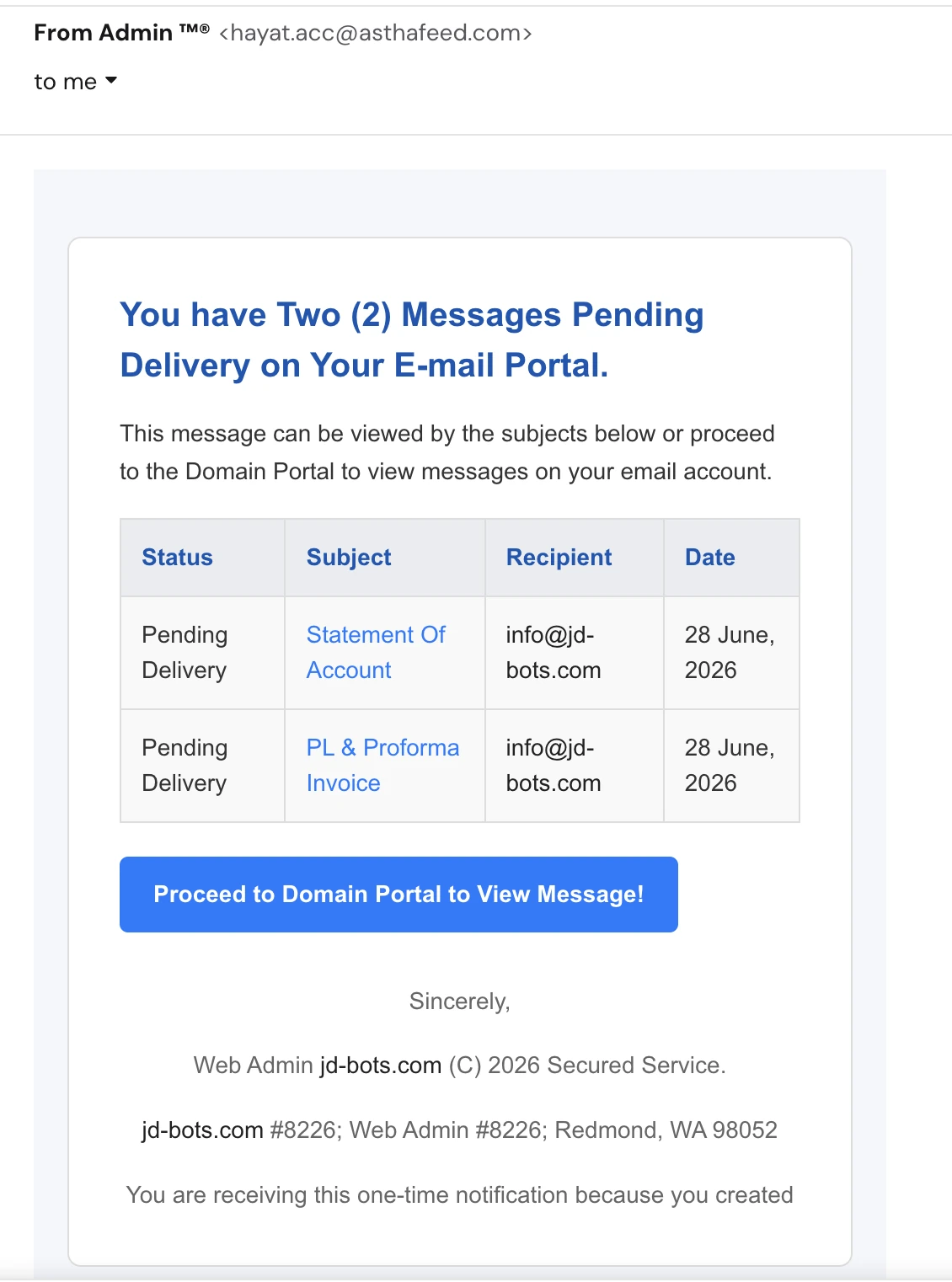
You have Two (2) Messages Pending Delivery on Your E-mail Portal. A notice claiming to be your own domain's web administrator, sent from an animal-feed company's accounts mailbox, whose button opens a page the attacker uploaded into a Google Cloud Storage bucket.
Complete Email
from: Admin ™® hayat.acc@asthafeed.com
to: info@jd-bots.com
reply-to: hayat.acc@asthafeed.com
date: 07/03/2026 5:20 PM
subject: Messages Pending Delivery on Your E-mail Portal
Email Body
You have Two (2) Messages Pending Delivery on Your E-mail Portal.
This message can be viewed by the subjects below or proceed to the Domain Portal to view messages on your email account.
| Status | Subject | Recipient | Date |
|---|---|---|---|
| Pending Delivery | Statement Of Account | info@jd-bots.com | 28 June, 2026 |
| Pending Delivery | PL & Proforma Invoice | info@jd-bots.com | 28 June, 2026 |
Proceed to Domain Portal to View Message!
Sincerely,
Web Admin jd-bots.com (C) 2026 Secured Service.
jd-bots.com #8226; Web Admin #8226; Redmond, WA 98052
You are receiving this one-time notification because you created
Hyperlink behind the "Proceed to Domain Portal to View Message!" button: https://storage.googleapis.com/claudesouth/index.html#info@jd-bots.com
Red Flags
This is a mail-quota phish, the oldest and most durable shape in credential harvesting: invent messages the recipient cannot see, then offer a portal where they can. Its opening move is to create a small, ordinary anxiety — two business documents are sitting somewhere you cannot reach — and to make the resolution a single blue button.
What makes this specimen worth dissecting is that almost every element of it is borrowed from somewhere else and none of the pieces were made to fit together. The sender is a real company that sells cattle feed. The postal address is Microsoft's. The landing page lives in Google's storage service. The footer's decorative bullets are broken HTML that never rendered, and the final sentence stops in the middle. Each of those is checkable in seconds, and every one of them contradicts the claim that your own domain's administrator wrote this.
1. Your "Web Admin" Is Emailing From an Animal Feed Company
- from: Admin ™®
hayat.acc@asthafeed.com - signature: Web Admin
jd-bots.com(C) 2026 Secured Service.
The signature claims the sender administers jd-bots.com. The address says asthafeed.com — a real business in the livestock and poultry feed trade, with no connection to the recipient's domain, its hosting, or its mail.
This is the flag that ends the analysis on its own, and it does not require knowing anything about the sender. Mail about your domain comes from your domain. The person who administers jd-bots.com has a mailbox at jd-bots.com; if the notice genuinely came from a hosting provider or mail platform, it would come from that provider's own domain, which you would recognise because you pay them. Neither is true here.
The local part is worth reading too. hayat.acc@ is not a systems mailbox — acc reads as accounts, and hayat is a person's name. Generic infrastructure addresses like admin@ or no-reply@ are what an attacker registers; a named accounts mailbox at an established company is what an attacker steals. The likelihood is that asthafeed.com has a compromised finance mailbox and is unknowingly sending this campaign, which also explains why the message will pass SPF, DKIM, and DMARC cleanly. It is genuinely authenticated mail from a genuine domain. That proves the sender controls the mailbox. It says nothing whatever about who they are.
2. "Admin ™®" — Trademark Symbols in a Display Name
- from: Admin ™®
The display name is the word Admin followed by a trademark symbol and a registered-trademark symbol, side by side.
No IT department has ever signed itself this way. ™ and ® are legal notices attached to brand names, they are not decoration, and nobody applies both to an internal job title. What this is, is an attempt to manufacture officialness out of typography — the same instinct that produces padlock emoji in subject lines and Secured Service in a footer. The attacker cannot supply real authority, so they reach for symbols that pattern-match to it.
It also survives spam filtering better than the alternatives. A display name of "Microsoft Support" or "Outlook Admin" invites brand-impersonation scoring; "Admin ™®" is nonsense, and nonsense trips fewer rules.
3. Email Has No "Pending Delivery" Waiting Room
- You have Two (2) Messages Pending Delivery on Your E-mail Portal.
This is the part of the message that is technically impossible, and it is worth being precise about why, because the whole pretext rests on it.
Mail is delivered or it is not. An SMTP server that cannot deliver a message either queues it invisibly and retries on its own, or gives up and returns a bounce to the sender — not a login prompt to the recipient. There is no holding area you visit, no messages parked pending your authentication, and no circumstance in which reading mail requires signing into a separate portal to release it.
The nearest real thing is a quarantine, where a filter has held a suspected spam or malware message. But quarantine notices come from the security product your organisation actually runs — Microsoft Defender, Proofpoint, Mimecast, your own mail gateway — they are branded as that product, they arrive on a schedule you recognise, and the release link lands on your provider's own domain. They do not arrive unannounced from a feed company, and they do not call themselves a "Domain Portal", which is not a product, a service, or a thing. The phrase exists because it sounds plausible and belongs to nobody who could be checked.
4. The Button Points Into a Google Cloud Storage Bucket
https://storage.googleapis.com/claudesouth/index.html#info@jd-bots.com
The single call to action does not lead to any portal. It leads to a file named index.html, uploaded by the attacker into a public bucket called claudesouth on Google's object storage service.
This is infrastructure laundering, and it is chosen for reasons that all work against the recipient:
- The domain is genuinely Google's.
storage.googleapis.comis real, its TLS certificate is valid, and the padlock in the address bar is authentic. Every visual trust cue people are taught to look for is present, because the page really is hosted by Google — the attacker simply rented a bucket. - Domain reputation blocking cannot touch it. No organisation can blocklist
storage.googleapis.comwithout breaking legitimate services across the business, so the URL sails past the reputation-based filtering that would kill a freshly registered domain instantly. - It costs nothing and it is disposable. A bucket takes a minute to create and a static HTML file is the whole payload. When it is reported and removed, the next one is up before the takedown completes.
- The bucket name is meaningless.
claudesouthhas no relationship to email, to portals, or to the recipient. It is a throwaway label on a throwaway container.
The lesson generalises well beyond this email: a trustworthy hosting domain says nothing about the page it is serving. Google Cloud Storage, Amazon S3, Azure Blob Storage, Cloudflare R2, Firebase, GitHub Pages, Notion, and every free site builder are all used this way, constantly, for exactly this reason. The reputable part of the URL is everything before the first single slash. Everything after it was written by whoever uploaded the file.
5. The Fragment After the # Is Your Own Address, and It Is There for a Reason
index.html#info@jd-bots.com
The URL ends with # followed by the recipient's email address. That is a fragment identifier, and its behaviour is the point.
A fragment is handled entirely inside the browser. It is never transmitted to the web server — it does not appear in server logs, it is usually stripped from proxy and gateway logs, and it is invisible to much of the URL inspection that sits between the click and the page. But JavaScript on the page can read it instantly.
So the phishing kit reads your address out of the fragment and writes it into the sign-in form before you see it. The page loads already showing your email address, waiting only for a password. That single detail does an enormous amount of work: a login screen that already knows who you are feels like a session that has merely expired, not a stranger's form. It is the same trick as the pre-filled Microsoft 365 clone, achieved without the attacker's server ever having to store a list.
It has a second use. The address is also how the kit tags the credentials it captures and decides which company's logo to render. The email address you were sent is the campaign's tracking identifier, and finding your own address embedded in a link is a reliable sign that the link was built for you by someone with a list.
6. The Footer Contains Microsoft's Postal Address
jd-bots.com#8226;Web Admin#8226;Redmond, WA 98052
98052 is Redmond, Washington — the ZIP code of Microsoft's headquarters. It is one of the most recognisable corporate addresses in technology, and it appears in the footer of nearly every Microsoft service notification ever sent.
It is in this email because the template was copied from one of those notifications and the location line was never changed. The recipient's domain has no premises in Redmond; the sending domain is an animal feed business; nobody involved in this message is within eight thousand kilometres of Washington State. The address is a fossil of the original that was plagiarised.
This is a good habit to build generally. Footers are copied more often than they are written, so the boilerplate at the bottom of a message frequently identifies the real template it was stolen from — a postal address, a company registration number, an unsubscribe line, or a copyright holder that belongs to somebody else entirely.
7. Broken HTML Entities Where the Bullets Should Be
jd-bots.com#8226;Web Admin#8226;Redmond, WA 98052
Those #8226; strings are not text anyone typed. • is the HTML numeric entity for a bullet character (•), the little separator used between footer items. Here the leading ampersand is missing, so the browser had nothing to decode and printed the raw code instead.
That is a rendering failure visible in the finished message, and it tells you how it was made. A template was hand-edited, or passed through a tool that escaped or stripped the &, and nobody looked at the result before sending. A real service notification is built by a mail platform and previewed across clients before a single copy goes out; it does not ship with its punctuation showing through as source code.
It is the same class of evidence as an unfilled merge field — the seam where the machinery shows. Worth noting that this seam is decorative: the attacker did not care that the footer was broken, because the footer is not the part that has to work. Only the button has to work.
8. The Last Sentence Stops in the Middle
- You are receiving this one-time notification because you created
Because you created what? The message ends there. No account, no mailbox, no domain — the sentence is amputated at the verb, and it is the final line of the email.
Legitimate bulk mail ends with a complete and legally careful explanation of why you received it, because senders are obliged to provide one and because their platforms enforce a footer. This one was truncated when the template was copied and never proof-read, which is consistent with everything else: the broken entities, the wrong city, the mismatched sender.
Notice also what the phrase is reaching for. "One-time notification" is designed to head off the obvious objection — why have I never had one of these before, and why will I never get another? — and to add a light, deniable pressure. This is your only notice. Act on it now.
9. Two Finance Documents, Chosen to Make a Business Open Them
- Statement Of Account — 28 June, 2026
- PL & Proforma Invoice — 28 June, 2026
The two withheld messages are not random. A statement of account is a summary of what a customer owes; PL is a packing list and a proforma invoice is the quotation-style document that precedes a shipment. Together they describe an ordinary export or supply transaction, and they are aimed squarely at the kind of mailbox that receives such things.
That targeting is the entire personalisation budget of this campaign. It went to info@jd-bots.com — a published, scrapeable, general-enquiries address — and the Recipient column of the table simply repeats that same address twice. There is no name, no company, no reference number, no amount, no counterparty. The only variable the attacker merged in is the address they already had.
The dates deepen the problem rather than supporting it. The documents are dated 28 June and the notification arrived on 3 July — five days of alleged limbo. Mail servers do not hold messages for five days and then email you about it. Real quarantine digests arrive within hours and list the actual sender of each held message, which is the one field this table conspicuously omits: who supposedly sent these documents. Without a sender there is nobody to contact and nothing to verify, and that is not an oversight.
The choice of bait also signals where this leads. Finance documents draw finance people, and a mailbox that handles statements and invoices is the most valuable kind to steal — not for what is in it, but for the payment conversations it lets the attacker join later.
How This Scam Works
The email is a doorway with nothing behind it. There are no pending messages, no statement, no packing list, and no portal — only a form that wants a password, and a plan for what to do once it has one.
- The Harvest: Published addresses are scraped from company websites,
WHOISrecords, directory listings, and breach dumps.info@,sales@, andaccounts@are the priority, because they are public by design and because they are read by people whose job is to open documents from strangers. - The Sending Mailbox: A legitimate mailbox at an unrelated company — here, an accounts address at an animal feed business — is compromised through an earlier phish or a reused password. Its mail passes
SPF,DKIM, andDMARCbecause it genuinely belongs to that domain, and it carries the domain's accumulated sending reputation. This is why authentication results are not a verdict on trustworthiness. - The Template: A Microsoft-style notification is copied and crudely rebranded, with the recipient's own domain merged into the signature so it appears to come from their own administrator. The Redmond address, the broken bullet entities, and the truncated final sentence all survive from the copy.
- The Landing Page: A single
index.html— a cloned webmail or Microsoft 365 sign-in, sometimes rendered over a blurred image of a document — is uploaded to a public cloud storage bucket. The attacker gets valid TLS, a globally trusted domain, and a URL that no organisation can afford to blocklist. - The Blast: The message goes out with each recipient's address appended to the link as a fragment, which doubles as the campaign's tracking identifier and as the value that pre-fills the login form.
- The Click: The recipient sees business documents held just out of reach and a single blue button. Nothing is threatened and nothing is demanded, which is precisely why the message does not read as an attack.
- The Pre-Filled Form: The page reads the fragment, displays the recipient's own email address, and asks only for the password — presenting itself as an expired session rather than a new sign-in.
- Credential Capture: The password is posted to the attacker's collection endpoint. Competent kits then forward the victim to the real service, or to a genuine error page, so nothing appears to have gone wrong.
- MFA Interception: Where two-factor is enabled, the page relays the prompt live and asks for the code, or steals the resulting session cookie. A code typed into a phishing page is handed over while it is still valid, which is why app and SMS codes slow this attack rather than stopping it.
- Quiet Reconnaissance: Inside the mailbox, the attacker reads. Who the suppliers and customers are, what the invoices look like, who signs off payments, how the finance team writes. A hidden inbox rule diverts replies containing invoice, payment, or bank into a folder nobody opens.
- The Real Payday: A genuine invoice thread is hijacked from the compromised account, in the victim's own voice and with the victim's own signature, carrying changed bank details. The customer pays the attacker. That is business email compromise, and it is the most expensive category of email crime by loss volume.
- The Cycle Repeats: The stolen mailbox becomes the next campaign's sending infrastructure, mailing that company's own contacts from an address they trust — which is almost certainly how
hayat.acc@asthafeed.comcame to be sending this one.
Conclusion and Recommendations
There are no pending messages. There is no Domain Portal. There is no statement of account and no proforma invoice, and the "Web Admin" of jd-bots.com is a compromised accounts mailbox at a cattle feed company writing from a template that still carries Microsoft's postal address, still shows its bullet characters as raw HTML, and still stops mid-sentence at the bottom.
The genuinely instructive part is the link. It is served over valid TLS from storage.googleapis.com, a domain no security team would ever block, and it carries the recipient's own email address in a fragment that the browser will read but the server will never log — so the fake sign-in page opens already knowing who you are. Every trust signal people are trained to check comes back clean, because the attacker borrowed all of them. What cannot be borrowed is the premise: email does not hold your messages hostage behind a login, and the administrator of your domain does not write to you from someone else's.
Immediate Actions:
- Do Not Click the Button or the Subject Links: The two document titles in the table are hyperlinks as well, pointing to the same destination as the button. There is no version of this message where clicking is safe.
- Do Not Enter a Password Anywhere You Arrived at From an Email: If a page reached from a link asks for credentials, close it and navigate to the service yourself, from a bookmark or by typing the address. This one habit defeats the entire genre.
- Do Not Reply: The reply-to is the compromised mailbox. A reply confirms an attended, human-operated business address and opens a thread that will be used for whatever comes next.
- Check Your Own Mail System Instead: If you genuinely have quarantined mail, it is visible in your provider's own quarantine — the Microsoft 365 or Google Workspace admin console, or your mail gateway. Look there. It takes less time than reading the email did.
- Report and Delete: Use the phishing report button rather than plain deletion, so the sending address is scored and your security team sees it. The Google Cloud Storage URL can be reported for abuse directly to Google, and buckets hosting phishing kits are usually removed quickly once reported.
- Consider Warning the Sending Company:
asthafeed.comis very likely a victim here, not the attacker. If you have a safe route to reach them — a phone number from their website, not a reply to the email — telling them their accounts mailbox is sending phishing may be the most useful thing you do with this message. - If Anyone Signed In, Move Immediately: Change the password from a device you trust, revoke every active session and refresh token, re-verify MFA, and then audit the mailbox for forwarding rules and filters you did not create — that hidden rule is how the intruder stays invisible after the password changes. Check newly registered MFA methods and OAuth app grants at the same time, and change the password anywhere else it was reused, because that is usually where the real loss lands.
Verification Steps:
- Read the Domain After the
@, Never the Display Name: "Admin ™®" is free text the sender typed.asthafeed.comis not. Mail about your domain that does not come from your domain or your named provider is answered by that fact alone. - Read a URL From the Left, and Stop at the First Single Slash: Everything up to
storage.googleapis.com/is Google. Everything after it —claudesouth/index.html— is a stranger's file. The trustworthy part of a URL is the host, and the host is not the page. - Treat a Padlock as Proof of Encryption, Not Honesty:
HTTPSmeans the connection is private. It has never meant the site is legitimate, and free certificates mean effectively every phishing page has one. - Be Suspicious of Your Own Address Inside a Link: A URL carrying your email address — after a
#, in a query string, or in a base64 blob — was constructed for you specifically, and its usual purpose is to pre-fill the form that is about to ask for your password. - Ask Who Supposedly Sent the Held Message: Every real quarantine notice names the original sender of each message. A table that lists a status, a subject, your own address, and a date, but no sender, is describing documents that do not exist.
- Check the Footer Against the Claimed Sender: A postal address, a copyright holder, or a company number that belongs to a different organisation is a copied template announcing itself.
- Verify Out of Band, Through a Route You Already Have: If you believe a supplier really did send a statement or proforma invoice, call them on the number in your own records. Never a number, link, or portal supplied by the message.
- Remember That Passing Authentication Proves Nothing About Intent:
SPF,DKIM, andDMARCconfirm the mail came from a mailbox on the domain it claims. When that mailbox has been stolen, all three pass perfectly.
Additional Protection Tips
- Move to Passkeys or Hardware Keys: A passkey or
FIDO2key is cryptographically bound to the real domain and simply will not operate on a copy hosted in a storage bucket. It is the only control on this list that stops credential phishing outright instead of slowing it down. - Use a Password Manager as a Domain Detector: A manager fills credentials only on the exact domain it saved them against. When it silently refuses to autofill a login page, it has just made the domain judgment that humans get wrong and software never does.
- Enable Number Matching and Block Push Fatigue: Where passkeys are not yet possible, number-matching MFA defeats the blind-approval attacks that follow a stolen password, and it costs nothing to turn on.
- Audit Mailbox Rules on a Schedule, Not Just After an Incident: External auto-forwarding and rules that file invoice, payment, or bank into an ignored folder are the fingerprint of an intruder already inside. Most organisations find them only after the money has gone.
- Make Bank-Detail Changes Require a Callback, Always: The stolen mailbox is a means, not the end. A standing rule that no change to payment details is actioned on an email — only after a voice call to a number in your own records, made by someone other than the person who received the request — is what turns a compromise into an inconvenience instead of a loss.
- Tag External Mail Visibly: A banner marking mail from outside the organisation makes a message pretending to be from your own administrator obvious at a glance, and it is a configuration change rather than a training programme.
- Publish Fewer Addresses, and Watch the Ones You Do:
info@andsales@exist to be public, so treat them as the exposed surface they are — extra filtering, no shared password, no privileged access, and never the mailbox that also approves payments. - Expect the Trusted-Host Trick and Teach It Explicitly: Cloud storage, free site builders, and document platforms are used to host phishing pages precisely because their domains cannot be blocked. The fake cloud storage payment failure notice used the same Google Cloud Storage pattern, and the WordPress.com renewal notice borrowed a real brand's design just as completely.
- Build a Reporting Habit, Not Just a Detection Habit: One-click reporting and a standing promise that admitting a click is met with help rather than blame is worth more than any poster. The minutes between the sign-in and the disclosure are where this attack is won or lost.
Remember: Your mail provider never holds messages behind a separate login, and your domain's administrator never writes to you from another company's mailbox. When a link's only trustworthy feature is the hosting company's name in front of the first slash, the trust belongs to the host — not to the page, and not to the form asking for your password.
