Phishing: Keep Your Brand Protected – Renew Your Domain | Fake WordPress.com Domain Renewal Notice

At a glance
- Verdict
- PhishingGet the recipient to click 'Renew Your Domain' and enter WordPress.com credentials, MFA codes and card details on a cloned page.
- Subject line
Keep Your Brand Protected – Renew Your Domain- Claimed sender
- Account Services
postmaster@pietradipadula.itReply-to:postmaster@pietradipadula.it - Impersonates
- WordPress.com — WordPress.com (Automattic) 'Customer Service Department' domain-renewal notice
- Received
- · Published
- Known variants
The support address quoted in the body belongs to the real brand but is plain text only; the Reply-To header points at the Italian postmaster mailbox.
Evidence: the message as received plus passive registry lookups; links and attachments are not opened. How we analyse a scam email.
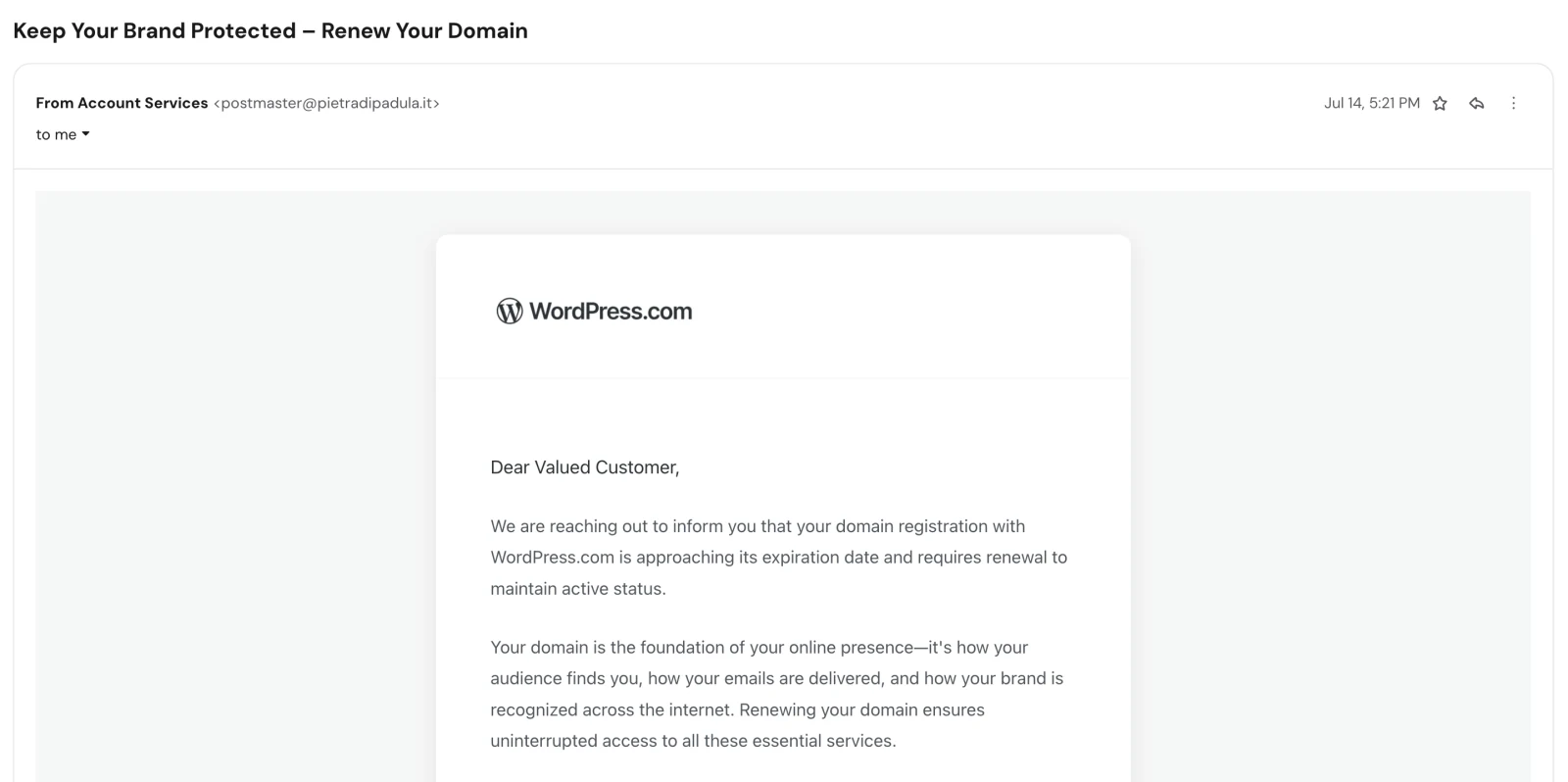
We are reaching out to inform you that your domain registration with WordPress.com is approaching its expiration date and requires renewal to maintain active status. A pixel-perfect WordPress.com notice sent from an Italian postmaster mailbox, whose only button points at a German health domain.
Complete Email
from: Account Services postmaster@pietradipadula.it
reply-to: postmaster@pietradipadula.it
date: 07/14/2026 5:21 PM
subject: Keep Your Brand Protected – Renew Your Domain
Email Body
WordPress.com
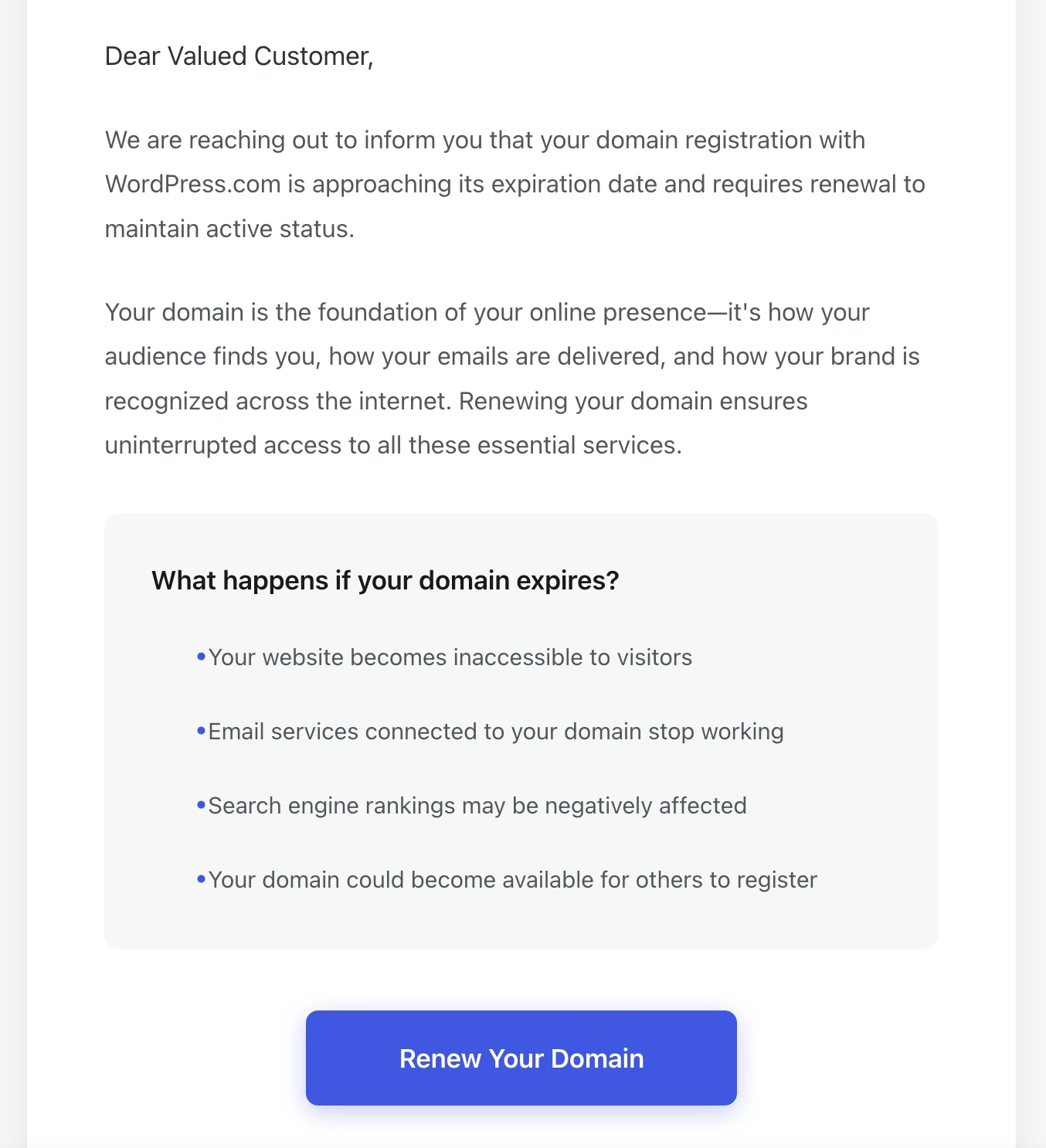
Dear Valued Customer,
We are reaching out to inform you that your domain registration with WordPress.com is approaching its expiration date and requires renewal to maintain active status.
Your domain is the foundation of your online presence—it's how your audience finds you, how your emails are delivered, and how your brand is recognized across the internet. Renewing your domain ensures uninterrupted access to all these essential services.
What happens if your domain expires?
- Your website becomes inaccessible to visitors
- Email services connected to your domain stop working
- Search engine rankings may be negatively affected
- Your domain could become available for others to register
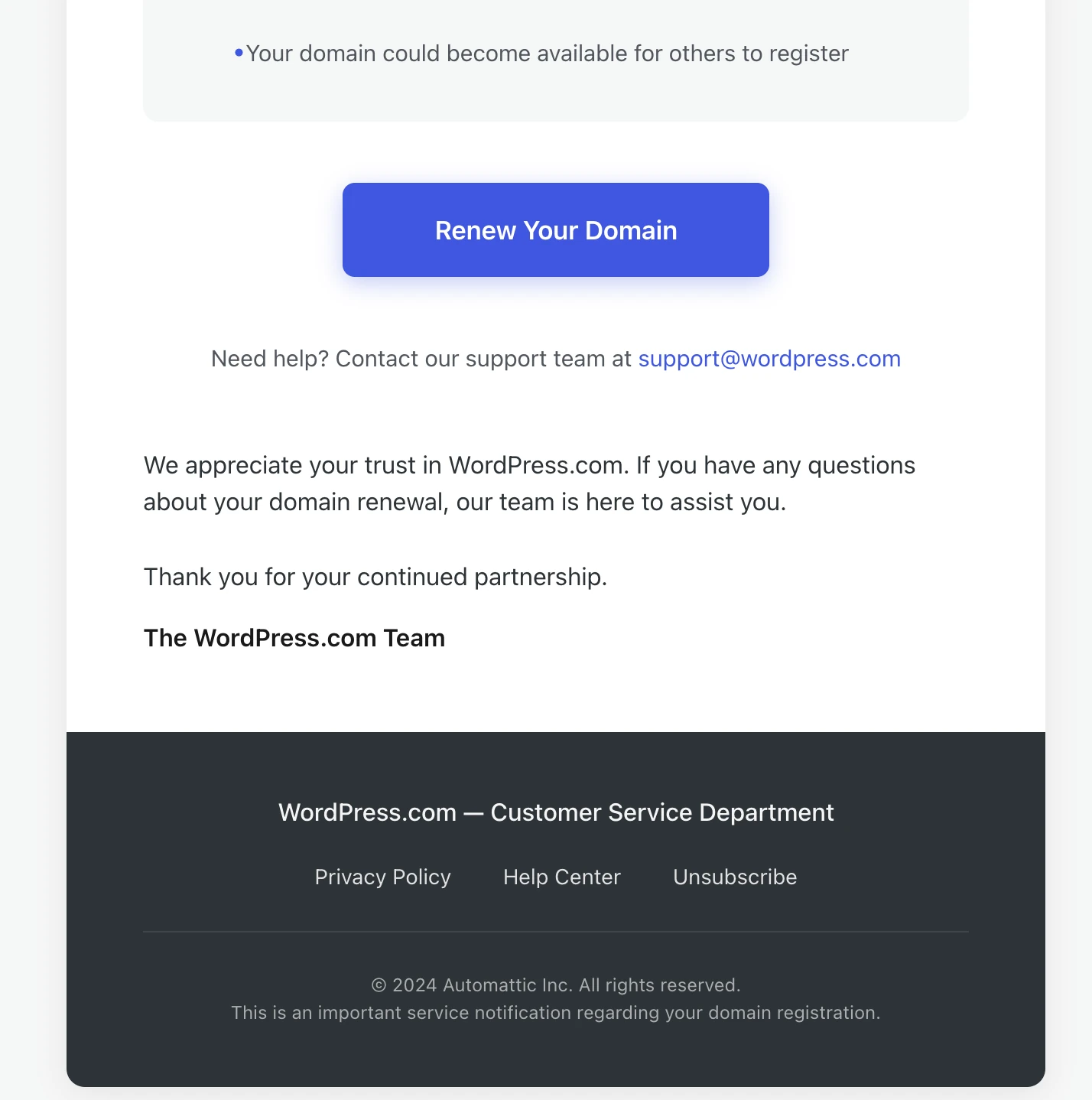
Renew Your Domain
Need help? Contact our support team at support@wordpress.com
We appreciate your trust in WordPress.com. If you have any questions about your domain renewal, our team is here to assist you.
Thank you for your continued partnership.
The WordPress.com Team
WordPress.com — Customer Service Department
Privacy Policy Help Center Unsubscribe
© 2024 Automattic Inc. All rights reserved.
This is an important service notification regarding your domain registration.
Hyperlink behind the "Renew Your Domain" button: https://skeu1.comotion-gesundheit.de/file/?QIQU=SKJI
Red Flags
This is a brand-impersonation phish built around a renewal deadline, and its opening move is to make you worry about something you already own. The design is genuinely good: the wordmark is right, the typography is close, the blue button is the right blue, and the fear list reads like a help-centre article. Nothing about the appearance gives it away.
Everything about the plumbing does. The message was sent from a mailbox in Italy, the one clickable element in it points to a host in Germany, and the brand it is wearing is American. Three countries, none of them talking to each other, and not a single byte of this email touches anything Automattic owns.
1. The Sender Is a Postmaster Mailbox on an Unrelated Italian Domain
- from: Account Services
postmaster@pietradipadula.it
.it is the country-code domain for Italy, and pietradipadula is Italian — literally stone of Padula, Padula being a town in the province of Salerno. Whatever that domain was registered for, it is not WordPress.com. Automattic sends its transactional mail from wordpress.com and automattic.com, and a domain-expiry notice is about as transactional as mail gets.
The local part matters as much as the domain. postmaster@ is not a marketing address — it is the administrative mailbox that mail standards require every domain to operate, the one that receives bounce and abuse reports. No company on earth sends customer billing notices from postmaster@. What sends mail from postmaster@ is someone who has taken control of a mail server and is using the account that was already sitting there, because creating a convincing new one would mean touching the domain's DNS and risking discovery.
The display name "Account Services" is doing all the work here. It is free text, chosen by the sender, and it is the only part of that line that sounds like WordPress. The part that is not free text — the address after the @ — is the part that tells you the truth.
2. The Button Goes to a German Health Domain
https://skeu1.comotion-gesundheit.de/file/?QIQU=SKJI
Read it left to right and stop at the first single slash. The domain is comotion-gesundheit.de — .de is Germany, and Gesundheit is German for health. This is the entire attack, and it has no relationship to WordPress.com, to Automattic, to domain registration, or to the sender in Italy.
Three details in that URL are worth naming individually:
skeu1.is a subdomain, and subdomains are free to whoever controls the parent domain. A host that has been compromised can be given an unlimited number of them, each disposable, each looking slightly different, so that blocking one does nothing. The nonsense string is a giveaway that it was generated rather than named./file/is a path chosen to sound like a document is waiting for you. It sets an expectation before the page has loaded.?QIQU=SKJIis a tracking token. Four characters, unique per recipient, which is how the attacker knows which address on the list clicked, and how the landing page knows which victim to associate the harvested credentials with. A genuine renewal link carries your domain name or an order reference. This one carries an identifier for you.
A real WordPress.com renewal link goes to wordpress.com/domains/manage, inside the dashboard you already log into. It does not leave the wordpress.com domain at all, because there is nowhere else for it to go.
3. A Domain Renewal Notice That Never Names the Domain
This is the flag that ends the argument on its own. Read the email again and count what a genuine expiry notice would contain and this one does not:
| A real renewal notice states | This email states |
|---|---|
| The exact domain name expiring | "your domain registration" |
| The expiry date | "approaching its expiration date" |
| The renewal price and currency | nothing |
| The account or order number | nothing |
| Whether auto-renew is already on | nothing |
Not one checkable fact. Every single reference is a placeholder. That is not sloppiness — it is a structural requirement of the attack. The sender does not know which domain you own, or whether you own one at all, because this went to a scraped list rather than to a customer. The message has to be vague to survive contact with every recipient, and the vagueness is the evidence.
It is also worth knowing that WordPress.com enables auto-renew by default on domains registered through it, and that the platform emails about renewals well in advance with the domain named in the subject line. The email you are looking at is structurally incapable of being that message.
4. "Dear Valued Customer" Is an Unfilled Merge Field
WordPress.com knows your username, your display name, and the name of every site on your account, and it uses them. Automattic's real notifications open with your name or your site's name because personalisation costs a template variable and buys enormous credibility.
"Dear Valued Customer" is what a template produces when the sender has an email address and nothing else. The same logic that forced the domain to go unnamed forces the recipient to go unnamed. Both blanks come from the same empty database.
5. "© 2024 Automattic Inc." on an Email Sent in July 2026
The footer claims a copyright year that is two years stale on the date of delivery.
Real corporate email templates are maintained: the copyright line is generated or updated annually, because legal and brand teams treat it as a compliance detail. A frozen 2024 tells you when this kit was built — or when the legitimate email it was copied from was captured — and that it has been in circulation, unmaintained, ever since. Phishing kits are traded and reused for years; nobody reselling one bothers to update the copyright.
It is a two-second check, it sits at the very bottom of every marketing email you receive, and it is one of the most reliable tells available for a template-based impersonation.
6. Automattic Does Not Have a "Customer Service Department"
- WordPress.com — Customer Service Department
Automattic's support staff have been called Happiness Engineers for well over a decade. It is not an obscure internal nickname; it is public, widely written about, and it appears in the signature of every real support interaction the company has. There is no "Customer Service Department" at Automattic, and the company does not sign mail that way.
This is what generic corporate language looks like when it is written by someone who has seen the logo but has never received an actual email from the company. The visual identity was copied faithfully. The voice was invented, and the voice is where impersonations fail.
7. support@wordpress.com Is Decoration, Not a Destination
- Need help? Contact our support team at
support@wordpress.com
The one address in the body that belongs to the real brand is the one address that does nothing. It sits in the message as plain text to reassure you that a legitimate escape route exists. Meanwhile the reply-to header on the message points at postmaster@pietradipadula.it — so anyone who hits Reply, including anyone replying specifically to ask whether the email is genuine, reaches the attacker in Italy rather than anybody at Automattic.
WordPress.com does not run general support through an email address at all; it routes customers through the Help Center and live chat inside the dashboard. Quoting a plausible-sounding support mailbox is a standard trick: it lowers your guard without giving you a channel that could actually contradict the message.
8. Exactly One Thing in the Email Is Clickable
The footer offers Privacy Policy, Help Center, and Unsubscribe. In the rendered message none of them are links — they are grey text laid out to look like links, with nothing behind them.
Genuine bulk email is legally obliged to carry a working unsubscribe mechanism and commercially motivated to link its policies. Here the furniture is painted on, because every path in this message is meant to converge on one URL. When a professional-looking email has a full navigation footer and only the call-to-action button responds to a click, you are looking at a single-purpose funnel wearing a corporate costume.
9. The Fear List Is the Engine, and It Has No Deadline
Four consequences, ordered so that each is worse than the last, ending on the one that is genuinely frightening to any business: your domain could become available for others to register. Losing a domain to a squatter is a real and expensive event, and the list is engineered to put you one click from preventing it.
Note what the list does not contain: a date. Not an expiry date, not a grace-period end, not a number of days remaining. Urgency without a deadline is the signature of manufactured pressure, because a specific date is a fact you could go and check against your registrar — and checking is the one behaviour this email cannot survive.
How This Scam Works
The email is a doorway and nothing else. Nothing is asked for in the message itself, which is exactly why it reads as harmless; the entire transaction happens after the click.
- The Blast: A template kit is sent to a large scraped list from a compromised mail server. The Italian domain lends the message a real sending reputation, real
SPFandDKIMalignment, and a history that spam filters have already learned to trust. The attacker pays nothing and inherits somebody else's credibility. - The Hook: Domain expiry is the ideal pretext for a business audience. Almost every recipient owns a domain, almost nobody remembers its exact renewal date, and the consequence of getting it wrong is severe and permanent.
- The Click: The tracking token
?QIQU=SKJIrecords which address responded. That alone has value: a confirmed, human-attended mailbox at a real organisation is worth more on the resale market than a hundred unverified addresses. - The Landing Page: A cloned WordPress.com login appears, usually pre-filled with the recipient's email address so it feels like a session you already had. The address came from the tracking token in the URL.
- Credential Capture: Username and password are submitted to the attacker's server. Better kits forward them to the real WordPress.com immediately, so you receive a genuine login and never notice anything went wrong.
- MFA Interception: If two-factor is enabled, the fake page asks for the code and relays it in real time. A code entered into a phishing page is a code handed to the attacker while it is still valid, which is why app-generated and SMS codes do not stop this class of attack.
- The Payment Step: The "renewal" then asks for card details to complete the transaction. This is the direct payout, and it is why the pretext was billing rather than a security alert.
- Account Takeover: With the login, the attacker owns the site: content can be defaced, malware or spam pages injected, the recovery email changed to lock you out, and the domain itself transferred away. The message warned you your domain could end up in someone else's hands, and clicking is precisely how that happens.
- Lateral Reuse: The captured password is replayed against your email, bank, and hosting accounts. Where it was reused, the compromise spreads well beyond the website.
Conclusion and Recommendations
There is no expiring domain, no renewal, and no message from WordPress.com. There is a phishing kit that was assembled in 2024, sent in 2026 from a hijacked Italian mail server, pointing at a hijacked German one, wrapped in Automattic's branding and signed by a department that does not exist.
What makes it worth studying is how little the visual quality mattered. The design is convincing enough to pass a glance from someone who genuinely uses WordPress.com. Every fact underneath it — the sending domain, the link destination, the missing domain name, the missing date, the stale copyright — contradicts the design. Reading the plumbing rather than the artwork resolves this email in under ten seconds, and that is the only skill this specimen is teaching.
Immediate Actions:
- Do Not Click the Button:
comotion-gesundheit.deis the attack in its entirety. A visit alone fingerprints your browser and confirms your address as live via the token in the URL, and there is no version of "just looking at the page" that costs nothing. - Do Not Reply: The reply-to is the attacker's mailbox in Italy, not WordPress.com. Replying to ask whether the email is real asks the forger to vouch for the forgery, and confirms an attended human mailbox in the process.
- Do Not Use
support@wordpress.comEither: It is quoted in the body of a message you already distrust. Reach support through the WordPress.com dashboard, never through contact details supplied by the email under suspicion. - Check Your Actual Renewal Status Yourself: Open a new browser tab, type your registrar's address by hand, and look. Thirty seconds of independent verification settles the only question the email raised.
- Report and Delete: Mark it as phishing in your mail client so the sending infrastructure is scored, and report the impersonation to Automattic. Consider notifying the Italian domain's owner if you can reach them through a channel other than the compromised mailbox — they are a victim here too and may not know their server is sending this.
- If Anyone Clicked, Act on the Password Immediately: Change the WordPress.com password from a device you trust, revoke all active sessions, re-verify MFA, and check for newly added users, changed recovery addresses, unfamiliar plugins, and new mailbox forwarding rules. If the same password is used anywhere else, change it there first — that is where the real damage usually lands.
- If Card Details Were Entered, Call the Bank Now: Block the card and dispute any charge. The first few hours are the window in which a payment can still be stopped.
Verification Steps:
- Read the Domain After the
@, Never the Display Name: "Account Services" is text the sender typed.pietradipadula.itis not. Making this the first reflex resolves the majority of impersonation attempts instantly. - Hover Every Button Before Trusting Any Email: The visible text of a link and its destination are unrelated by design. On mobile, press and hold to preview the URL rather than tapping.
- Read URLs Left to Right and Stop at the First Single Slash: That is the real domain. Everything after it —
/file/,/renewal/,/wordpress/— is chosen by the attacker and proves nothing. - Demand That a Renewal Notice Name the Thing Being Renewed: Domain, date, price, order number. A billing email missing all four is not a billing email. This single question defeats the entire domain-renewal genre.
- Go to the Registrar Directly, Never Through the Email: Type the address yourself or use your own bookmark. If a renewal is genuinely due, it will be visible in your account; if it is not there, the email was fiction.
- Check the Copyright Year and the Company Voice: A stale year and an invented department name are both visible without clicking anything, and both are hard for a copied template to get right.
- Know Who Actually Registered Your Domains: A surprising share of these attacks succeed because nobody in the organisation is certain which registrar holds which domain. If you cannot answer that from memory, you cannot evaluate a renewal notice — and you are the intended target.
Additional Protection Tips
- Put Every Domain on Auto-Renew and Record the Dates: A domain that renews automatically, with its expiry date in a shared calendar and a card on file that has not expired, makes the entire pretext inert. You cannot be panicked about a deadline you already control.
- Use a Password Manager as a Phishing Detector: A manager fills credentials only on the domain it saved them against. When it silently declines to offer a login on a page that looks exactly like WordPress.com, it has just told you the domain is wrong — which is the check humans reliably fail and software never does.
- Move to Passkeys or Hardware Keys Where They Are Offered: Codes typed into a fake page can be relayed in real time. Passkeys and
FIDO2security keys are cryptographically bound to the real domain and simply do not work on a lookalike, which is why they stop this attack outright. - Lock Domains Against Transfer: Enable registrar lock and, on the domains that matter, registry lock. Even after a credential compromise, a locked domain cannot be moved without an out-of-band step.
- Assign One Named Owner for Domains and Hosting: Renewal notices should reach a person whose job includes knowing whether they are true, not a shared inbox where everyone assumes somebody else has checked.
- Treat Brand-Perfect Design as Neutral Evidence: Logos, fonts, and colours are copied by right-clicking. A pixel-accurate email proves only that the attacker visited the website — the same lesson as the fake QuickBooks debit alert, where a link displayed as an Intuit address routed somewhere else entirely.
- Expect Domain-Themed Lures in Both Flavours: This one impersonates your registrar. The Chinese domain registration notice impersonates a third party warning you that someone else is buying your brand. Same anxiety, opposite pretexts, and both are working the same list.
- Register a Reporting Habit, Not Just a Detection Habit: A one-click "Report Phishing" button and a standing promise that reporting a click is met with help rather than blame is worth more than any awareness poster. This class of attack is defeated in the minutes between the click and the disclosure.
Remember: A genuine renewal notice knows what you own. It names the domain, gives the date, quotes the price, and sends you to the registrar you already log into. This one knew nothing about you except your email address — and an email that has to say "your domain" because it cannot say which domain has already admitted it is not writing to a customer.
