Phishing: Final Warning — Immediate Domain Renewal Needed | Fake WordPress.com Renewal Notice

At a glance
- Verdict
- PhishingPush the recipient to click a 'Renew & Restore Services' button that captures registrar credentials and card details on a hijacked site.
- Subject line
Final Warning — Immediate Domain Renewal Needed- Claimed sender
- Account Services
support@mt1.endlosleben.deReply-to:support@mt1.endlosleben.de - Impersonates
- WordPress.com — WordPress.com 'Domain Support Department' final domain-renewal notification
- Received
- · Published
- Known variants
The sender is a default support mailbox on a mail-server subdomain of an unrelated German domain. The only link is behind a 'Renew & Restore Services' button.
Evidence: the message as received plus passive registry lookups; links and attachments are not opened. How we analyse a scam email.
We are contacting you regarding your expired domain registration. A WordPress.com-branded final warning sent from a German mail server subdomain, whose only button points at a throwaway subdomain of an Italian sports academy.
Complete Email
from: Account Services support@mt1.endlosleben.de
reply-to: support@mt1.endlosleben.de
date: 05/08/2026 1:42 PM
subject: Final Warning — Immediate Domain Renewal Needed
Email Body
Logo
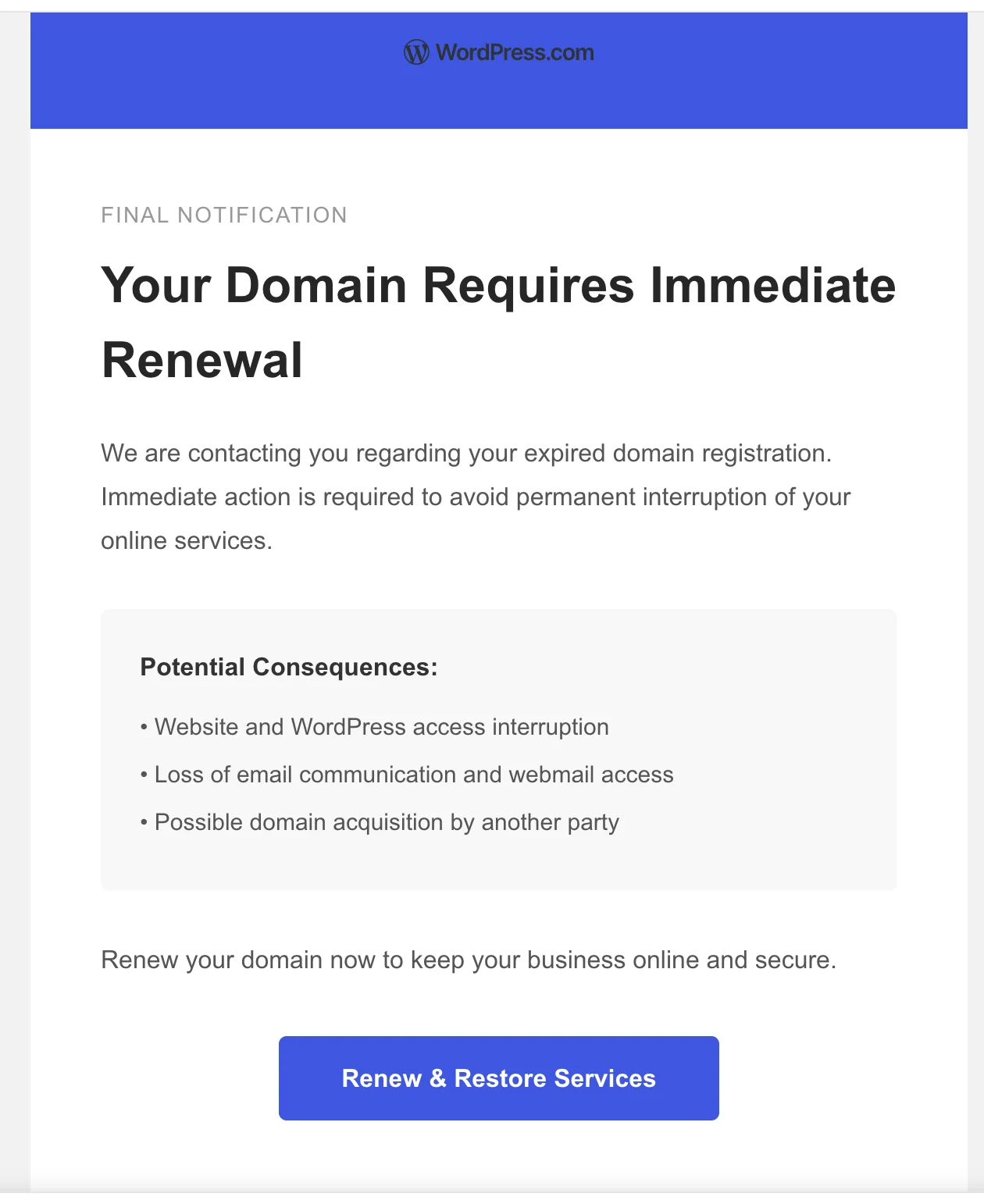
Final Notification
Your Domain Requires Immediate Renewal
We are contacting you regarding your expired domain registration. Immediate action is required to avoid permanent interruption of your online services.
Potential Consequences:
• Website and WordPress access interruption
• Loss of email communication and webmail access
• Possible domain acquisition by another party
Renew your domain now to keep your business online and secure.
Renew & Restore Services
Thank you for choosing our services.
© 2026 Domain Support Department
Hyperlink behind the "Renew & Restore Services" button: https://loli.sportacademyroma.com/wep?2FOR73VER=HERL923HDS
Red Flags
This is a domain expiry phish, and it is a well-made one. There is no lurid threat, no mangled English, and no obvious tell in the writing. It is three short paragraphs, a grey box of consequences, and a single blue button, laid out in the house style of a real product notification. The whole design is an argument that this is routine.
What gives it away is not the prose. It is the arithmetic of the thing: a message that claims to be about your domain never once names a domain, never names a registrar, never names a price, and never names itself. Strip the borrowed logo off the top and there is nothing left that could be checked, contacted, or held responsible — which is precisely how it was built.
The second thing worth noticing is that we have met this campaign before. Nearly every structural choice here matches the fake WordPress.com renewal notice dissected earlier: the same "Account Services" display name, the same impersonated brand, the same shape of URL. Only the hosts have been swapped, and they were swapped between the same two countries.
1. The Only WordPress in the Email Is a Picture
- The header logo renders as the WordPress.com wordmark
- from: Account Services
support@mt1.endlosleben.de
The email is branded as WordPress.com. The blue banner, the W-in-a-circle mark, the wordmark — visually it is Automattic's notification template. And it is the single point in the entire message where the brand appears as an assertion.
Read the body text again with the logo covered up. It says your expired domain registration, your online services, our services, Domain Support Department. It never says WordPress, never says Automattic, never says wordpress.com. The one near-exception is the bullet "Website and WordPress access interruption", which reads as a generic product word rather than a claim about who is writing.
That is not sloppiness, it is design. The copy is brand-agnostic so that one template can wear any logo. Swap the header image for GoDaddy, Namecheap, Hostinger, or Bluehost and not a single sentence needs rewriting. The attacker maintains one body of text and a folder of logos, and the branding is a remote image swapped per campaign.
It also means the impersonation is only as durable as an image load. Which brings us to the alt text.
2. The Logo's Alt Text Is the Word "Logo"
- Alt text of the header image:
Logo
When this message is read with remote images blocked — the default in Outlook, in Gmail's image-proxy-off mode, on many mobile clients, and in every plain-text extraction — the top of the email does not say WordPress.com. It says Logo.
A genuine WordPress.com notification carries real alt text, because Automattic's mail is built by a platform where accessibility is enforced and the brand name is the whole point of the image. Alt text reading Logo is the default placeholder that email builders and HTML editors drop in when nobody types anything, and it survives here because nobody involved cared what the message looked like without pictures.
This is a useful habit to build. Turn remote images off and the borrowed trust evaporates, because brand impersonation in email is almost always an image, and images are the one part of a message your client will not load until you let it. What remains is the text, and the text in this email belongs to nobody.
3. "Expired" and "Final Warning" Contradict the Email's Own Existence
- subject: Final Warning — Immediate Domain Renewal Needed
- We are contacting you regarding your expired domain registration.
- Loss of email communication and webmail access
The message states as fact that the registration has already expired, and then warns of consequences in the future tense.
Those cannot both be true. When a domain's registration lapses to the point of interruption, the nameservers stop answering — and the mail stops with the website. There is no state in which your domain is expired, your services are about to be cut off, and a warning about it lands cleanly in a mailbox on that domain. The email arriving is evidence against the email's own premise.
The subject compounds it. A "Final Warning" implies a documented series of earlier notices, each of which should be sitting in the same mailbox. Search for them and there is nothing, because there was never a first warning — the sequence is asserted, not sent. Claiming to be the last in a chain is a cheap way to manufacture both history and deadline at once, and it discourages the obvious response of waiting to see whether anything actually breaks.
4. Nothing in the Message Can Be Checked
A real renewal notice is almost entirely specifics. This one has none of them:
- No domain name. Not once. A registrar that manages your domain writes the domain in the subject line, because that is the only fact that matters and because customers hold several.
- No expiry date. "Expired" with no date attached cannot be compared against anything.
- No price, currency, or renewal term. You are asked to pay without being told what for or how much.
- No account, customer, order, or invoice number.
- No addressee. Not even Dear Valued Customer. The message opens on a headline.
- No registrar name, company, or postal address.
- No unsubscribe link, no privacy policy, no support contact.
Each omission is individually explainable. Together they describe a message that was sent to a list rather than to a customer, because the sender does not know which domain you own, or whether you own one at all. Everything specific is missing for the same reason: specifics are checkable, and the sender has nothing to check against.
Compare this to the earlier WordPress.com specimen, which at least managed a Dear Valued Customer and a fake support address. This iteration stripped even that out. The trend across these campaigns is toward less content, not more — every named detail is a surface a filter can score and a reader can disprove.
5. The Sender Is a Mail Server Hostname in Germany
- from: Account Services
support@mt1.endlosleben.de
Three separate problems live in this one address.
The domain is wrong. endlosleben.de is a German domain whose name translates roughly as endless life — nothing to do with domain registration, hosting, or WordPress. Renewal notices come from your registrar's own domain, which you would recognise because you pay them annually and have done for years.
It is not even the domain, it is a subdomain of it. mt1. is a machine name — the conventional label for a mail transport node, the host that moves mail rather than the organisation that sends it. Legitimate business mail comes from @company.de, not from @mt1.company.de. Seeing customer-facing mail sent from a server hostname means the mail was injected at the machine, by someone with access to the box, rather than composed in an account on the domain.
support@ on a server hostname is a default. Hosting control panels create generic mailboxes and catch-alls automatically when a subdomain is provisioned. An attacker who gets into a poorly secured German hosting panel inherits support@ on every hostname it manages, for free, on a domain with real age and real sending history — which is exactly what makes the message pass SPF and DKIM and land in the inbox. Authentication confirms the mail came from that machine. It says nothing about who was at the keyboard.
The reply-to repeats the same address, so there is no separate collection mailbox to expose. The attacker does not want replies; they want a click.
6. The Button Goes to an Italian Sports Academy
https://loli.sportacademyroma.com/wep?2FOR73VER=HERL923HDS
The only action in the email leads nowhere near WordPress. It leads to sportacademyroma.com — by its name a sports academy in Rome — on a subdomain called loli, at a path called /wep.
Take that apart:
- The registrable domain belongs to somebody else entirely. A WordPress.com domain renewal happens at
wordpress.com, signed into an account you already hold. It has never happened at an Italian sports club, and no legitimate billing flow in existence redirects a payment to an unrelated third party's website. loli.is a throwaway label. It has no relationship to sport, to Rome, to domains, or to renewal. Random short subdomains like this are the fingerprint of an attacker with control of a site's DNS or hosting panel, spinning up a disposable hostname that can be abandoned the moment it is reported without touching the rest of the compromised site./wepis not a word. It sits one keystroke fromweb, close enough to look unremarkable in a status bar and meaningless enough to be a folder the attacker created. Kits favour short nonsense paths precisely because they carry no keyword for a filter to match.- The site is a victim too. A small club's WordPress install with an outdated plugin is among the most commonly compromised things on the internet. The academy almost certainly has no idea it is hosting a phishing page.
There is a broader point here. The brand in a link is the registrable domain, and nothing else. Not the subdomain, which the attacker chose; not the path, which the attacker chose; not the query string, which the attacker chose. Read a URL from the left, find the domain that sits immediately before the first single slash, and judge the link on that alone.
7. The Query String Is Your Tracking Number
?2FOR73VER=HERL923HDS
The link ends with a parameter whose name is 2FOR73VER and whose value is HERL923HDS. Neither means anything. Both are doing work.
The value is a campaign identifier, and it is how a bulk phishing operation functions. Each recipient gets a distinct token, so the kit's operator can see who opened the page, correlate a captured password back to the address it was sent to, and pre-fill or brand the landing page for that specific target. Your own address does not need to appear in the link when a random string maps to it in the attacker's database.
The parameter name is the more interesting half. 2FOR73VER is 2FOREVER written in leetspeak, with digits standing in for letters. That substitution is not a mistake and it is not decoration — it defeats keyword matching. Security gateways and URL filters look for suspicious literal strings in query parameters; a parameter named token, id, email, or user is scored, while 2FOR73VER matches no rule anyone has written. It is the same instinct that produced the nonsense path.
The practical takeaway: an unsolicited link carrying a long random token was generated for you individually. Real broadcast mail does not need one. A per-recipient identifier means somebody is measuring who bites, and that measurement is the point of the campaign.
8. The Footer Is Copyrighted to a Department That Does Not Exist
- Thank you for choosing our services.
- © 2026 Domain Support Department
A copyright notice names a legal person — a company, a partnership, an individual. "Domain Support Department" is none of those. It is a job function, it cannot hold copyright, it cannot be sued, it cannot be looked up in a company register, and it cannot be phoned.
That is what the footer is for. Every real service email ends with the boilerplate its lawyers require: the entity name, a registered address, an unsubscribe mechanism, a link to the privacy policy. The earlier WordPress.com specimen at least copied that structure, footer text and all, right down to "© 2024 Automattic Inc." — a real company, in the wrong year, on a 2026 email. This one has dropped the pretence entirely and replaced the identifiable entity with a generic noun phrase.
"Thank you for choosing our services" performs the same trick on the relationship. It asserts that you are already a customer while carefully avoiding any statement about whose customer, because naming the company would invite you to check whether you are one.
Read together, the closing lines are the whole email in miniature: warm, official-sounding, and constructed so that not one word of it can be verified.
9. "Possible Domain Acquisition by Another Party" Is Not How Expiry Works
- • Possible domain acquisition by another party
This is the strongest fear in the list and it is technically false as stated.
An expired domain does not become available for someone else to register. ICANN's Expired Registration Recovery Policy puts a mandatory sequence between expiry and release, and for a typical gTLD it runs roughly:
- An auto-renew grace period — commonly around 30 days, during which the original registrant can simply renew at the normal price.
- A 30-day Redemption Grace Period — the domain stops resolving, but only the original registrant can recover it, for a restore fee.
- A 5-day Pending Delete phase — nothing can be done by anyone.
Only after all of that, typically more than two months past the expiry date, does the name return to the pool. The same policy obliges the registrar to send renewal reminders on a fixed schedule — approximately one month before expiry, one week before, and again shortly after — to the registrant address in the WHOIS record.
So the threat is engineered backwards. The genuinely urgent moment in a domain's lifecycle arrives weeks after the point this email is describing, and by then your registrar has sent several dated, itemised notices naming the exact domain. Urgency is the one thing a real expiry notice does not need to manufacture, because it can simply state the date.
The bullet above it deserves the same scrutiny. "Website and WordPress access interruption" quietly bundles four separately purchased things — a domain registration, DNS hosting, web hosting, and a WordPress installation — into one account that can be cut off with one missed payment. For most businesses these come from two or three different vendors. Collapsing them is how the email makes a single small charge feel like it is holding up everything at once.
How This Scam Works
The email is a payment page with an envelope around it. There is no expired registration, no department, and no renewal to process — only a form that wants a card number, a password, or both.
- The Infrastructure: Two unrelated European small businesses are compromised, most often through an outdated CMS plugin or a reused hosting password. One provides a sending mailbox on a mail server subdomain; the other provides a website to host the landing page. Neither owner knows.
- The Rotation: The pair is swapped campaign to campaign. The previous run of this operation sent from an Italian mailbox to a German landing page; this one sends from a German mailbox to an Italian landing page. Same kit, same countries, roles reversed — a pool of hijacked hosts being cycled as each is burned.
- The Template: A brand-agnostic body is paired with a remote logo image. Changing the impersonated company is one image swap, which is why the copy never names WordPress in text.
- The List: Addresses come from
WHOISrecords, website contact pages, and breach dumps.WHOISis the natural source for this pretext — it is a public list of people who demonstrably own domains, and every one of them has a renewal date they cannot recall. - The Blast: Each message carries a unique token in the query string, so opens and submissions can be attributed back to individual recipients.
- The Landing Page: A cloned renewal or sign-in page on the compromised site, served over valid
HTTPSwith a free certificate, showing a padlock that means the connection is encrypted and nothing more. - The Capture: The page takes registrar or hosting credentials, card details, or both. A renewal flow is one of the few phishing pretexts where asking for a card is entirely in character, which is why it converts.
- The Reassurance: After submission the victim is redirected to the real WordPress.com or to a plausible error page. Nothing appears to have gone wrong, and the discovery is delayed by days or weeks.
- The Card Cash-Out: Details are tested with a small charge and then sold or spent. The "renewal fee" itself may be taken as a real transaction, which makes the theft feel like a completed purchase rather than a loss.
- The Account Takeover: Stolen registrar or hosting credentials are the more damaging outcome. Control of a domain means control of its
DNS, and therefore of the website, theMXrecords, and every email address on it. - The Real Damage: With
MXrecords repointed, the attacker receives the company's mail, resets passwords on services tied to those addresses, and can pass domain-validated certificate checks. A hijacked domain is also quietly transferred away or held for ransom, and recovering it is a legal process, not a support ticket. - The Cycle Repeats: The compromised site becomes the next campaign's landing page, and the compromised mailbox becomes its sender — which is how
endlosleben.deandsportacademyroma.comcame to be involved in this one.
Conclusion and Recommendations
There is no expired registration. There is no Domain Support Department. The WordPress.com branding is a remote image whose alt text is the word Logo, the sender is a default support@ mailbox on a mail server hostname belonging to a German business, and the renewal button leads to a nonsense path on a throwaway subdomain of a sports academy in Rome.
The instructive part is how little the email actually says. No domain name, no expiry date, no price, no company, no addressee, no unsubscribe — every fact that could be checked has been removed, and what remains is a logo and a deadline. The message is engineered to be believed rather than verified, and it survives only for as long as nobody asks it the simplest possible question: which domain?
The defence needs no technical knowledge at all. Your registrar knows your domain name, your expiry date, and your price, and it will tell you all three. Anyone writing about your domain who cannot name it is not your registrar.
Immediate Actions:
- Do Not Click the Button: There is no version of this message where the link is safe. The destination is a compromised third-party website, whatever the padlock says.
- Do Not Enter Card Details Reached From an Email: A renewal pretext exists to make a payment form feel routine. If a page you arrived at from a link asks for a card, close it.
- Do Not Reply: The reply-to is the same hijacked mailbox as the sender. A reply confirms an attended, human-read address and marks you for the next campaign.
- Check Your Actual Registrar Instead: Log in to the registrar you know you use — from a bookmark or by typing the address — and look at the expiry date on the domains you actually own. It takes less time than reading the email did, and it answers the question completely.
- Report and Delete: Use the phishing report button rather than plain deletion, so the sender is scored and your security team sees the campaign.
- Consider Warning the Two Businesses: Both
endlosleben.deandsportacademyroma.comare almost certainly victims. If you have a safe route to contact them — a phone number from their own website, never a reply to this mail — telling them their systems are being used to phish is the most useful thing you can do with this message. - If Anyone Entered Anything, Move Now: Cancel the card through your bank's own number and watch for a small test charge. Change the registrar and hosting passwords from a trusted device, revoke active sessions, enable multi-factor authentication, and then check the domain's
DNSandMXrecords and its transfer lock — a repointed nameserver or an unlocked domain is what turns a stolen password into a lost business.
Verification Steps:
- Ask Which Domain: This is the entire test. A renewal notice that cannot name the domain, the expiry date, and the price is not from anyone who manages it.
- Read the Domain After the
@, Never the Display Name: "Account Services" is free text the sender typed.mt1.endlosleben.deis not, and it is neither a registrar nor an organisational domain. - Read a URL From the Left and Stop at the First Single Slash:
sportacademyroma.comis the brand in this link.loli.,/wep, and?2FOR73VER=were all chosen by the attacker and mean nothing. - Turn Off Remote Images and Re-Read the Message: Brand impersonation in email is nearly always an image. With images blocked, this one is headed by the word
Logoand names no company anywhere in its text. - Look for the Earlier Notices It Claims to Follow: A "final warning" implies a first one. Search the mailbox for it; a chain that begins at the end never existed.
- Check the Footer for a Real Legal Entity: A copyright line naming a department rather than a company is a footer written to avoid identifying anyone.
- Verify Through a Route You Already Have: Your registrar's control panel, your own bookmark, your own invoice history. Never a link, phone number, or portal supplied by the message that raised the alarm.
- Remember That Passing Authentication Proves Nothing About Intent:
SPFandDKIMconfirm the mail genuinely came from that server. When the server has been hijacked, both pass perfectly.
Additional Protection Tips
- Turn On Auto-Renew, Then Stop Reacting to Renewal Mail Entirely: Auto-renew with a current card on file removes the entire pretext. When renewal is automatic, every urgent renewal email is by definition false, and that is a rule anyone in the business can apply without judgement.
- Put a Calendar Reminder on the Expiry Date: Knowing your own renewal date, from your own records, means an unexpected notice is answered by a glance at your calendar rather than by a click.
- Enable Registrar Lock and Transfer Authorisation: A domain transfer lock and two-factor authentication on the registrar account are what stop a stolen password from becoming a stolen domain.
DNSSECand registry lock are worth it for domains the business genuinely depends on. - Treat the Registrar Account as Critical Infrastructure: It controls the website, the mail, and the certificates. It deserves a unique password, a hardware key or passkey, and the smallest possible number of people with access.
- Use a Password Manager as a Domain Detector: A manager fills credentials only on the exact domain it saved them against. When it silently refuses to autofill on a renewal page, it has just made the domain judgment that humans get wrong.
- Move to Passkeys Where the Registrar Supports Them: A passkey is bound to the real domain and will not operate on a copy hosted at a sports academy. It is the only control that stops credential phishing outright rather than slowing it down.
- Use a Virtual or Limited Card for Online Renewals: A single-merchant virtual card caps what a captured number is worth and makes the fraudulent test charge obvious.
- Keep the
WHOISContact Private and Monitored: Registrar privacy removes your address from the public list these campaigns are built from. Where the address must stay public, treat it as an exposed surface with extra filtering. - Tag External Mail Visibly: A banner marking mail from outside the organisation makes a "final warning" from an unknown German mail server obvious at a glance, and it is a configuration change rather than a training programme.
- Expect the Compromised-Small-Business Pattern: Hijacked mailboxes and hacked club websites are the standard delivery infrastructure for these campaigns, exactly as in the pending delivery portal phish. Reputation and authentication checks pass because the hosts are real. The content is what has to be judged.
Remember: Your registrar knows your domain name, your expiry date, and your price, and it puts all three in the email. A renewal notice that cannot name the domain it is warning you about is not late — it is fake, and the only urgency in it belongs to the attacker.
