Phishing: 🔔 Action Required: Storage 100% Full | Fake Cloud Services Payment Notice, Five Weeks Later

At a glance
- Verdict
- PhishingGet the recipient to click anywhere in the message and enter card details on the page its affiliate-tracked link opens.
- Subject line
🔔 Action Required: Storage 100% Full- Claimed sender
alert-3371@hgqyv.jnyspoofed to look like the recipient- Impersonates
- No real organisation or personPersona: Cloud Services, an unnamed generic cloud storage provider signing as 'Trusted Sender'
- Received
- · Published
- Known variants
- Related analyses
- Phishing: Account Activity Notification, Debit Your Account | Fake Intuit QuickBooks Debit Alert
- Phishing: Mail Verification Required Tuesday, March 19, 2024
- Phishing: Messages Pending Delivery on Your E-mail Portal | Fake jd-bots.com Domain Portal Notice
- Phishing: Re: Payment Confirmation & Records | Fake SWIFT Advice PDF Attachment
- Phishing: Pending lncoming Tuesday, January 7, 2025:6:03:03 PM - Message ID:XVMQN3LPSBW5SEJ05IHC5IE3OU28D22UZ6XE
- Phishing: Update payment details | Fake OpenAI ChatGPT Payment Declined Notice
- Phishing: URGENT Renewal attempt failed | Fake Cloud Services Disabled Storage Alert
- Phishing: Your mailbox is full. | Fake Storage Warning From Your Own Address
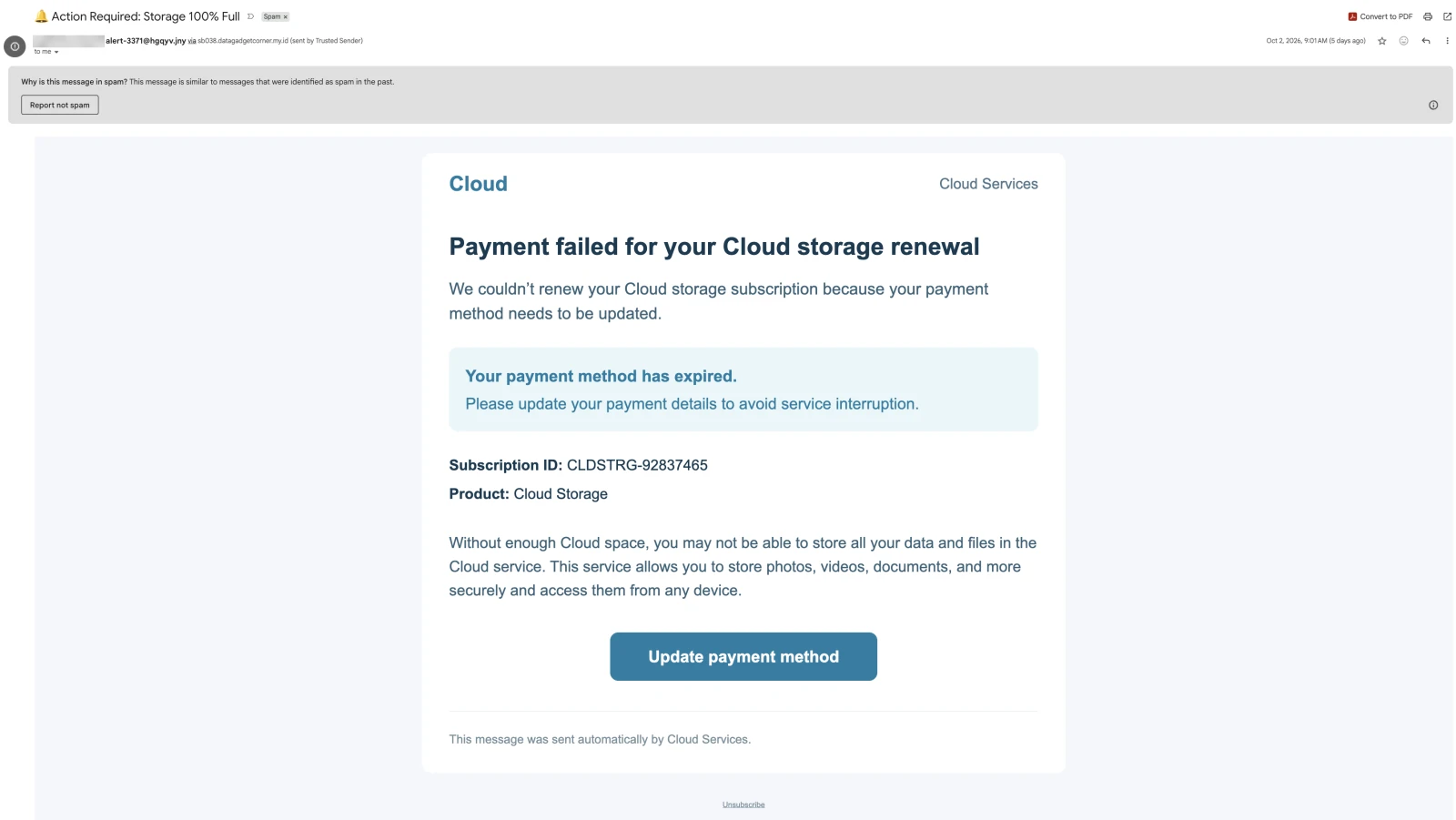
The From display name and the 'sent by' address are the recipient's own mailbox, redacted here; the From address sits on the non-existent .jny TLD and the message was relayed by an Indonesian .my.id host. The To line is a dummy AOL address, the whole message is a single link, and Gmail filed it in Spam.
Evidence: the message as received plus passive registry lookups; links and attachments are not opened. How we analyse a scam email.
We couldn't renew your Cloud storage subscription because your payment method needs to be updated. Five weeks after the copy analysed in August, the same storage-full template arrives again — word for word, subscription number included — with a new sender on a top-level domain that does not exist, a new numbered relay on a new Indonesian domain, a new Google Cloud Storage bucket, and the whole message turned into a single link.
Complete Email
from: [recipient's own mailbox name] alert-3371@hgqyv.jny
via: sb038.datagadgetcorner.my.id
sent by: Trusted Sender [the recipient's own email address]
to: me@aol.com
mailed-by: sb038.datagadgetcorner.my.id
date: 10/02/2026 9:01 AM
subject: 🔔 Action Required: Storage 100% Full
Email Body
Cloud Cloud Services
Payment failed for your Cloud storage renewal
We couldn’t renew your Cloud storage subscription because your payment method needs to be updated.
Your payment method has expired.
Please update your payment details to avoid service interruption.
Subscription ID: CLDSTRG-92837465
Product: Cloud Storage
Without enough Cloud space, you may not be able to store all your data and files in the Cloud service. This service allows you to store photos, videos, documents, and more securely and access them from any device.
Update payment method
This message was sent automatically by Cloud Services.
Unsubscribe
Link
- Behind the whole message, as reported by the recipient:
https://storage.googleapis.com/obsidianly/obsidianly.html?act=cl&pid=14603_md&uid=2&vid=572947&ofid=335&lid=492&cid=1358804
Red Flags
This is the billing-failure phish wearing a storage-quota subject line taken apart in August, sent again. Its opening move has not changed: make you afraid for files you have already stored, then route the fix through a payment form. What has changed is everything around the words — the subject, the sender, the relay, the bucket, the colours and the shape of the link — and the line between what changed and what did not is the most useful thing this copy shows. Everything below comes from the message, its headers as Gmail displays them, the recipient's report of the link, and public registry records.
1. The Same Email as August, Word for Word — Subscription Number Included
- Subscription ID:
CLDSTRG-92837465 - Subscription ID in the August copy:
CLDSTRG-92837465
Put this message beside the copy received on 25 August and the text is the same, sentence for sentence: the same headline, the same expired payment method, the same paragraph about photos, videos and documents, the same footer line. Only the paint and the wiring changed:
| August copy | This copy | |
|---|---|---|
| Arrived | 25 August 2026, 4:59 AM | 2 October 2026, 9:01 AM |
| Subject | ⛔️ Warning! Your Cloud Storage Is Full | 🔔 Action Required: Storage 100% Full |
| From address | alert-7751@rlnvq.pgq | alert-3371@hgqyv.jny |
| Relay | sb003.directtrafficroute.my.id | sb038.datagadgetcorner.my.id |
| Sent by | Trusted Sender, the recipient's own address | Trusted Sender, the recipient's own address |
| To | me@aol.com | me@aol.com |
| Body text | Payment failed for your Cloud storage renewal … | the same, word for word |
| Subscription ID | CLDSTRG-92837465 | CLDSTRG-92837465 |
| Colours | red panel, purple button | teal panel, teal button |
| What is linked | the button | the whole message |
| Bucket | flores/flores.html | obsidianly/obsidianly.html |
| Unsubscribe line | If you want to unsubscribe please click here | Unsubscribe |
The subscription number is the giveaway. A real subscription ID is issued by a billing system to one customer's account. This one does not even look issued: read alternate digits of 92837465 and you get two runs, 9-8-7-6 and 2-3-4-5, interleaved. It is a number made up to look like a reference — placed behind CLDSTRG, which is cloud storage with the vowels taken out — and typed into a template once. A constant in a template goes, unchanged, to everyone the template reaches, in August and again in October. The sender, the relay, the bucket, the subject and the colours are disposable. The words are what this operator keeps.
Gmail's filter, at least, recognised the message: it filed this copy in Spam as similar to messages that were identified as spam in the past.
2. .jny Is Not a Top-Level Domain
- From:
alert-3371@hgqyv.jny
Read the sender's address from the end. .jny is not a top-level domain. As of our lookup on 7 October 2026, the DNS root zone has no such name, and IANA, which maintains the list of top-level domains, has no record of it. Nothing ending in .jny can resolve, so hgqyv.jny has no mail server, and a reply to alert-3371@hgqyv.jny cannot be delivered anywhere.
August's copy came from alert-7751@rlnvq.pgq, on a suffix that does not exist either. Side by side, the recipe is plain: the word alert, a hyphen and four digits; five random letters; a three-letter ending that exists nowhere. The address is new in each wave, so a blocklist entry made for the last one does not match the next, and it is built never to receive anything — no replies, no bounces, no complaints. A billing department that needs you to update your payment details can be written back to. This sender cannot.
3. Your Name on the From Line, Your Address Behind "Trusted Sender" — and me@aol.com in the To Line
- From display name: the recipient's own mailbox name
- sent by: Trusted Sender, at the recipient's own email address
- to:
me@aol.com
The From line's display name is not a company's name. It is the recipient's own mailbox name, the part of their address before the @, so in an inbox list, which shows display names rather than addresses, the message appears to come from the recipient. Gmail's sent by note names a Trusted Sender, and the address behind that name is the recipient's own.
Neither proves anything. A display name is free text, and the sent by note is Gmail's view of a header that the sending software fills in however it likes. Putting the recipient's own name and address there takes an address list and a mail-merge field, not access to the recipient's account: the message was sent by the relay in Red Flag 4, not from the recipient's mailbox. What it buys is a first glance that reads from me and trusted. The via note, on the other hand, is Gmail's own: it appears when the server that sent a message belongs to a different domain from the one in the From line. It is the one part of that header line written by your mail provider rather than by the sender.
Then look at where the recipient's address is not: the To line. Gmail's one-line header for this message reads to me, which is easy to take as addressed to you. The full header shows what the To line actually holds: me@aol.com, a mailbox called me at AOL. The recipient's address appears twice, in fields where it proves nothing, and not at all in the one field that says who a message is for. A billing notice about your subscription is addressed to you. This one is addressed to a stranger, with your name worn as a disguise.
4. A Second Numbered Relay on a Second New .my.id Domain — Gone Five Days Later
- via:
sb038.datagadgetcorner.my.id - mailed-by:
sb038.datagadgetcorner.my.id
The From address cannot be checked, because its domain does not exist. The only real domain in the header is the one Gmail reports itself: the message came via sb038.datagadgetcorner.my.id, which is also the mailed-by domain — in Gmail's terms, the domain the message was actually sent from. It has nothing to do with cloud storage.
.my.id is a namespace inside Indonesia's country-code domain, .id, intended for individuals. The public records for datagadgetcorner.my.id, looked up on 7 October 2026:
- Registered on 11 August 2026, 52 days before the email arrived, through PT Registrasi Neva Angkasa, the registrar behind the DomaiNesia service.
- Name servers at Cloudflare — which no longer serves it. The registry still points the domain at Cloudflare's name servers, but those servers now refuse queries for it, and
sb038.datagadgetcorner.my.idno longer resolves. Five days after the email arrived, the only real domain in its header had stopped working. Whether the operator removed it or Cloudflare did cannot be told from outside.
August's copy came via sb003.directtrafficroute.my.id. That domain was registered on 22 July 2026, 20 days before this one, through the same registrar, with its name servers at the same provider, and it was still being served when we checked. Two generic names with no connection to storage, the same registrar, the same DNS provider, and sending hosts numbered sb003 and sb038: this is the shape of a sending fleet, in which each domain is typically used until it is blocked or dropped, with the next one already registered. A cloud provider's billing mail comes from its own domain, which is years old and resolves on any day you check. This message's only real domain was seven weeks old when it was used and had stopped resolving within a week.
5. The Whole Message Is One Link
In August, the button was the link. In this copy, the recipient found the whole message hyperlinked to one address. The headline, the subscription number, the paragraph about photos and documents, the empty space around the card: a click anywhere opens the same page.
A real billing notice is not built this way. It links specific actions — pay, manage the plan, contact support — each to its own page, and leaves the rest as text. A message that is one large link turns every stray click into a visit: a tap meant to scroll on a phone, a click to select the subscription number and copy it, a click to bring the window to the front. It also takes away the careful reader's choice of what to click, because nothing in the message is safe to click.
It does give the careful reader one thing back. On a computer, rest the pointer anywhere on the message without clicking, and the destination appears at the bottom of the window. It is not a billing page. It is a file in a storage bucket.
6. A New Bucket, the Same Offer
- This copy:
https://storage.googleapis.com/obsidianly/obsidianly.html?act=cl&pid=14603_md&uid=2&vid=572947&ofid=335&lid=492&cid=1358804 - August:
https://storage.googleapis.com/flores/flores.html#?act=cl&pid=11992_md&uid=2&vid=338155&ofid=335&lid=492&cid=1358804
Read the address from the left and stop at the first single slash. storage.googleapis.com is genuinely Google's: it is the public address of Google Cloud Storage, where anyone can create a bucket and publish files. Everything after the slash belongs to whoever created the bucket. In August it was flores/flores.html; now it is obsidianly/obsidianly.html — a new name, and the same habit of naming the file after its bucket. Google's domain and certificate come with any bucket, which is why a link check that looks only at the domain sees Google and passes it.
What stayed the same is the string of tracking values after the file name:
| Parameter | August | This copy |
|---|---|---|
act | cl | cl |
pid | 11992_md | 14603_md |
uid | 2 | 2 |
vid | 338155 | 572947 |
ofid | 335 | 335 |
lid | 492 | 492 |
cid | 1358804 | 1358804 |
As the August analysis set out, names like these are the vocabulary of affiliate tracking: an offer, a campaign, a publisher. Five weeks and a new bucket later, the offer ID, the lid and the campaign ID are unchanged; only pid and vid differ. If the names mean what affiliate networks usually mean by them, this link points at the same offer as August's, under the same campaign, behind a different bucket. A cloud subscription does not have an offer ID.
One detail of the link did change. In August the values sat after a #, which keeps them in the browser; here they follow an ordinary ?, so they are sent to the server with the request. How the link carries its values changed between waves. The offer it carries did not.
7. "Storage 100% Full" Over a Payment Notice That Names No Payment
- Subject: 🔔 Action Required: Storage 100% Full
- Headline: Payment failed for your Cloud storage renewal
The subject has been rewritten since August — ⛔️ Warning! Your Cloud Storage Is Full became 🔔 Action Required: Storage 100% Full — and the body still does not match it. A full quota is a capacity problem on an account that is paid up; a failed renewal is a billing problem on an account that may be nearly empty. The subject announces one, the headline the other, and the body mentions space only once, to say that without enough of it you may not be able to store your files.
100% Full sounds like a measurement, but there is nothing measured: no gigabytes used, no allowance, no plan. The billing side is just as empty. There is no card brand or last four digits, no amount, no currency, no date the charge was tried, no date the service will stop and no account name. The provider is Cloud, writing as Cloud Services, selling Cloud Storage — a category, not a company. Your payment method has expired is a claim with a date inside it, and no date is given.
The pressure is all in the wrapping: a notification bell in the subject, Action Required, avoid service interruption. None of it is tied to a deadline. A notice that cannot say whose account, which plan, which card or how much is not about an account. It is written so that it could be about anyone's.
How This Scam Works
The email is bait for one click, anywhere on it. What the link served on the day was not examined — links in reported email are not opened for these analyses — but the campaign's two copies show how it is run, and storage-and-billing lures of this family are well documented. They typically work like this:
- The List: Each copy is generated for one recipient from an address list. The recipient's mailbox name goes into the From display name and their full address behind Trusted Sender, while the To line holds a fixed placeholder —
me@aol.comin both copies seen here. The body is a fixed template. - The Sending Fleet: Copies go out through numbered relays on
.my.iddomains registered weeks ahead — 52 days here — under From addresses on top-level domains that do not exist, so that replies, bounces and complaints go nowhere. A relay's domain is typically dropped once it has been used or blocked; this one stopped resolving within five days. - The Repaint: Between waves, the parts that get blocklisted change: the subject, the From address, the relay, the bucket, even the colours. The text that does the persuading stays the same.
- The Click: The whole message is one link, so any click, deliberate or not, opens a static file in a fresh Google Cloud Storage bucket, under Google's domain and certificate.
- The Handoff: Pages of this kind typically do little more than pass the visitor, with the tracking values, on to whatever page the offer currently points to. The destination can be changed at any time without changing the link that was mailed.
- The Payment Page: The landing page is typically styled as a storage renewal or upgrade: a small fee and a form for card details, sometimes after a sign-in page for the "cloud account". The card is the prize, whether it is charged once, enrolled in a recurring subscription disclosed only in small print, or sold on.
- The Payout: The offer and campaign IDs credit each click, and each sign-up, to whoever supplied the traffic. Affiliate arrangements of this shape typically pay per visitor or per conversion, which is how the same offer can be worth mailing again five weeks later.
- The Next Wave: When a wave's infrastructure is blocked or burned, the operator registers the next relay domain, generates the next sender on the next suffix that does not exist, creates the next bucket, rewrites the subject and sends the same body again — as happened between 25 August and 2 October.
Conclusion and Recommendations
There is no cloud service, no failed renewal, no subscription CLDSTRG-92837465 and no full storage. There is the August template, unchanged down to its reference number, sent again from an address on a top-level domain that does not exist, through a numbered relay on a seven-week-old Indonesian domain that stopped resolving five days later, with the recipient's own name and address worn as a disguise, me@aol.com in the To line, and the whole message wired to a file in a fresh Google bucket carrying the same affiliate offer as before.
The second copy is as instructive as the first, because it shows which parts of the campaign are disposable and which are not. The sender, the relay, the bucket and the subject are thrown away between waves; the story is kept. Learn to recognise the story, and every future wave fails the same way.
Immediate Actions:
- Do Not Click Anywhere in the Message: The whole message is a link — not just the button. Do not click to select text, to copy the subscription number, or to bring the window forward.
- Do Not Use "Unsubscribe": You never subscribed. On a message like this it is one more link, and using it confirms that the address is read by a person. Use your mail client's block or report option instead.
- Do Not Reply:
hgqyv.jnydoes not exist, so a reply cannot be delivered, and the relay's domain no longer resolves. There is no one at the other end to write to. - Leave It in Spam: Gmail filed this copy correctly. Do not press Report not spam; if a copy reaches your inbox, use Report phishing.
- Check Your Storage the Way You Normally Would: Open your provider's app, or type its address yourself. Your real usage and billing status are there, and thirty seconds settles it.
- Report It: Report the relay domain to its registrar, PT Registrasi Neva Angkasa, at
admin@rna.id— the domain is still registered, and can be pointed somewhere new at any time. Google accepts abuse reports for content hosted in Cloud Storage buckets. Forward the message to CERT-In atincident@cert-in.org.in, and if money was lost, use the National Cyber Crime Reporting Portal atcybercrime.gov.inor call the helpline 1930. - If Card Details Were Entered, Call the Bank Now: Block the card and dispute every charge, including small ones. A small first charge is often the start of a recurring subscription, not the end of the incident.
- If You Signed In Anywhere: From a trusted device, change that account's password, sign out of every session, and check its recovery email, recovery phone and mail forwarding rules. If the password is used anywhere else, change it there too.
Verification Steps:
- Read the Text After the Last Dot of the Sender's Address:
.jnyis not a top-level domain, and neither was August's.pgq. If you do not recognise the ending, look it up; a sender on a suffix that does not exist cannot be a company. - Open the Header Details When Your Own Name Is the Sender: A message that shows your name as its sender, with via and sent by notes you did not write, was not sent by you. The details show what did send it.
- Check the To Line, Not the Summary: to me in a one-line header is a summary. The full header shows the actual address — here,
me@aol.com. - Point Before You Click: On a computer, rest the pointer on a link and read the destination at the bottom of the window. A billing link that leads to a file in a storage bucket is not a billing link.
- Treat an Exact Repeat as a Template: If a "failed payment" notice arrives again weeks later, word for word, with the same reference number, it is not a follow-up on your account. Search your mail, or this site, for the subject line and the reference.
- Make a Billing Email Name the Money and the Company: Card brand and last four digits, amount, date of the attempted charge, plan, and the provider's name. A payment notice missing all of them is not a payment notice.
Additional Protection Tips
- Do Not Rescue Billing Mail From Spam to Act on It: If a notice in the Spam folder worries you, check the account directly in the provider's app. Moving the message to your inbox only teaches the filter the wrong lesson.
- Know What You Pay For: Keep a list of your cloud subscriptions, their renewal dates and the card on each. A failed renewal for a service you can name in a second is easy to check; one for a service you cannot name is easy to dismiss.
- Turn On Storage and Billing Alerts Inside the Provider's App: A warning that appears inside the app cannot be forged by email, and it makes an emailed version of the same warning immediately suspect.
- Use a Password Manager: It offers a saved sign-in only on the domain it was saved for, so it stays silent on a lookalike page, however convincing the page looks.
- Move to Passkeys Where You Can: A passkey is bound to the real site and does not work on a copy of it.
- Turn On Time-of-Click Link Checking: Mail security that checks a link when it is clicked, and not only when the message arrives, sees what the reader would see at that moment — which matters when the page behind a link can be changed at any time.
- Report, Don't Unsubscribe: Reporting teaches your mail provider to recognise the campaign, including its next wave. Unsubscribing from a stranger's campaign teaches the stranger that your address works.
Remember: A real billing notice is written about one account, so no two are alike. This one arrived five weeks after its twin, word for word, reference number and all. When a failed-payment notice repeats itself word for word, it is not chasing your payment. It is re-running a campaign.
