Phishing: Action Required: Dewiride technologies private limited Employee Salary Adjustment Contract Document September 16, 2026 | Fake HR DocuSign Notice With a QR-Code PDF

At a glance
- Verdict
- PhishingGet an employee to scan the PDF's QR code with a phone, beyond company link filtering, and hand over their work login.
- Subject line
Action Required: Dewiride technologies private limited Employee Salary Adjustment Contract Document September 16, 2026- Claimed sender
- Dewiride technologies private limited-HR-PACKAGE
postmaster@escortdimension.net - Impersonates
- Dewiride Technologies — the recipient's own employer: its HR department, sending a salary adjustment contract dressed as a DocuSign signing request, with a OneDrive-branded PDF
- Received
- · Published
- Related analyses
- Phishing: Messages Pending Delivery on Your E-mail Portal | Fake jd-bots.com Domain Portal Notice
- Phishing: Re: Payment Confirmation & Records | Fake SWIFT Advice PDF Attachment
- Phishing: Please review and sign your document | Fake DocuSign Secure Portal
- Phishing: Re: Priority Notice - Review Doc_Xerox File Shared to Dewiride:MDT _Ref.59b43df15d05ddab0f8bc1bd9cc74524
Attachment: Dewiride technologies private limited-CONTRACT-DOCUMENT-September 16, 2026.pdf, a two-page PDF of 34,182 bytes, detonated by the recipient in a secured sandbox; its pages are shown from screenshots taken there. The recipient mailbox is blurred wherever it appears, and the QR code is pixelated and was not decoded for this analysis.
Evidence: the message as received, passive registry lookups, and the results of a detonation the recipient ran in a secured sandbox; the analysis itself opens nothing. How we analyse a scam email.
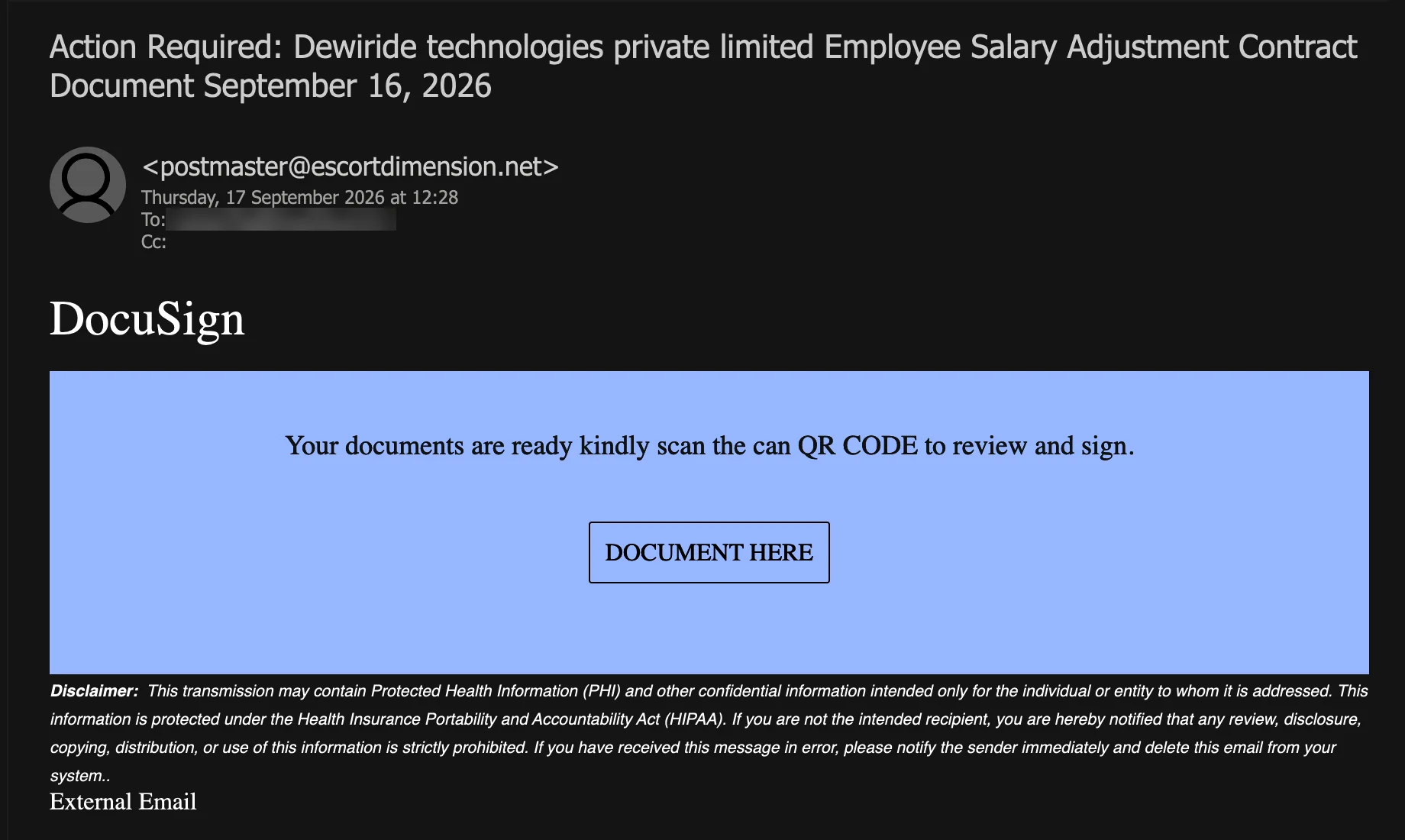
Your documents are ready kindly scan the can QR CODE to review and sign. A salary adjustment contract posing as the company's own HR department, sent from the postmaster mailbox of an unrelated domain, styled as DocuSign in the email and OneDrive in the PDF, with the company's name, logo and mailbox merged in — and a QR code as the only way in.
Complete Email
from: Dewiride technologies private limited-HR-PACKAGE postmaster@escortdimension.net
date: 09/17/2026 12:28 PM
subject: Action Required: Dewiride technologies private limited Employee Salary Adjustment Contract Document September 16, 2026
Email Body
DocuSign
Your documents are ready kindly scan the can QR CODE to review and sign.
DOCUMENT HERE
Disclaimer: This transmission may contain Protected Health Information (PHI) and other confidential information intended only for the individual or entity to whom it is addressed. This information is protected under the Health Insurance Portability and Accountability Act (HIPAA). If you are not the intended recipient, you are hereby notified that any review, disclosure, copying, distribution, or use of this information is strictly prohibited. If you have received this message in error, please notify the sender immediately and delete this email from your system..
Attachment
Dewiride technologies private limited-CONTRACT-DOCUMENT-September 16, 2026.pdf — PDF, two pages, 34,182 bytes. File-type inspection recorded it as a genuine PDF, matching its .pdf extension.
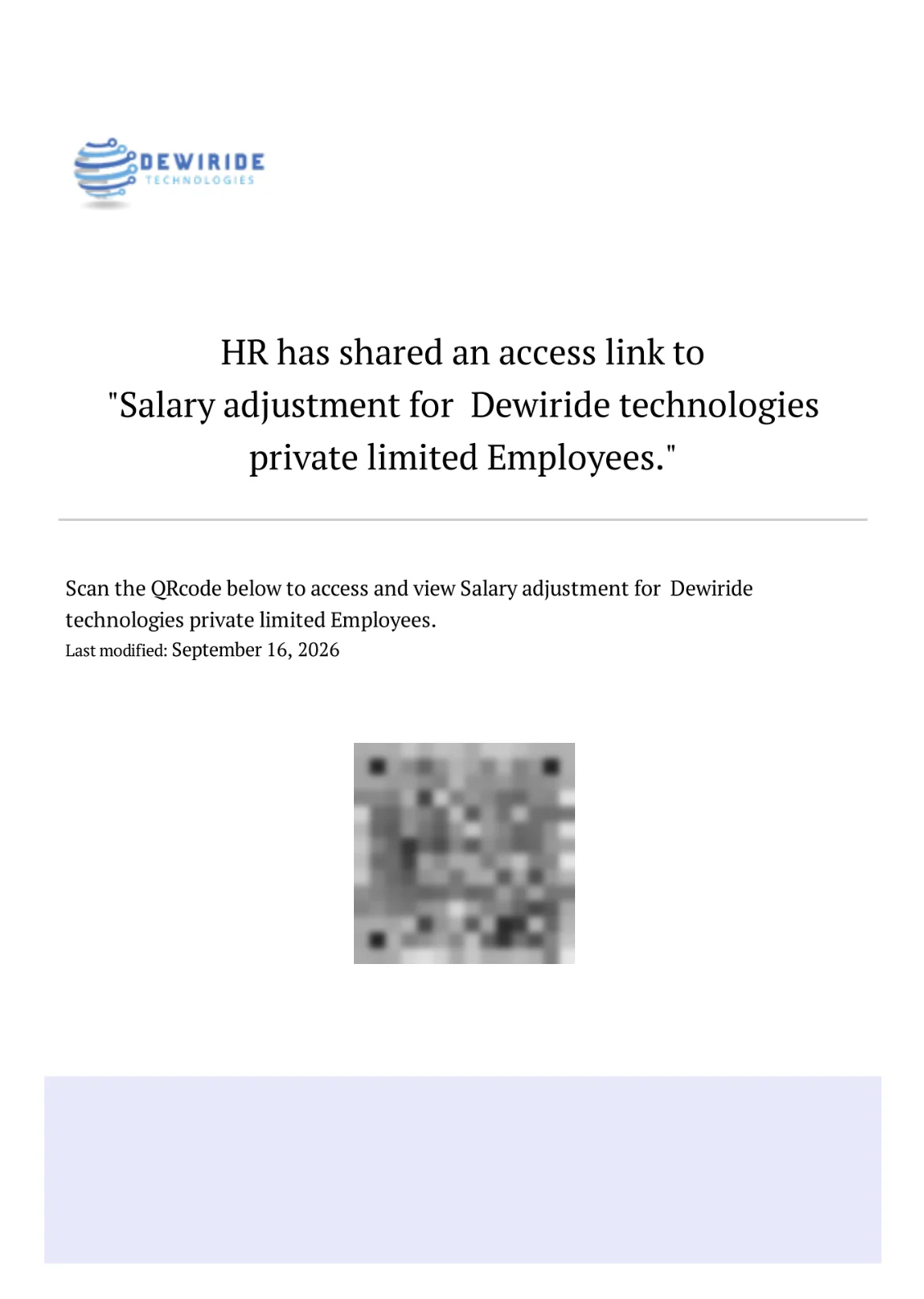
The recipient detonated the PDF in a secured sandbox, opened it there, and supplied screenshots of its two pages, reproduced below; the analysis works from those screenshots, not from the file. The recipient's mailbox, which page two prints, is blurred. The QR code on page one has been pixelated by Secure Techie so that it cannot be scanned from this page, and it was not decoded for this analysis.
Page 1
(Dewiride Technologies logo)
HR has shared an access link to
"Salary adjustment for Dewiride technologies private limited Employees."
Scan the QRcode below to access and view Salary adjustment for Dewiride technologies private limited Employees.
Last modified: September 16, 2026
(QR code)
Page 2
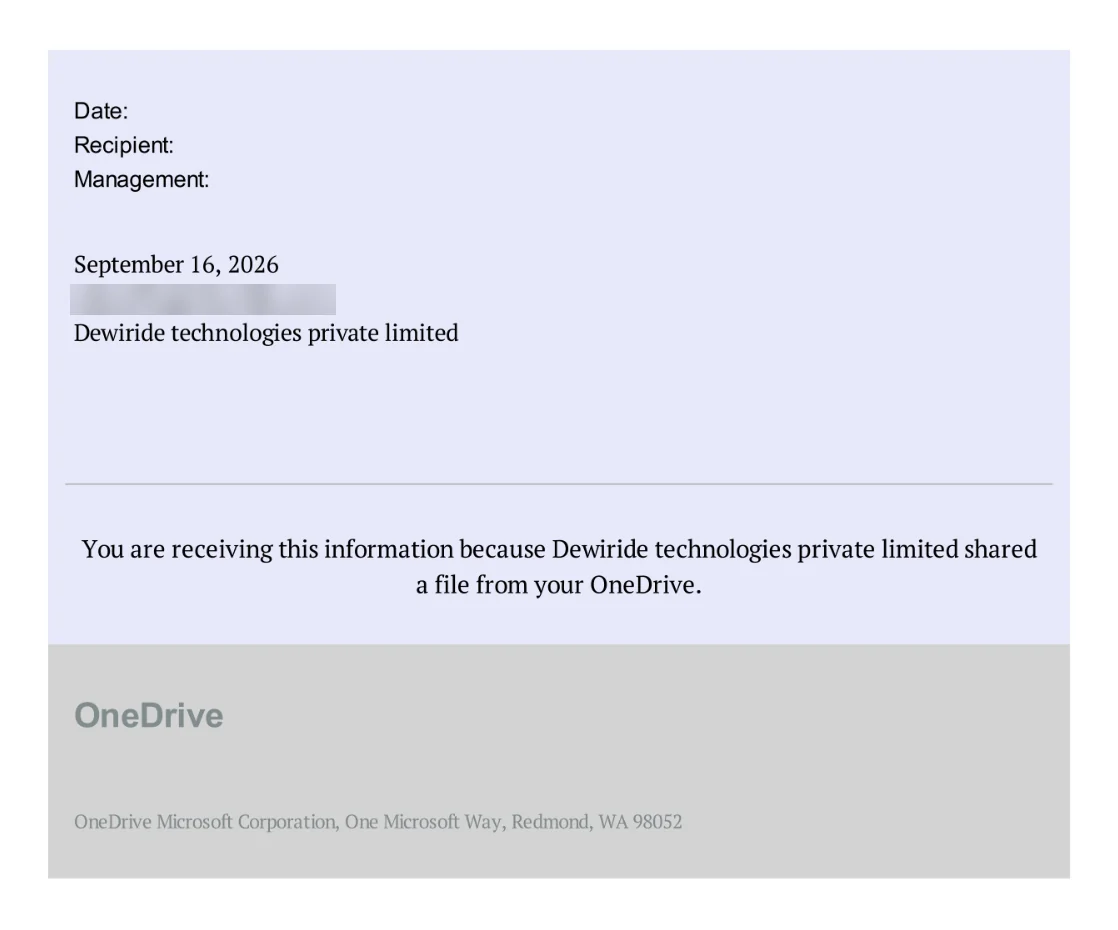
Date:
Recipient:
Management:
September 16, 2026
(recipient mailbox, blurred)
Dewiride technologies private limited
You are receiving this information because Dewiride technologies private limited shared a file from your OneDrive.
OneDrive
OneDrive Microsoft Corporation, One Microsoft Way, Redmond, WA 98052
Red Flags
This is QR-code phishing — quishing — dressed as a notice from the recipient company's own HR department and aimed at that company's employees. It is built in layers, so that no single layer contains anything a mail filter can object to. The email holds no link a gateway can read, only an instruction to scan a QR code. The QR code is not in the email; it is inside a PDF. The PDF is a genuine PDF. And the one thing everything points to — the destination — appears nowhere as text, only as a picture of an address. Each layer is a deliberate choice, and each is a tell.
1. The Company's Own HR Department, Writing From Someone Else's postmaster@ Mailbox
- Display name: Dewiride technologies private limited-HR-PACKAGE
- From:
postmaster@escortdimension.net
The display name claims the recipient company's own HR department. The address belongs to escortdimension.net, a domain with no connection to the company, to HR, to DocuSign or to Microsoft. A company's HR department writes from the company's own domain, or from the HR system the company actually uses — not from the technical mailbox of an unrelated website. The display name is free text, typed by the sender and verified by nobody; the part after the @ is the only part that says where the message came from, and it says somewhere else.
The mailbox is postmaster@ — the address the email standard (RFC 5321) reserves on every mail system for reports about delivery problems. It is a technical role address. It is not where anyone's HR department, on any domain, sends contracts from.
The public registry fills in the rest. escortdimension.net was registered in October 2009 through Tucows; its DNS and mail are hosted by FORPSI, a Czech web host (INTERNET CZ, a.s.), and it carries a Google site-verification record — the trace of a real website someone once set up. It is not a domain registered last week for this campaign. It publishes no SPF record and no DMARC policy, so nothing tells a receiving server which machines may send as escortdimension.net: anyone, anywhere, can put postmaster@escortdimension.net in a From line without failing a check the domain never asked for. Whether this message left a compromised account on that old hosting plan or was forged from somewhere else entirely cannot be told from the capture, which does not include the full headers. Either way, the domain tells you nothing about who sent it.
And the recipient's own mail system said so before anyone read a word. The External Email line at the foot of the message is the gateway's tag for mail that arrived from outside the organisation. A notice from the company's own HR department does not arrive from outside the company. Like the fake web-admin notice before it, this message claims to come from inside the organisation, and the organisation's own infrastructure contradicts it.
2. The Link Is a Picture, Inside a Document, Inside the Email
- Email: "Your documents are ready kindly scan the can QR CODE to review and sign."
- Attachment, page 1: "HR has shared an access link" … "Scan the QRcode below to access and view Salary adjustment"
The whole message leads to a single destination, and at no point is that destination written down. The email tells the reader to scan a QR code but contains none; the bordered DOCUMENT HERE box is the only thing that looks clickable, and the capture does not show whether it points anywhere. The code is in the attachment. The attachment calls it "an access link" — and then draws it as a square of black and white modules instead of writing it.
Each layer removes a check that would otherwise stand in the way:
- The gateway. A link written as text in an email can be read, rewritten and checked by the mail gateway before anyone clicks it. A link drawn as an image inside an attached PDF gives the gateway nothing to read unless it renders the document and decodes the picture.
- The work computer. A link clicked at a desk passes through the company's web filtering, endpoint protection and logging. A QR code is scanned with a phone — very often a personal one, which has none of those.
- The reader. A text link can be hovered over and read before it is opened. A QR code cannot be read by a human at all; the only way to learn where it goes is to point a device at it, and most camera apps offer to open the address the moment they decode it.
The SWIFT-advice PDF analysed in August moved its link out of the email and into an attachment, and that post noted a growing variant that renders the destination as a QR code instead. This is that variant. We did not decode the code, and do not know where it leads. We did not need to: a sender who goes to three layers of trouble to keep a destination unreadable has told you what they think of it.
3. DocuSign in the Email, OneDrive in the PDF — and Neither of Them Sent It
- Email heading: DocuSign
- Attachment, page 2: "You are receiving this information because Dewiride technologies private limited shared a file from your OneDrive."
- Attachment footer: OneDrive Microsoft Corporation, One Microsoft Way, Redmond, WA 98052
A real document arrives through one system. This one claims three. The email is a DocuSign signing request — "review and sign". Page one of the PDF is an HR notice — "HR has shared an access link". Page two is a OneDrive sharing notice. The story changes brands between the message and its attachment, and again between the attachment's two pages.
A genuine DocuSign envelope comes from DocuSign's own mail domain and opens with a button that leads to DocuSign's site, as the earlier DocuSign fake in this archive set out. A genuine OneDrive share comes from Microsoft and opens in OneDrive. Neither arrives from an unrelated domain as a PDF attachment with a QR code in it. The DocuSign "logo" at the top of this email is the word DocuSign typed in a plain serif font.
The OneDrive sentence does not survive being read slowly. The company "shared a file from your OneDrive" — but a file in your OneDrive is already yours, and nobody needs to share it with you. It is the vocabulary of a sharing notice with the parts in the wrong order. The footer's address — One Microsoft Way, Redmond — is Microsoft's real headquarters, pasted in. A real address costs nothing to copy, and proves nothing about who sent the document it is printed on.
4. Three Merge Fields and a Logo: Everything the Sender Actually Knew
- Company name: in the display name, the subject, the attachment's filename, twice on page one and twice on page two — seven times.
- Date: September 16, 2026 — in the subject, the filename, Last modified and Date — four times.
- Mailbox: in the To line, and printed on page two as Recipient.
The personalisation is thorough and shallow. A company name, a mailbox, a date and a logo are the whole of what the sender knew; every other word in the email and the PDF is fixed text that would read the same for any company. The fields show their seams:
- The capitalisation. Dewiride technologies private limited — a capital on the first letter and nowhere else — is what a program produces when it takes a name and capitalises only the first character of the string. Nobody in a company's own HR department writes the company's legal name that way. A script that looked the name up and tidied it does.
- The double space.
for␣␣Dewiride— two spaces before the name, in both places it appears on page one — is where the template's own trailing space meets a field inserted with a leading one. - The hyphens. -HR-PACKAGE in the display name and -CONTRACT-DOCUMENT- in the filename are fixed fragments glued to the company name.
- The broken form. Page two's labels — Date:, Recipient:, Management: — sit stacked in one block in a sans-serif font, and their values sit in another block below them in a serif one, instead of side by side. Management: Dewiride technologies private limited means nothing. It is a slot the template had and the kit filled.
The logo on page one is the company's own, reproduced at low resolution with soft edges, as if enlarged from a small image. Kits of this kind commonly pull the target's logo in automatically, from its website or a public logo service; either way, a logo is public, and anyone can print it on anything. The Xerox "file shared" lure of January 2025 used the same trick with a shorter field, writing Dewiride into its subject and its attachment's filename.
One consequence is worth knowing. Because the company, the mailbox and the date are written into the PDF itself, each copy is generated for its recipient, so no two recipients' attachments are the same file — which is one reason filters that block known-bad attachments by their fingerprint do not catch this kind.
5. A Salary Contract for Every Employee, Addressed to No Employee
- Subject: Employee Salary Adjustment Contract Document
- Page 1: "Salary adjustment for Dewiride technologies private limited Employees."
- Page 2: Recipient: a functional company mailbox
Salary is the most personal document an employer issues, and that is exactly why it was chosen: no employee ignores a message about their pay. But a genuine salary revision names the employee, carries their employee number, gives the old and new figures and the date the change takes effect, and names a person in HR to ask about it. It reaches that employee through the payroll or HR system they already sign in to, or in their own mailbox. This one names no employee, states no figure, gives no effective date and names no one in HR. It is a document "for ... Employees" — all of them at once — that nevertheless has to be individually reviewed and signed as a "contract".
And it was addressed to a functional company mailbox of the kind published on a website — not to any employee — with the same mailbox printed on page two as its Recipient. An HR department knows who works for it. A list of addresses harvested from the web does not, and so the recipient of this "salary contract" is simply whatever address the list held for the company.
6. A US Health-Privacy Notice on an Indian Salary Contract
- Disclaimer: "This transmission may contain Protected Health Information (PHI) ... protected under the Health Insurance Portability and Accountability Act (HIPAA) ... delete this email from your system.."
HIPAA is a United States federal law governing health information held by American healthcare providers, insurers and the businesses that serve them. It has nothing to say about an Indian technology company's payroll, and "Protected Health Information" is not something a salary contract contains. The paragraph is a confidentiality footer lifted from a US healthcare organisation's email, down to the double full stop at the end that nobody proofread.
It is there to do two things, neither of them legal. It lends the message the tone of an organisation with lawyers. And it tells the reader that "any review, disclosure, copying, distribution, or use" is "strictly prohibited" — which, whatever the sender intended, reads as an instruction not to show the message to anyone else, including the IT team who would recognise it.
7. "Kindly Scan the Can QR CODE"
- "Your documents are ready kindly scan the can QR CODE to review and sign."
- "Scan the QRcode below"
- Subject: Action Required:
The email has exactly one sentence of its own, and it carries a missing full stop between two clauses, a stray can where a word was deleted or never finished, and a technical term in shouting capitals. The PDF spells the same term a second way, QRcode. Notifications from DocuSign and Microsoft are generated from proofread templates; they do not read like this. The subject opens with Action Required, but the message sets no deadline and names no consequence — urgency by label, with nothing behind it.
How This Scam Works
The email is bait for one action — pointing a phone at a picture — and everything in it is arranged to make that action feel routine. What happens after a scan was not observed here: the code was not decoded for this analysis. But QR-code lures of this kind are well documented, and they typically run like this:
- The List: A kit is fed company domains and the mailboxes harvested from their websites. For each company it looks up the name, normalises the capitalisation and pulls in the logo.
- The Build: A PDF is generated for each recipient with the company name, the mailbox and the date written in, and a QR code that, in many kits, carries a token identifying the recipient, so the operator knows exactly who scanned.
- The Delivery: The email goes out from a mailbox with no connection to the target — here, the
postmasteraddress of an old domain on a Czech web host that publishes no SPF or DMARC — carrying no link for a gateway to check and a real PDF that passes file-type inspection. - The Switch: The employee is told to scan, and does so with a phone, leaving the company's link filtering, web proxy and endpoint protection behind on the desk.
- The Page: The code typically opens a page styled as a Microsoft 365, OneDrive or DocuSign sign-in, often pre-filled with the employee's own address, and frequently behind a CAPTCHA or bot check whose job is to keep security scanners from seeing what is behind it.
- The Harvest: The password is captured. More capable kits relay the sign-in to the real provider in real time and capture the session itself, which defeats multi-factor authentication based on codes and push approvals.
- The Use: A mailbox taken with an HR lure is typically put to the uses HR access is good for — redirecting salary payments to a new bank account, invoice fraud against the company's customers, and the next round of the same email, sent this time from inside the company.
Conclusion and Recommendations
There is no salary adjustment, no contract, no DocuSign envelope and no OneDrive share. There is a postmaster mailbox on an unrelated domain registered in 2009, a PDF generated for this one recipient from a company name, a mailbox, a date and a logo, and a QR code whose only purpose is to keep its destination out of sight of every filter and every reader along the way.
It works for the same reason it is dangerous: it is aimed at employees, it is about their pay, and it carries their employer's own name and logo. Every one of those is borrowed. The sending domain, the brand that changes between the email and its attachment, the missing name and figures, and the instruction to change devices are not — they are what this message actually is.
When a message from your own HR department arrives from outside the company, knows nothing about you but your employer's name, and can only be opened by pointing a phone at a picture, it is not from HR.
Immediate Actions:
- Do Not Scan the QR Code: Not with a work phone, not with a personal one, and not "just to see where it goes". Most camera apps offer to open the address the moment they read it, and in many kits the code itself identifies who scanned it.
- If Anyone Scanned It and Signed In: Treat the account as compromised. From a trusted device, change the password, sign the account out of every session, review the multi-factor methods registered on it and remove any that are not the owner's, and check the mailbox for new forwarding addresses and inbox rules. Then check the payroll system for any change to that employee's bank details.
- Do Not Forward It Around the Office "To Check": Every forward puts the QR code in front of another employee who is also waiting to hear about their salary. Report it to IT or security in a fresh message, or with the mail client's report button.
- Report It as Phishing: Use the report button rather than plain deletion, so that the sender and the attachment reach the gateway's blocklist.
- Ask HR Directly: A message or a call to someone in HR you already know settles it in a minute. If a salary adjustment existed, HR would know about it, and would be glad you asked.
- Warn Everyone at Once: A short note to all staff — HR has not sent a salary contract with a QR code, so do not scan it — protects the people who received it but have not opened it yet.
Verification Steps:
- Read the Domain Right of the
@: Your HR department writes from your company's domain or from the HR system you already use.escortdimension.netis neither, and no display name changes that. - Check for the External Tag: If your mail system labels mail from outside the organisation, an "internal" notice carrying that label is not internal.
- Look for Your Name and Your Numbers: A genuine salary letter names you and gives your employee number, the figures and the effective date. "Employees", plural, with no name and no number, is a template.
- Go to the System You Already Use: Payslips and salary revisions live in the payroll or HR portal. Open it the way you always do; if there is a document for you, it is there.
- Count the Brands: DocuSign, OneDrive and your HR department in one message means none of them sent it. A genuine document arrives through one system, from that system's own domain.
- Treat a QR Code in an Email as a Link You Are Not Allowed to Read: It cannot be hovered over, and it was chosen for that reason. A QR code that arrives by email and leads to a sign-in page should be treated as hostile until someone you trust confirms otherwise.
Additional Protection Tips
- Tell Staff How HR Really Sends Documents: One line in the handbook — HR never sends QR codes, and payslips and contracts are only ever in the HR portal — turns every lure of this kind into an obvious fake.
- Check Whether Your Mail Security Reads QR Codes: Some gateways can now render attachments and decode the QR codes in them. It is worth confirming whether yours does, and whether that covers codes inside PDFs.
- Use Phishing-Resistant Multi-Factor Authentication: Passkeys and FIDO2 security keys are bound to the real sign-in domain and will not complete a sign-in on a lookalike page, whatever the phone was pointed at.
- Bring Phones Into Scope: A QR lure works by moving the attack onto a device the company does not watch. If staff read work email on their phones, those phones need protection too — and at minimum, a rule never to sign in to a work account from a scanned code.
- Confirm Every Change to Salary Bank Details Out of Band: A second confirmation, by phone or in person, for any change to where an employee's salary is paid closes the door an HR-themed compromise is typically trying to open.
- Expect HR Lures Around Appraisals: Salary revisions, bonuses, benefits enrolment and policy updates are the messages employees are waiting for, and attackers theme their lures to match. A reminder when those messages are due costs nothing.
Remember: Your HR department knows your name and your figures, and sends them through a system you already sign in to. A document that can only be opened by pointing your phone at a picture is not a document. It is a link that does not want to be read.
