Phishing: Account Activity Notification, Debit Your Account | Fake Intuit QuickBooks Debit Alert

At a glance
- Verdict
- PhishingScare the recipient with a fake $3,520.00 debit into clicking a disguised link that harvests QuickBooks credentials.
- Subject line
Account Activity Notification, Debit Your Account- Claimed sender
- QuickBooks Team
info@jd-bots.comspoofed to look like the recipientReply-to:info@jd-bots.com - Impersonates
- Intuit QuickBooks — Intuit QuickBooks 'Security team' debit notification of $3,520.00
- Received
- · Published
- Related analyses
- Phishing: 🔔 Action Required: Storage 100% Full | Fake Cloud Services Payment Notice, Five Weeks Later
- Phishing: [MetaMask] New Device Confirmation
- Phishing: Multiple unusual login attempts | Fake Mail Administrator Alert From Your Own Address
- Phishing: Re: Payment Confirmation & Records | Fake SWIFT Advice PDF Attachment
- Phishing: Please review and sign your document | Fake DocuSign Secure Portal
- Phishing: Someone tried to log into your account, user ID:#4976302
- Phishing: Unrecognized device signed in to your Stripe account
- Phishing: ⛔️ Warning! Your Cloud Storage Is Full | Fake Cloud Services Payment Failure Notice
The From, To and Reply-To headers all carry the recipient's own info@jd-bots.com mailbox; the sender address is forged to look like the recipient's own domain.
Evidence: the message as received plus passive registry lookups; links and attachments are not opened. How we analyse a scam email.
Your bank account will be charged $3,520.00. A fake QuickBooks debit alert whose visible Intuit link actually routes through a hijacked mobile-marketing redirect to an attacker-controlled site.
Complete Email
from: QuickBooks Team info@jd-bots.com
to: info@jd-bots.com
reply-to: info@jd-bots.com
date: 07/16/2026 11:50 PM
subject: Account Activity Notification, Debit Your Account
Email Body
This email originated automatically from Intuit Quickbooks and mark as safe.
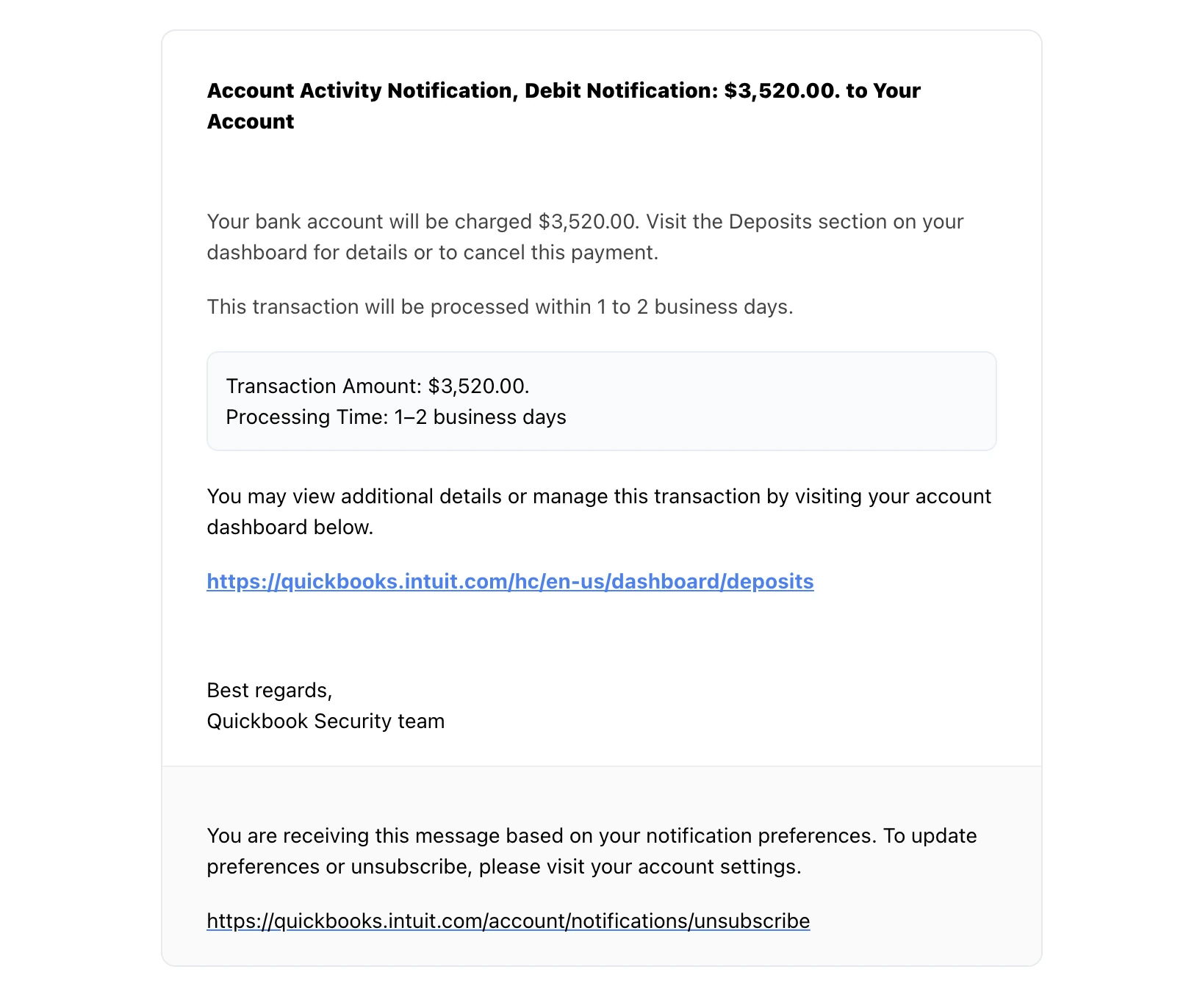
Account Activity Notification, Debit Notification: $3,520.00. to Your Account
Your bank account will be charged $3,520.00. Visit the Deposits section on your dashboard for details or to cancel this payment.
This transaction will be processed within 1 to 2 business days.
Transaction Amount: $3,520.00.
Processing Time: 1–2 business days
You may view additional details or manage this transaction by visiting your account dashboard below.
https://quickbooks.intuit.com/hc/en-us/dashboard/deposits
Best regards,
Quickbook Security team
You are receiving this message based on your notification preferences. To update preferences or unsubscribe, please visit your account settings.
https://quickbooks.intuit.com/account/notifications/unsubscribe
Where the links actually go:
Both the "dashboard" link and the "unsubscribe" link carry the identical destination:
https://app.adjust.com/os8lvd_etbi8p?campaign=BookingConfirmation&adgroup=DE&creative=DE&deep_link=flixbus://booking?wt_mc=owned.de.FlixBus.email.backend.bookingconfirmation.bookingconfirmation.ad&fallback=https://tuiluminacionve.com/26/
Red Flags
This is brand-impersonation phishing built on a payment scare. The message does not ask you for anything — it simply announces that $3,520.00 is about to leave your bank account and offers you a link to cancel it. The entire attack rests on a single reflex: nobody reads carefully when their money is walking out the door. Every element below falls apart the moment that reflex is resisted.
1. The Sender, Recipient, and Reply-To Are All Your Own Address
- From: QuickBooks Team
info@jd-bots.com - To:
info@jd-bots.com - Reply-to:
info@jd-bots.com
The email claims to come from Intuit while carrying the recipient's own mailbox in all three fields. This is a forged From: header — trivially set by any sending script, because SMTP does not verify it. Intuit sends from intuit.com and notification.intuit.com, never from your domain. An email that appears to be from you, to you, about your bank account, is self-evidently spoofed, and that single header settles the matter before any of the content is worth reading.
2. "Mark as Safe" — The Email Vouches for Itself
- The opening line reads: "This email originated automatically from Intuit Quickbooks and mark as safe."
- No legitimate sender declares its own trustworthiness. Real transactional mail from Intuit does not open by asserting it is genuine, because it has no reason to expect doubt.
- The phrasing is also a broken instruction — "and mark as safe" is a leftover directive telling the reader to add the sender to their allow list, so future messages from the same address bypass filtering. It is spam-filter evasion written in plain sight, and the grammar collapsed on the way.
3. The Visible Link Is Not the Real Link
This is the core of the attack. The email displays a full, clean Intuit URL as plain text — the kind of thing a careful reader checks and approves. But the underlying hyperlink on that text points somewhere else entirely:
- Displayed:
https://quickbooks.intuit.com/hc/en-us/dashboard/deposits - Actual destination:
https://app.adjust.com/os8lvd_etbi8p?...&fallback=https://tuiluminacionve.com/26/
Showing one URL and linking to another is the oldest trick in HTML email, and it is still the most effective, because the reader's verification step — reading the address — has been pre-satisfied with a decoy. The text of a link is decoration. Only the hyperlink beneath it is real.
4. Even the Decoy URL Is Wrong
The displayed address does not survive inspection either. quickbooks.intuit.com/hc/en-us/ is a help-centre path: /hc/en-us/ is the standard URL structure of a hosted support-desk platform, used for knowledge-base articles. A logged-in financial dashboard does not live under a help-centre route. The attacker assembled a plausible-looking Intuit URL out of fragments without understanding what the fragments mean.
5. The Redirect Is a Hijacked FlixBus Marketing Link
Pull the real destination apart and it is not attacker infrastructure at all — it is a legitimate mobile attribution service being used as an open redirect:
app.adjust.comis a well-known mobile marketing and deep-linking platform. Its domain is reputable, widely allow-listed, and carries a valid TLS certificate.campaign=BookingConfirmation,adgroup=DE,deep_link=flixbus://booking?wt_mc=owned.de.FlixBus.email.backend.bookingconfirmation...— these parameters are lifted verbatim from a German FlixBus booking-confirmation campaign. A long-distance coach operator has no connection to a QuickBooks debit notice.fallback=https://tuiluminacionve.com/26/is the only part the attacker actually changed. Thefallbackparameter tells the redirector where to send anyone who does not have the mobile app installed — which is everyone reading email on a desktop. That is the real payload, and it belongs to an unrelated third-party website that has almost certainly been compromised and fitted with an attacker's page in a/26/directory.
The reason for this elaborate detour is defensive: security gateways that inspect links see a reputable marketing domain and let it through. The malicious address is buried inside a query parameter, where simple URL reputation checks do not look.
6. Both Links Go to the Same Place
The "account dashboard" link and the "unsubscribe" link resolve to the identical redirect. In genuine bulk mail these are never the same — an unsubscribe link carries its own per-recipient token and lands on a preference page. Identical destinations prove the footer is scenery. It is also a deliberate trap: the cautious reader who avoids the main link and reaches for "unsubscribe" instead arrives at exactly the same page.
7. The Financial Language Contradicts Itself
- "Debit Notification: $3,520.00. to Your Account." A debit takes money from an account; it does not go to one. The subject line combines both directions in one sentence.
- "Visit the Deposits section" — to review a debit. Deposits are incoming; debits are outgoing. The two are being used interchangeably by someone who does not know the difference.
- "$3,520.00." appears twice with a trailing full stop inside the figure, in the subject line and again in the transaction box. Automated financial notifications are generated from templates and do not punctuate currency values inconsistently.
8. "Quickbook Security team" Is Not a Real Signature
- The product is QuickBooks, with an s. The sign-off drops it. A system that genuinely originated at Intuit cannot misspell its own product name.
- The body also writes "Intuit Quickbooks" without the capital B. Brand names are template constants, not free text — they do not vary between paragraphs of a real automated email.
- A "Security team" does not issue debit notifications. Payment activity alerts come from billing and payments systems. The word "Security" is there to borrow authority and add alarm, not because it describes any real department.
9. Nothing Identifies the Account, the Payer, or the Transaction
A genuine payment notification is dense with specifics. This one has none:
- No last four digits of the bank account being charged.
- No transaction or reference ID — the one thing you would need to look the payment up or dispute it.
- No merchant, payee, or invoice number. Money is supposedly moving, and the email cannot say to whom or for what.
- No company name and no recipient name — not even the QuickBooks account it claims to be reporting on.
The message is generic because it was mailed to a scraped list. The attacker does not know whether you use QuickBooks at all, and $3,520.00 is simply a figure large enough to frighten and small enough to be believable.
10. No Branding, on a Brand-Impersonation Email
The rendered message is plain black text on white. There is no Intuit logo, no QuickBooks green, no header, no footer chrome, and no legal or address block. Real Intuit notifications are heavily templated and instantly recognisable. Ironically, the crudeness helps the attacker: a bare, utilitarian layout reads as "system-generated," and it sidesteps the image-based detection that catches copied brand assets.
11. Sent to a Generic, Published Inbox
The recipient is info@ — a public, general-purpose company address scraped from a website. Bank-account debit alerts go to the named account holder or billing contact, not to a shared enquiries mailbox that anyone in the organisation might be watching. That is also the point: shared inboxes are monitored by whoever is on duty, and a $3,520.00 alarm reaching an untrained reader is exactly the outcome the attacker wants.
How This Scam Works
The email is not the attack. It is the alarm bell that makes you click, and every clean-looking detail exists to get you past that one step.
- The Scare: A specific, unexplained sum is presented as already in motion, with a 1–2 business day clock attached. Loss aversion does the work — cancelling an unauthorised charge feels urgent and entirely reasonable.
- The False Assurance: The message tells you up front that it is automated, from Intuit, and safe. It shows a full
intuit.comURL in plain text so that a reader who checks the address is reassured by the check itself. - The Redirect Chain: The click leaves through
app.adjust.com— a reputable, allow-listed marketing domain with a valid certificate. Mail gateways and link scanners see a legitimate host and pass it. The mobile deep link fails on a desktop browser, so the redirector falls through to thefallbackparameter. - The Landing Page: The browser arrives at
tuiluminacionve.com/26/, a directory planted on an unrelated, compromised website. Because the site is real and long-registered, domain-age and reputation checks do not flag it. - The Harvest: What waits there follows one of two patterns. Most commonly a counterfeit Intuit sign-in page — you "log in to cancel the payment," and your QuickBooks credentials, and often the MFA code you type next, go straight to the attacker. The alternative is a callback lure: a "cancel this transaction" page displaying a support telephone number, which routes you to a scammer who talks you into remote-access software or a bank transfer.
- The Payload: A working QuickBooks session is a payments system. It exposes bank connections, customer lists, and every invoice you have issued or received.
- The Escalation: From there, the attacker alters bank details on outgoing invoices so your customers pay them, issues fraudulent invoices under your name, and mines the accounting data for the next target. A stolen accounting login is worth far more than $3,520.00 — which is precisely why that number was chosen to be alarming rather than enormous.
Conclusion and Recommendations
No money is moving. This is a forged notification sent from your own spoofed address, displaying an Intuit URL it does not actually link to, and routing clicks through a hijacked FlixBus marketing redirect to a page on a compromised third-party website. The $3,520.00 exists only to stop you thinking.
Immediate Actions:
- Do Not Click Any Link — Including Unsubscribe: Both links in this message lead to the same redirect. There is no safe link here.
- Do Not Reply: The reply-to is your own address, so a reply either bounces or lands in your own inbox — but any engagement with the campaign confirms a live, human-attended mailbox.
- Do Not Call Any Number a Landing Page Shows You: If the destination offers a "cancellation helpline," that number belongs to the attacker. Refund and cancellation call-backs are a scam category in their own right.
- Report It as Phishing: Use the report button in your mail client rather than deleting, so your provider learns both the spoofed sender and the redirect destination.
- If Someone Already Entered Credentials: Treat it as a live compromise. Change the Intuit password from a different device, revoke all active sessions, re-register MFA, and then review connected bank accounts, saved payment methods, user access, and the audit log for changes. Check your email account too, in case the same password is used there.
Verification Steps:
- Check the Real Balance, Never the Email: Open your banking app and your QuickBooks account directly — type the address or use a saved bookmark. A charge that is genuinely pending appears in your account. One that does not appear was never real.
- Hover Before You Click: The status bar shows the true destination, which is rarely the text on screen. On mobile, press and hold the link to reveal the URL instead of tapping it.
- Read Past the Domain, Into the Parameters: A link can begin with a reputable host and still carry an attacker's address inside a
fallback,redirect,url, ornextparameter. The first domain in a URL is not always the last one your browser visits. - Check the From Address, Not the Display Name: "QuickBooks Team" is free text that anyone can type. The address beside it is the only part with any evidentiary value — and here it is your own domain.
- Confirm Out of Band: Contact Intuit through the support route published on their own website, never a number or link from the email.
Additional Protection Tips
- Treat Any Unexpected Charge Alert as a Lure First: Fake debit, subscription-renewal, and refund notices are among the highest-converting phishing themes in circulation precisely because the natural response — "cancel this immediately" — is a click.
- Deploy Phishing-Resistant MFA: Codes from an app or SMS can be relayed in real time by modern phishing kits. FIDO2 security keys and passkeys cannot — they are bound to the genuine domain and will not authenticate against a lookalike.
- Use a Password Manager as a Domain Check: It will not offer to fill your Intuit credentials on a page hosted at
tuiluminacionve.com. A login form that suddenly requires manual typing is telling you something. - Enable and Enforce SPF, DKIM, and DMARC on Your Own Domain: This email forged your own address as the sender. A DMARC policy set to
rejectstops that specific abuse — external mail claiming to be from your domain gets refused at the gateway rather than delivered to your team. - Turn On Every Payment Alert Your Bank Offers: Real-time alerts direct from the bank give you an independent source of truth, so a fake notification can be dismissed in seconds without touching the email.
- Watch Your Accounting Platform's Audit Log: In QuickBooks and comparable systems, review user access, connected apps, and bank-detail changes on a schedule. Invoice tampering after a credential theft is quiet and easy to miss until a customer says they already paid.
- Restrict Who Watches the Shared Inbox — and Train Them: Generic
info@andaccounts@mailboxes take the first hit, and the people monitoring them are often the least equipped to inspect a header or a redirect.
Remember: The text of a link is written by whoever sent the email; the destination is where you actually go. A message that shows you a trustworthy address is not showing you evidence — it is showing you what it wants you to check.
